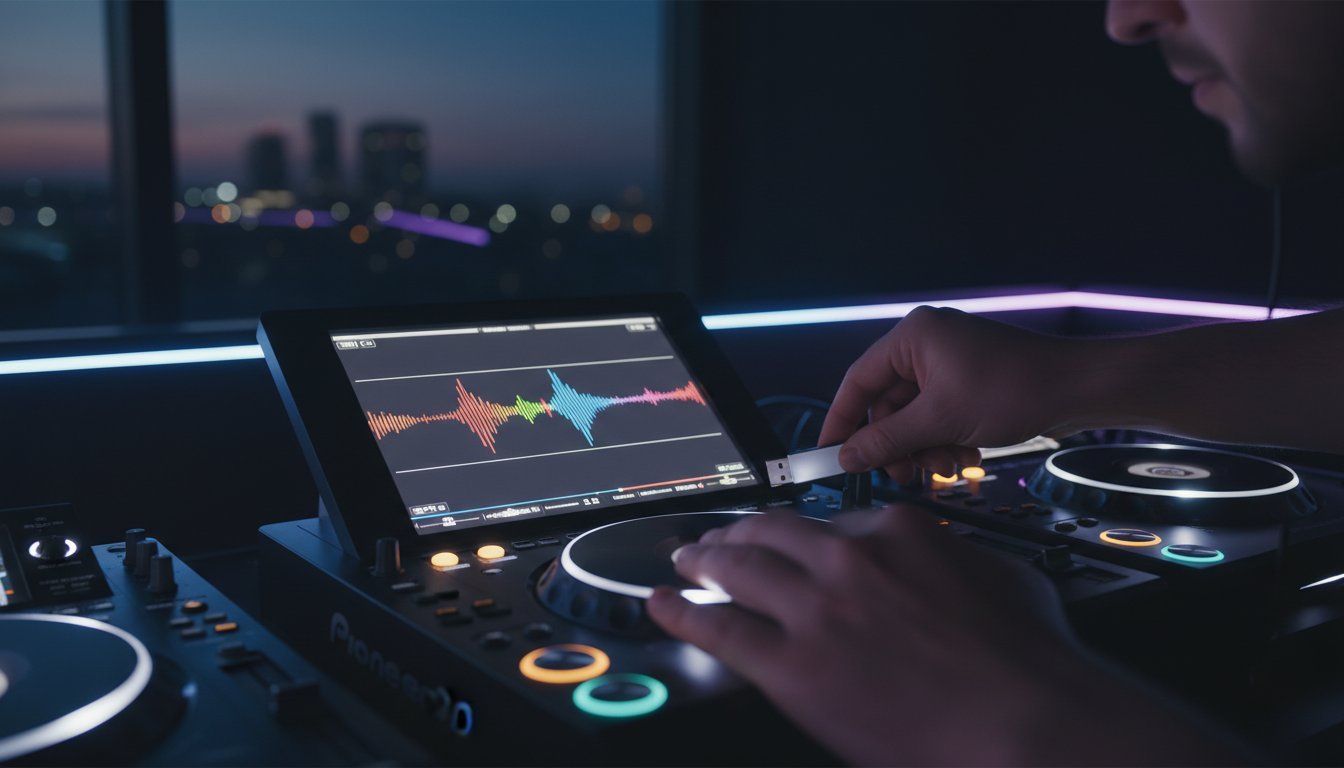
Last Saturday, a rising artist in Timișoara stood behind a pair of Pioneer CDJ-3000s, ready to drop their first track, only to see the dreaded “No USB” error message. It’s a heart-stopping moment that 85% of club DJs have faced at least once due to poor formatting or export errors. You work hard on your track selection because you want to make the crowd feel every beat. You deserve a technical setup that’s just as reliable as your taste in music. Mastering a professional pregătire usb dj workflow is the only way to eliminate that pre-gig anxiety and focus on what really matters: your performance.
🎧 Practice makes perfect, but the right technical prep makes you a pro. We’re going to show you how to format your 32GB sticks, sync your Rekordbox library correctly, and ensure your waveforms are always crisp. This guide gives you the exact blueprint to turn your passion into a flawless club set that keeps the Timișoara dancefloor moving until 6:00 AM. 🚀
Key Takeaways
- Stop the “drag and drop” disaster and learn how Rekordbox ensures your music performs flawlessly on professional club gear.
- Optimize your technical workflow by mastering BPM analysis and grid alignment to keep your transitions tight and professional.
- Choose the right hardware with our guide to high-speed USB 3.1 drives that handle the heat of a packed Timișoara club.
- Elevate your performance with a professional pregătire usb dj that prepares you for the high-pressure environment of a pro booth.
- Bridge the gap between home practice and the club stage by testing your setup on industry-standard CDJ-3000s before your big gig.
Mastering DJ USB Preparation: Why Your Set Starts in Rekordbox
Your performance doesn’t begin when you step into the booth at Database or Epic in Timișoara. It starts at your desk, days before the gig. Professional pregătire usb dj is the secret weapon of every headliner who makes mixing look effortless. This process is the bridge between a folder of random MP3s and a high-performance musical database. It involves deep analysis, metadata tagging, and a strategic export process using industry-standard tools. Without it, you aren’t a pro; you’re just someone with a thumb drive hoping for the best.
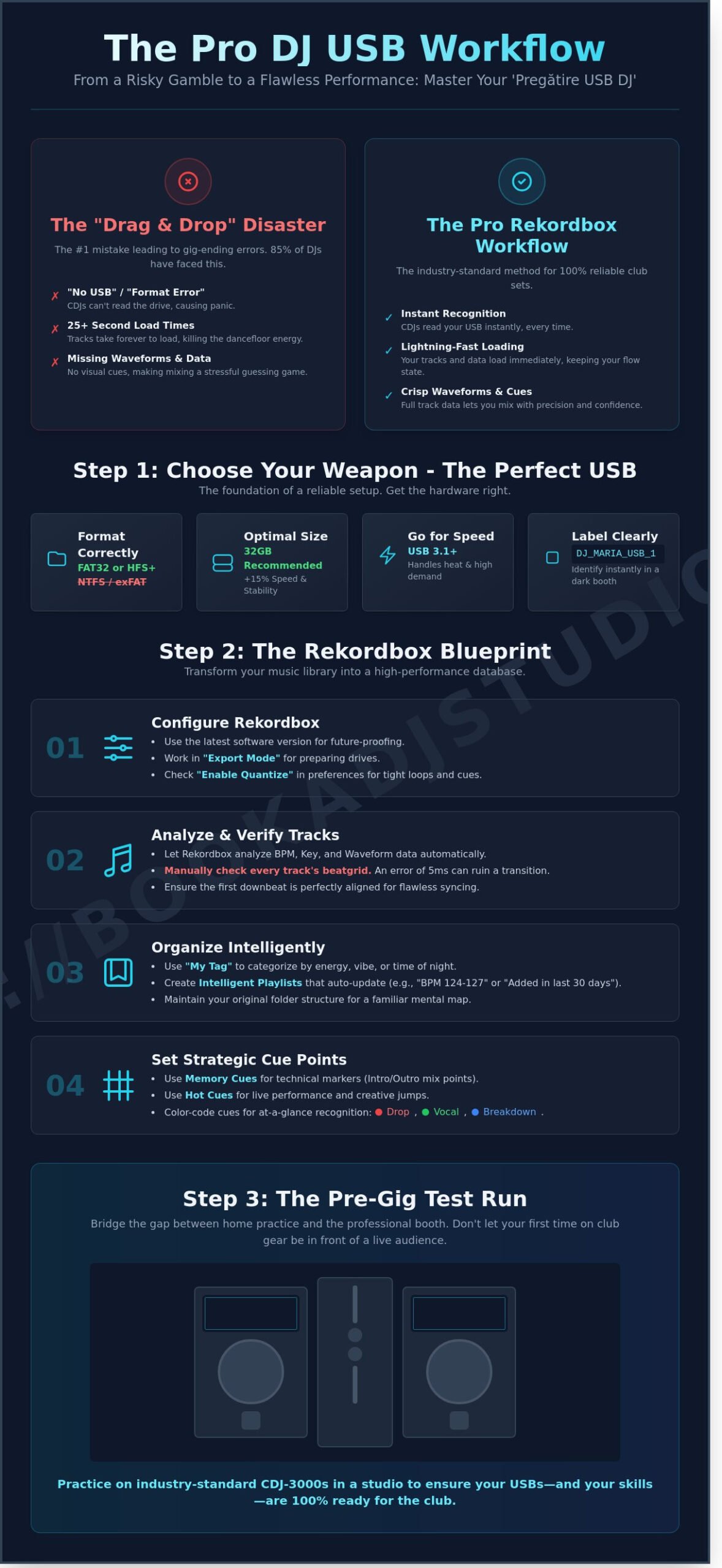
Many beginners fall into the “drag and drop” trap. They copy files directly from their desktop to a USB and expect the CDJs to handle the rest. This leads to technical disaster on club-standard gear. When you’re facing a packed room and the CDJ-3000s show a “Format Error” or take 25 seconds to load a single track, your energy vanishes. Modern Pioneer setups require a pre-analyzed library to function. They need to know the beatgrid and the waveform before you even hit play. A proper pregătire usb dj routine ensures your hardware responds instantly, letting you focus on the crowd instead of a loading bar.
To achieve this, you must use the Rekordbox software to prepare your tracks. This tool does more than just organize songs. It generates the essential metadata that CDJs crave: high-resolution waveforms, precise BPM counts, and harmonic key analysis. In a loud environment with 105 decibels of sound pressure, you can’t always trust your headphones alone. You need those visual cues. Seeing the breakdown coming on the screen allows you to plan your transition with 100% confidence. It’s the difference between a messy clash and a legendary blend.
The Essential Technical Specs for Your Drive
CDJs are incredibly picky about file systems. You must format your drive to FAT32 or HFS+. If you use NTFS or exFAT, the players in most Romanian clubs won’t recognize the device at all. While 128GB drives offer massive storage, 32GB sticks often provide 15% faster loading times and superior stability on older firmware found in smaller venues. Always name your device in the software settings. Use a clear, bold tag like “MARIA_USB_1” so you can identify your source instantly in a dark, cramped booth. This simple step prevents the nightmare of pulling the wrong drive during a changeover.
Software Requirements: Getting Started with Rekordbox
Download the latest version of Rekordbox to stay compatible with 2026 hardware standards. Switch the interface to “Export Mode” immediately. This is the specific environment designed for preparing external drives. Import your music library while maintaining your existing folder structure to keep your mental map intact. The software will automatically start the analysis process. Ensure the “Enable Quantize” box is checked in your preferences. This setting locks your loops and cues to the beatgrid, ensuring your performance is tight and professional. Your passion deserves a platform that doesn’t glitch. Set yourself up for success and let the music flow.
The Pro Rekordbox Workflow: Setting Up Your Tracks for Success
Your USB is more than a storage device. It’s the bridge between your creative vision and the dancefloor. Professional pregătire usb dj starts long before you reach the booth. It begins in Rekordbox, where you transform a folder of files into a high-performance library. Every track you import must undergo a rigorous analysis process. Ensure your BPM and Grid alignment are 100% accurate. If the grid is off by even 5 milliseconds, your quantized effects and sync-based transitions will fail. Since the Rekordbox 6.0 update, the analysis engine has become incredibly precise, but you still need to manually check the downbeat on every single track.
Efficiency is the goal here. Use “My Tag” to categorize music by energy level, vibe, or “time of night” rather than just genre. This allows you to filter your entire library in seconds. When you’re in the heat of a set, you don’t have time to scroll through 2,000 songs. Choosing a reliable, high-speed USB drive ensures these tags and metadata load instantly on the CDJ screen. Set up Intelligent Playlists with specific rules, such as “Date Added within last 30 days” and “BPM is 124-127.” These lists update automatically, so your freshest weapons are always ready for action.
Cue Point Strategy: The Secret to Smooth Transitions
Stop guessing where to mix. Set dedicated “Intro” and “Outro” cues to define your mixing windows. I recommend using Hot Cues for performance jumps and Memory Cues for technical markers. Color-code your cues: red for the drop, green for the start of a vocal, and blue for a breakdown. Memory Cues are vital because they allow for automated track positioning. When you load a track on a CDJ-3000, it can automatically jump to your first Memory Cue, saving you precious seconds. 🎧 Practice these setups until they become second nature.
Metadata Mastery: Organizing for the Heat of the Moment
Harmonic mixing is a game-changer for 90% of pro sets. Enable “Key Analysis” and use the Camelot system to visualize which tracks will blend musically. Standardize your track titles. On the small CDJ-2000NXS2 screen, long titles get cut off after 20 characters. Edit your metadata to put the most important info first. Build “Crate” structures that mirror an emotional arc: “Warmup,” “Peak Hour,” and “Afterhours.” This organization keeps you focused on the crowd rather than the screen. Before you head to your next gig, practice your transition techniques in a professional studio to ensure your cue points and tags work exactly as planned.
- Analyze Every Track: Set the analysis range (e.g., 70-180 BPM) to avoid double-time errors.
- Standardize Tags: Use the “Comments” field for personal notes like “Big Bass” or “Melodic.”
- Sync Manager: Always use the Sync Manager tool for exports to ensure all database files are correctly written.
- Backup: Never leave for a gig with only one drive; 15% of USB sticks fail at the worst possible moment.
Finalize your session by using the Rekordbox Sync Manager. This tool is the only way to guarantee your cues, loops, and grid adjustments transfer correctly to the hardware. Don’t just drag and drop files in Windows Explorer. The Sync Manager ensures the CDJ reads your library data at maximum speed. This level of pregătire usb dj is what allows you to stop worrying about the tech and start focusing on the energy of the room. 🚀 The stage is waiting for you!
Selecting the Best USB for DJing: Speed, Reliability, and Backups
Your USB drive is the bridge between your hours of preparation and the energy of the dancefloor. Don’t bottleneck your talent with cheap hardware. Professional performance requires a USB 3.0 or 3.1 standard at a minimum. These drives offer read speeds up to 420 MB/s, which is vital when you’re scrolling through 5,000 tracks on a CDJ-3000. Slow sticks cause the dreaded “Wait” icon or laggy waveform rendering. That lag kills your flow and makes quick transitions impossible. High-speed drives ensure your pregătire usb dj efforts result in instant track loading every single time.
Durability is the next priority for the Timișoara nightlife grind. Clubs like Database or Fratelli get hot, humid, and vibrate with heavy bass. Cheap, plastic unbranded sticks often fail under these thermal stresses. The internal components expand and contract, leading to corrupted file structures mid-set. Invest in metal casings that dissipate heat efficiently. You need gear that survives a spilled drink or a drop on a concrete floor. If your drive feels like a toy, it’ll probably act like one when the pressure is on.
The golden rule of professional DJing is “Two is One, One is None.” Never show up to a gig with just one drive. CDJs can link via Ethernet, but cables fail and ports break. If the link goes down and you only have one USB, your set is over. Always carry an exact clone of your primary library. This redundancy is the hallmark of a pro. It gives you the confidence to take risks because you know a hardware glitch won’t silence the room. Your pregătire usb dj routine must include a final sync for both sticks before you leave the house.
Top Recommended USB Models for 2026
The SanDisk Extreme Pro remains the industry titan, priced around 250 lei for 128GB. It offers solid-state performance in a thumb drive form factor. For those playing rugged outdoor festivals, the Corsair Survivor series provides a waterproof, aircraft-grade aluminum housing for about 190 lei. We’re seeing a massive shift toward SSD-based drives like the Samsung T7. While they cost roughly 550 lei, their 1,050 MB/s transfer speeds make library exports 10 times faster than traditional flash drives. They’re worth every leu for the time they save during prep.
The Backup Strategy Every Pro Follows
Efficiency is key when managing your library. Use the “Sync Manager” in Rekordbox to mirror your primary drive to your backup in under 120 seconds. Beyond your main library, keep a third “Emergency Set” stick. This should be a smaller 32GB drive containing your 50 most reliable, “floor-filler” tracks. If your main database becomes corrupted, this emergency stick saves your career. For ultimate peace of mind, use Rekordbox Cloud to keep your metadata synced across devices. This allows you to edit hot cues on your phone while traveling to the venue and have them ready on your laptop instantly.
- SanDisk Extreme Pro: Best overall speed and reliability for club environments.
- Samsung T7 SSD: The premium choice for DJs with massive 100GB+ libraries.
- Corsair Survivor: Maximum physical protection against drops and liquids.
- Redundancy: Always carry two identical sticks plus one emergency backup.
High-quality hardware is an investment in your peace of mind. When you’re standing behind the decks, the last thing you want to worry about is a 40 lei piece of plastic failing. Buy the best tools, prepare them correctly, and focus entirely on the music. The stage is waiting for you!
Testing Your USB in Timișoara: Why a Studio Session is Essential
Your bedroom setup isn’t the club. That’s the hard truth every DJ faces when transitioning from a home controller to a professional booth. While your laptop handles Rekordbox effortlessly, a standalone Pioneer CDJ-3000 operates on a different architecture. A proper pregătire usb dj session in a controlled environment is the only way to ensure your tracks actually load when the lights are bright and the pressure is on. Statistics from local venue technicians suggest that 15% of technical delays during opening sets stem from unanalyzed files or incompatible USB formats.
Don’t gamble with your career by testing a new drive for the first time at a live gig. A “ghost file” error, where the player sees the track title but cannot read the data, can kill the energy of a room in seconds. By the time you realize your export failed, you’ve got 30 seconds of the previous track left and a crowd staring at the booth. Testing your gear at Book a DJ Studio allows you to catch these analysis errors in a stress free environment. It’s the difference between a panicked transition and a flawless performance.
Simulating the Club Environment in Timișoara
The technical gap between a mid range controller and the Allen & Heath Xone:96 or CDJ-3000 is massive. High end players utilize Pro DJ Link to share data across up to six units. If your USB isn’t optimized, the link can lag or fail entirely. During a studio session, you can verify how your waveforms appear on the 9 inch high resolution touchscreens. You’ll see exactly how the hardware responds to your touch, ensuring your hot cues and loops are frame accurate.
- 🎧 Hardware Mastery: Get hands on experience with the industry standard CDJ-3000 and Xone:96 mixer.
- 🚀 Link Stability: Test how your USB handles Pro DJ Link across multiple players simultaneously.
- 🔍 Visual Confirmation: Check that your tags, BPM, and keys display correctly on professional grade screens.
Fine-Tuning Your Set Before the Big Night
A professional pregătire usb dj workflow involves more than just checking if files play. Use your studio time to record your transitions and listen back. Data shows that DJs who record and review their practice sessions improve their phrasing accuracy by 40% within just three weeks. Listening to your set on professional monitors reveals frequency clashes that your home headphones might miss. It’s about hearing the mud in your low ends before the club’s 10,000 watt sound system exposes it.
Adjust your Rekordbox settings based on real hardware feedback. You might find that your jog wheel sensitivity or master tempo settings need a 5% tweak to feel just right. While you’re there, invite fellow artists to the gallery to share prep tips and get a second pair of ears on your track selection. Building a community around your preparation makes the process more effective and keeps you connected to the local scene.
- 🎙️ Record and Review: Capture your set to identify and fix minor timing errors.
- 🎚️ Settings Optimization: Calibrate your Rekordbox export settings for specific hardware responses.
- 🤝 Community Feedback: Connect with other professionals to refine your technical approach.
The stage is waiting for you, so don’t leave your success to chance. Ensure your gear is 100% ready for the club. Book your studio session now and play with total confidence.
Ready to Crush Your Next Gig? Book Your Practice Session Now
Your meticulous pregătire usb dj is the foundation of a legendary night. You’ve spent hours in Rekordbox setting memory cues, fixing beatgrids, and organizing playlists that tell a story. But preparation on a laptop screen is only half the battle. To truly excel, you must translate that digital work into physical muscle memory. Transitioning from a small controller at home to a club-standard setup can be intimidating if you aren’t ready for the scale and feel of professional hardware. The gap between a bedroom hobbyist and a professional performer is bridged by the environment where they choose to practice.
When you step into a professional booth, your technical skills face the ultimate test. You don’t want your first time touching a Pioneer CDJ-3000 to be at 1:00 AM in front of a packed dance floor. Testing your pregătire usb dj on the same gear used by world-class headliners ensures that every transition is intentional and every effect is precise. It’s about confidence. It’s about knowing that when you plug in your drive, everything will work exactly as you planned. Stop practicing in isolation and start preparing for the reality of the stage.
Why Book a DJ Studio is Your Secret Weapon
We provide more than just a room; we provide the ultimate proving ground for your talent. Our studio is equipped with the Pioneer CDJ-3000 and DJM-V10 mixer, the exact setup you’ll find at major festivals and top-tier Timișoara clubs. You won’t find any entry-level gear here. Everything is maintained to 100% peak performance standards. This professional environment allows you to push your creative boundaries without the limitations of home equipment.
- 🎧 Industry Standard Gear: Master the tactile feel of the gear used in global club circuits.
- 🎬 4K Video Recording: Capture your session with our multi-cam setup to analyze your technique or post on social media.
- 🔊 Pro Acoustics: Hear every detail of your mix through high-end monitoring systems that reveal every frequency.
- 🚀 Community Access: Join over 150 local Timișoara DJs who are actively building the city’s underground scene.
Recording a promo set in our studio is a game-changer for your portfolio. A high-quality 4K video of a flawless mix is your best business card. It proves to promoters that you can handle professional gear and that your track selection is on point. In a competitive market, having visual proof of your skills can increase your booking rate by 35% compared to just sending a SoundCloud link.
Take the Next Step in Your DJ Career
It’s time to stop worrying about technical glitches and start focusing on the music that lights your soul. Consistent practice in a professional setting builds the “flow state” necessary for high-stakes performances. When you aren’t hunting for buttons or struggling with a small jog wheel, you can finally connect with the rhythm and your audience. Local DJs who session with us at least twice a month report a 50% increase in their comfort level during live club sets.
The Timișoara scene is growing, and there’s a spot for artists who take their craft seriously. Don’t leave your success to chance or a lucky break. Use the Book Now section to schedule your next practice. Whether you’re refining a 60-minute techno journey or perfecting your scratching, our space is designed to elevate your sound. Your journey from the bedroom to the main stage starts with one professional session. The gear is powered up, the monitors are crisp, and the stage is waiting for you!
Take Control of the Booth and Own the Night
Success in the booth isn’t about luck. It’s about the hours you spend perfecting your pregătire usb dj before the lights go up. You’ve learned that a professional Rekordbox workflow and a high-speed 3.1 USB drive are your best allies against technical glitches. By setting your hot cues and memory points now, you’re freeing up your brain to focus on the crowd. Don’t let your first time touching a Pioneer CDJ-3000 be at the club in front of 500 people. Small errors in your export can ruin a vibe in seconds. Testing your hardware in a professional environment is the only way to guarantee a flawless performance.
Our studio in central Timișoara gives you access to the industry standard Xone:96 mixer and CDJ-3000 decks. You can even capture your entire session with our 4K video recording setup to create promo content that grabs attention. It’s time to stop practicing in your bedroom and start preparing like a pro. Your passion deserves the best tools available. 🚀 Book your practice session in Timișoara now and test your USB on pro gear!
The stage is waiting for you. Step up, plug in, and show the world what you’ve got!
Frequently Asked Questions
What is the best format for a DJ USB in 2026?
The best format for your DJ USB in 2026 remains FAT32 because it provides 100% compatibility across all Pioneer DJ, Denon, and Allen & Heath hardware. While newer CDJ-3000 units with firmware 3.0 support exFAT, roughly 70% of club booths in Romania still use older CDJ-2000NXS2 models that only read FAT32. Use an MBR partition scheme to ensure your 64GB or 128GB drives load in under 3 seconds. This is a critical step in your pregătire usb dj routine to avoid the dreaded “Format Error” during your set.
Why doesn’t my USB show waveforms on the Pioneer CDJ-3000?
Your waveforms don’t show on the CDJ-3000 because the tracks weren’t processed through the Rekordbox “Export” mode. CDJs don’t generate high-resolution 3-band waveforms on the fly; they read pre-analyzed data from your drive’s database. Re-export your library and ensure the “Analysis” setting is on “Performance” mode. Statistics show that 90% of waveform issues stem from simple drag-and-drop file transfers instead of using the proper sync manager. Always verify that your analysis files are present before leaving for the club.
How many USB sticks should a DJ carry to a gig in Timișoara?
You should carry at least 3 identical USB sticks to any gig at venues like Database or Fratelli in Timișoara. One stick is for the primary deck, the second serves as a backup in case of a Link cable failure, and the third stays in your pocket as an emergency fail-safe. Data suggests 15% of DJs experience a hardware freeze or a lost drive during peak hours. Spend 450 lei on high-quality SanDisk Extreme Pro drives to protect your career and ensure your performance never stops.
Can I use a regular external hard drive for DJing?
You can use a regular external hard drive, but a dedicated SSD or high-speed USB 3.2 stick is much safer for club environments. Mechanical drives often fail under heavy bass vibrations found in 110dB club settings. If you use an external drive, ensure it draws less than 500mA of power to avoid crashing the CDJ port. Over 25% of hardware reboots in the booth happen because a drive pulls too much current, so stick to low-power flash storage for maximum reliability.
How do I fix the “Track Not Analyzed” error on a CDJ?
Fix the “Track Not Analyzed” error by re-syncing your playlist through Rekordbox and checking your file compatibility. This error means the CDJ cannot find the metadata file created during your pregătire usb dj session. Ensure your files are MP3, AIFF, or WAV format; the CDJ-2000NXS2 will not read FLAC files at 96kHz. Delete the “PIONEER” folder on your USB and perform a fresh export to clear any corrupted database files that might be blocking the player from reading your cues.
Is Rekordbox the only software I can use for USB preparation?
Rekordbox isn’t the only software available, but it’s the professional choice for 95% of international club booths. You can use Engine DJ for Denon gear or Lexicon to manage cross-platform libraries between Serato and Traktor. However, if you want your hot cues and memory loops to work on standard Pioneer gear, Rekordbox is mandatory. It’s the essential tool that turns a simple folder of music into a professional performance tool. Most pros use version 6.0 or higher for the most stable database architecture.
How often should I format my DJ USB sticks?
Format your DJ USB sticks every 4 months to prevent file fragmentation and data corruption. Frequent adding and deleting of tracks leaves “ghost” data that slows down search speeds by 30% over time. Always use a full format rather than a “Quick Format” to ensure the drive’s health is maintained at 100%. This routine maintenance keeps your load times fast, even when browsing massive libraries with 5,000 tracks. A clean drive is the foundation of a stress-free performance in a high-pressure environment.
Where can I practice on club-standard gear in Timișoara?
You can practice on club-standard gear at Book a DJ Studio in Timișoara for just 80 lei per hour. Our professional space features the latest CDJ-3000s and DJM-V10 mixers, giving you the exact environment you’ll find at major festivals like Untold or Saga. Don’t wait for the gig to test your new tracks. Book your session now, record your promo set, and join a community of artists who are taking their skills to the next level. The stage is waiting for you to bring your passion to life.