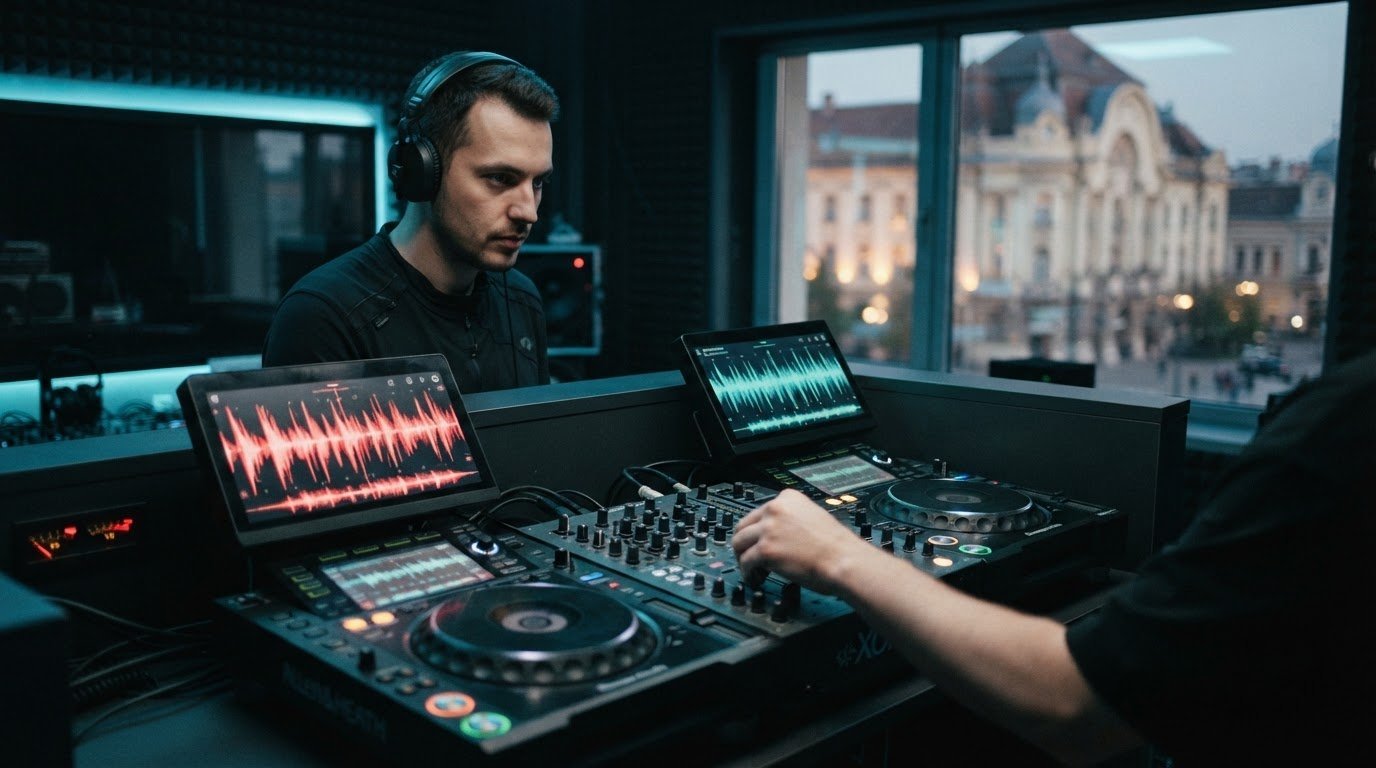

If you’re asking “why does my dj mix sound bad?”, start by identifying what you hear instead of blaming your skills or gear. The tracks may sound fine on their own, but the way they overlap could be the problem.
Distortion, muddiness, volume jumps, and awkward transitions each point to different possible causes. Use a simple check: listen, isolate one issue, adjust one thing, then compare. This guide shows you how to spot mix problems, check your monitoring, and decide when a focused practice session could help.
Key Takeaways
- When you ask “why does my dj mix sound bad?”, identify the exact symptom first, such as distortion, muddiness, harshness, uneven loudness, or an awkward transition.
- Check gain levels and track balance before adding processing. Abrupt changes can make a blend feel louder or rougher.
- Use a repeatable listen-and-adjust workflow, changing one thing at a time so you can tell what improves the mix.
- Prepare tracks and review transitions at a comfortable listening level to catch issues before your next set.
- If home monitoring leaves you unsure, a dedicated DJ booth and recording can offer another way to practise and review your mix.
Why does your DJ mix sound bad? Start with what you hear
A rough mix is diagnosable. You don’t need to blame your talent or assume your gear is failing. Start by naming what you hear: distortion, muddiness, uneven loudness, harshness, or an awkward transition. Each symptom can have several causes, so one quick knob turn won’t fix every problem.
If you’re asking, “why does my dj mix sound bad?”, compare each track on its own with the moment the tracks overlap. A track may sound clean solo, but competing levels, frequencies, or timing can make the blend feel rough. Headphones, speakers, room acoustics, and recorded playback can also reveal different problems.
For another perspective on how a mix can change across playback systems, watch this video:
What does a bad DJ mix sound like?
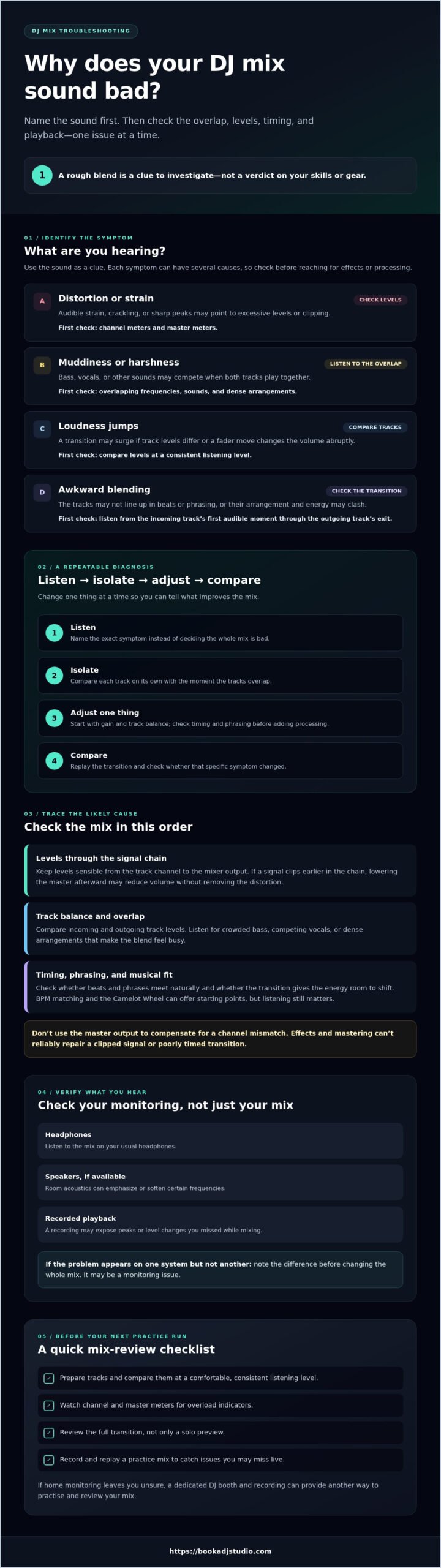
Use the symptom as a clue, not a verdict. Audible strain, crackling, or sharp peaks may point to clipping or excessive levels, so check both channel and master meters. Proper gain staging helps keep signal levels controlled through the audio chain. A muddy blend may come from competing low frequencies or overlapping sounds. A harsh edge can also reflect frequency clashes. Noticeable volume jumps between tracks or during a transition may point to mismatched levels or abrupt fader changes.
- Distortion or strain: Check channel and master levels.
- Muddiness or harshness: Listen for overlapping frequencies and sounds.
- Loudness jumps: Compare track levels and listen for changes in volume during the transition.
- Awkward blending: Check timing and how the tracks interact.
Why can individual tracks sound fine but the mix sound wrong?
Two tracks can each sound balanced alone, then compete when played together. Their bass, vocals, or other elements may overlap, their levels may not match, or their beats and phrasing may not line up. Judge the whole transition, from the incoming track’s first audible moment through the outgoing track’s exit, instead of relying only on solo previews.
Check the mix on your usual headphones, then on speakers if available. A room can emphasize or soften certain frequencies, while recorded playback may expose peaks or level changes you missed live. If the problem appears on one system but not another, note the difference before adjusting. It may be a monitoring issue, not a reason to reshape the entire mix.
The main causes of a DJ mix that sounds muddy, harsh, or uneven
Once you’ve named the symptom, trace it back through the mix instead of reaching straight for an effect or master limiter. Distortion often points to excessive levels somewhere in the signal chain. Muddiness may come from overlapping bass, vocals, or dense arrangements. Unevenness can stem from tracks with different perceived loudness or fader moves that create sudden jumps. Timing, phrasing, or a mismatch in energy can also make a transition feel wrong.
Are clipping and gain staging making the mix harsh?
Watch the channel meters as you mix, and don’t let overload indicators stay lit. Gain staging means keeping the signal at a sensible level through each stage, from the track channel to the mixer output. DJ TechTools explains proper gain staging to help avoid harsh distortion. If a signal clips earlier in the chain, turning down the master afterward may lower the volume without removing that distortion. Meter displays and controls vary by software and equipment, so check your setup’s instructions before relying on a particular indicator or setting.
Track levels matter, too. If the incoming song is noticeably louder, even a smooth fader move can sound like a sudden surge. Compare the tracks at a consistent listening level, then adjust channel gain carefully before the transition. Don’t use the master output to compensate for a mismatch between channels.
Are track choice and transitions creating muddiness?
Listen to what overlaps. Two bass-heavy sections playing together may crowd the low end. Competing vocals or dense arrangements can make a blend feel busy. These are clues, not fixed rules. A brief overlap might work in one pairing and feel cluttered in another.
Before adding effects, check that the beats align, the phrases meet naturally, and the transition lasts long enough for the musical energy to shift smoothly. BPM matching can help you find tracks with compatible tempos, while the Camelot Wheel can offer a starting point for key compatibility. Neither replaces listening: two technically compatible tracks may still clash in arrangement or mood.
EQ and mastering have their place, but they can’t reliably repair a poorly timed transition, a clipped signal, or a source track that already sounds rough. If you’re still asking “why does my dj mix sound bad,” isolate the cause before processing. A focused practice session in Timișoara gives you room to test transitions in a DJ booth. Explore DJ studio practice access as one option.
How to diagnose a bad DJ mix without guessing
Turn “why does my dj mix sound bad?” into a focused test. Don’t change several settings at once. Replay the section, name the most obvious symptom, inspect the transition, adjust one thing, then listen again. This keeps you from chasing problems with random EQ or volume moves.
- Listen: Replay the same short passage at a comfortable, consistent volume.
- Label: Note one issue, such as a loudness jump, distortion, timing slip, or muddy overlap.
- Inspect: Check the transition and the relevant channel, cue, or playback source.
- Adjust: Change one variable, such as channel gain or transition timing.
- Compare: Replay the passage and decide whether that single change helped.
Keep a simple log with the track names, timestamp, and symptom. “00:18, incoming track jumps in volume” gives you a repeatable practice target. “The mix sounds off” doesn’t.
How can you tell whether the problem is your mix or your monitoring?
Replay the same transition on another reliable source, such as speakers if you first heard it on headphones, or headphones if speakers revealed the issue. Check the headphone connection, cue selection, channel balance, and speaker placement before making mix changes. If the problem shifts or disappears between sources, investigate the monitoring setup first. Don’t rework the whole set based on one playback check.
What should you check in a recorded DJ set?
Listen for level jumps, distortion, timing slips, and abrupt transitions. Compare the recording with what you remember hearing live. If a mix sounded smooth in your headphones but the recording has a sharp volume spike, the capture or monitoring path may be part of the issue. If the same flaw is clear both live and in the recording, focus on the transition or levels themselves.
Use the recording as evidence, not as an instant verdict. Note the timestamp, replay that moment, then change one thing and record or review it again when practical. Also consider whether any part of your setup could affect the workflow.
How to make your DJ mix sound cleaner on your next practice run
Give your next session a clear target. Instead of rebuilding the whole set, choose a few transitions to work on and follow the same routine each time. Prepare your tracks, balance their levels before adding effects, then review the mix at a normal listening level. This makes it easier to hear whether your changes improve the blend or simply make it louder.
- Prepare: Choose tracks with a clear musical direction and check cue points, beatgrids, and phrasing before you start.
- Balance: Preview each track and match perceived loudness with channel gain before blending. Keep the master level steady.
- Practise: Work on one transition or technique at a time. Listen to the full overlap, not just the moment you bring in the next track.
- Review: Record a short section if you can, then listen back for level jumps, crowded overlaps, or moments that feel rushed.
What should you change first when a transition sounds wrong?
Start with tempo and beat alignment. If the beats drift, fix that before reaching for EQ or effects. If the transition feels crowded, try bringing in the next track at a different phrase or shortening the overlap. Then make small level or EQ moves, one at a time, and compare them with the original. If the blend still feels off, the track pairing or energy shift may be the issue, not a missing effect.
How can a focused practice session reveal recurring problems?
Repeat the same transition under consistent monitoring instead of changing several tracks and settings at once. Note the timestamp and symptom after each attempt. A recurring bass clash or loudness jump becomes easier to spot when you can compare focused takes. Reviewing a recording afterward can also help you hear choices you missed while performing. Book a DJ Studio offers hourly practice access and optional audio recording in Timișoara.
If you want a dedicated booth for your next focused run, explore DJ studio practice access. Use the session to practise and review your own mix, then take your notes into the next run. That’s how you turn “why does my dj mix sound bad” into a specific fix you can test.
When to practise, record, or get a fresh listen in Timișoara
If the same uncertainty keeps showing up after home tests, pause before changing your set again. Maybe your headphones and speakers tell different stories. Maybe you can’t tell whether a transition is off because of your monitoring, your workflow, or the way the tracks fit together. A fresh practice environment can help you test those questions, but it isn’t a guaranteed fix. The goal is to gather clearer evidence, not to expect a different room to solve every mix issue.
When can a dedicated DJ studio help you review your mix?
A dedicated booth gives you a chance to practise on professional players and mixers and get familiar with a booth-style workflow. That can be useful if you’re preparing a set or want to see whether a transition feels different on another setup. Optional audio recording lets you listen back afterward and review your performance away from the moment of mixing. Check the studio’s current equipment and recording options before making plans.
Book a DJ Studio offers hourly studio access in Timișoara. Treat a session as focused practice: bring a specific question, work through your set, and note what you hear. For context, read this DJ studio practice overview.
How can you take the next step without overcomplicating your setup?
Pick one recurring issue for your next session, such as an incoming track that feels too loud or a transition that loses momentum. Set a practical goal: compare two transition points, practise a steadier level change, or review one recorded section. Keep your monitoring consistent while testing so you can judge the change fairly. Resist adding new gear or processing until you know what you’re trying to solve.
If you’re still wondering “why does my dj mix sound bad,” return to your notes and choose the clearest symptom to investigate next. Before booking, check the current session and recording options so you know what’s available for your plan. If a dedicated place to practise would help you test your set, you can explore DJ studio sessions in Timișoara as an optional next step.
Make your next mix a focused practice run
A rough mix isn’t a verdict on your ability. It’s a signal to investigate. If you’re still asking “why does my dj mix sound bad,” identify one audible issue, test one change at a time, and compare the result on dependable playback. Keep notes as you practise, so each session gives you a clearer target instead of another round of guesswork.
When you want a different practice environment, Book a DJ Studio offers a fully equipped DJ studio in Timișoara for set preparation. Optional audio and 4K video recording, plus a livestreaming setup, can help you capture a session for later review. Check current options, then explore DJ studio sessions if a dedicated booth fits your next practice run.
Keep listening, keep refining, and let each set bring your sound closer to the mix you hear in your head.
Frequently Asked Questions
Why does my DJ mix sound distorted even when the tracks sound fine?
Distortion can enter at several points, including a channel, mixer output, recording input, or playback device. Check where it first becomes audible, then inspect the related meter and level controls. Change one setting at a time so you can identify what matters. If the recorded mix distorts but live monitoring sounds clean, compare the recording path with the original mix before adjusting your whole set.
How do I make my DJ mix sound less muddy?
Start by listening for overlapping low frequencies, dense arrangements, or transitions where too many elements compete. Check the track pairing, transition point, and levels before reaching for EQ. Make one small adjustment, replay the same section, and compare it with the original. If the muddiness appears only on one playback system, check that monitoring setup first instead of reshaping the whole mix.
Can mastering fix a bad DJ mix?
Mastering can help prepare a finished mix for a particular listening context, but it can’t reliably fix every performance or source problem. Clipping, poor timing, awkward transitions, or badly balanced tracks may need attention in the mix itself. Diagnose the source, correct what you can, and listen to a cleaner version before considering mastering. A louder or processed master won’t automatically make a rough blend work.
Why does my DJ mix sound different on headphones and speakers?
Headphones and speakers present sound differently, and the room can affect what you hear from speakers. Replay the same section on more than one reliable source and note which problems persist. Check cue routing, channel balance, connections, and speaker placement, too. If a flaw appears on just one system, investigate monitoring before making a major change to the mix based on a single playback check.
How can I stop my DJ mix from having sudden volume changes?
Compare how loud each track seems before and during the transition. Check channel and master levels, then listen for abrupt fader moves or a large difference between incoming and outgoing tracks. Adjust one control at a time and replay the same passage. Watch the relevant meters, but follow your equipment’s instructions because meter behaviour and controls can vary across setups.
Should I record my DJ mix to find out what sounds wrong?
Yes, a recording lets you listen back without performing at the same time. Mark timestamps where the mix sounds distorted, uneven, or awkward, then compare them with what you remember hearing live. This can help separate performance or monitoring issues from problems in the recording path. In Timișoara, Book a DJ Studio offers optional audio recording during studio sessions, so you can review a practice set afterward.