
What if the key to growing your Twitch channel as a DJ isn’t streaming longer, but giving viewers a reason to remember your set? When live numbers stay low and other channels blur together, it’s easy to focus on the viewer count. A distinctive stream and a welcoming community can make a stronger first impression than another hour on air.
You already know the music matters. The challenge is balancing your performance with chat, helping new listeners find your stream, and giving first-time viewers a reason to return. This guide covers practical ways to shape a recognisable DJ experience, promote each set, and build consistent habits without losing the energy behind the decks.
We’ll look at stream identity, scheduling, discoverability, audience interaction, and music rights. You’ll also learn how recording and a prepared studio setup can help you review sets and create promotional clips. Build a sound and atmosphere that feel like you, then give every viewer a clear reason to come back.
Key Takeaways
- Define the musical lane, mood, or audience promise that makes your channel recognisable, without limiting where your sound can go.
- Plan your set and test the broadcast before going live. Prioritise clear, balanced audio over extra visual effects.
- Use streams, short clips, and announcements for different purposes. Help new listeners discover your mixes without relying on Twitch recommendations.
- To grow your twitch channel as a dj, make interaction feel natural and review each stream for one useful improvement.
- Use a prepared studio session to practise, livestream, or record promotional material for your channel.
Why a DJ Twitch channel needs a clear identity before it needs more viewers
You can mix with precision and still leave a new viewer wondering what makes your channel worth remembering. Strong technique is the foundation, but it doesn’t tell people whether they’ve landed in a deep-house warm-up, a high-energy techno set, or a relaxed session for late-night listening. A clear identity gives your skills a frame viewers can recognise.
Think of your channel as a live show with its own sound and atmosphere. The wider Twitch platform supports live broadcasts and community interaction, so shape the stream around both the music and the experience of being there. Early growth can vary. Focus on the parts you control: a clear promise, a consistent presentation, and a welcoming entrance for newcomers.
For more ideas on channel growth, watch this video:
Choose a DJ stream concept viewers can describe
Write one sentence that sums up your sound, energy, and intended audience. For example: “I play melodic house with a patient build for listeners easing into the night.” Use that sentence as a compass, not a cage. You can still explore new genres and moods while giving viewers a reliable sense of your channel’s core.
Build recurring formats around what you genuinely enjoy, such as a genre-focused session or a set that moves from warm-up grooves to peak-time tracks. Keep titles and visual presentation recognisable, but let each mix develop in its own direction. Regulars will know what they’re returning to, while each stream can still feel fresh.
Make the channel welcoming to first-time viewers
Use your channel description to state your musical lane and what a typical stream feels like. When you go live, offer a simple welcome. If someone arrives mid-set, add brief context between transitions or during a natural pause. Mention the style you’re playing or where the mix is heading.
You don’t need to perform a bigger personality for the camera. Let your real presence come through in how you introduce the set, respond to chat, and share your taste. That genuine consistency helps newcomers settle in and gives you a practical foundation to grow your twitch channel as a dj, one memorable stream at a time.
Prepare a DJ livestream that sounds clear and feels like a real show
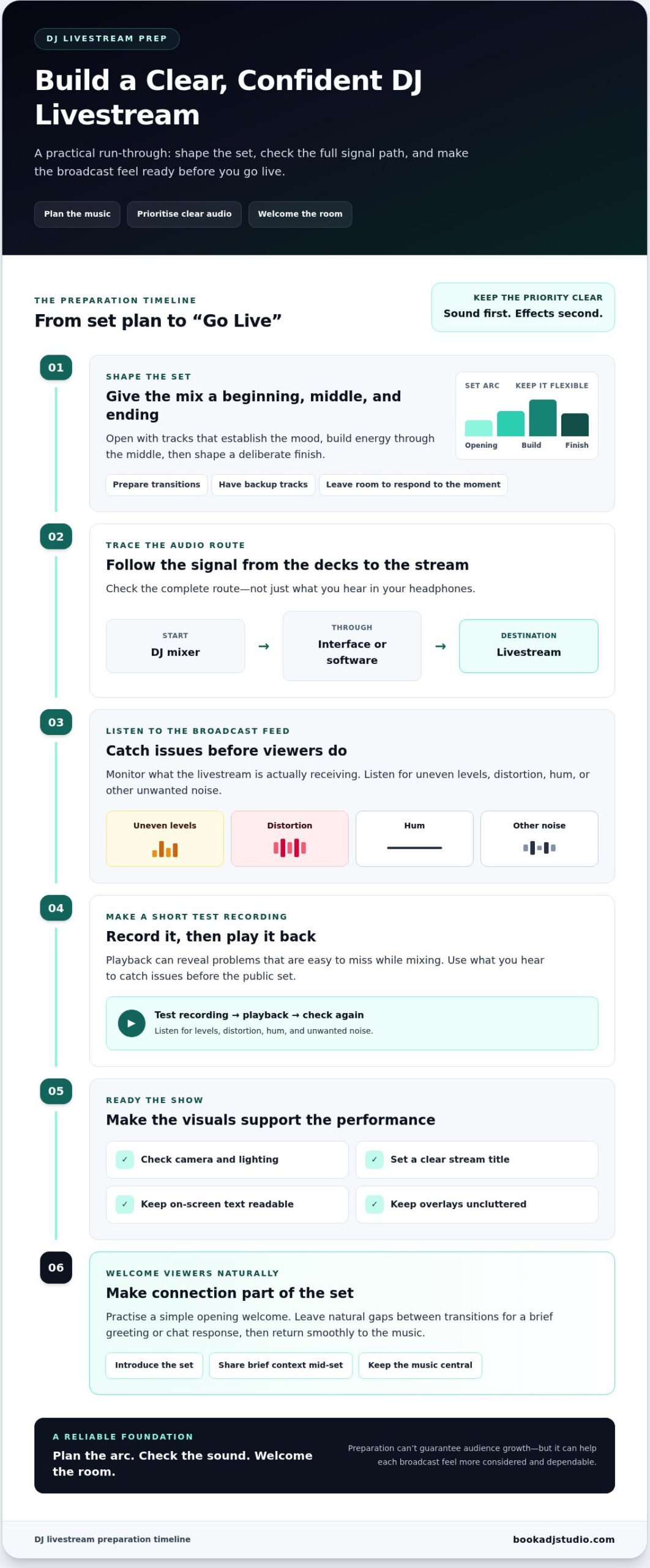
A confident broadcast starts before you press “Go Live.” Plan the set, test the full signal path, then welcome viewers in. This sequence helps you focus on the mix instead of troubleshooting while people are watching.
Clear audio matters more than a screen full of effects. Viewers come for the music, and harsh levels, distortion, or unwanted noise can pull them out of the set. Keep visuals intentional and readable, but check your sound first. Twitch and OBS Studio settings can change, so consult their current setup guidance rather than relying on old menu names or instructions.
Plan the set while leaving room for the room
Give your mix a beginning, middle, and ending. Open with tracks that establish the mood, build energy through the middle, then shape a finish that feels deliberate. Prepare transitions and backup tracks, but don’t script every move. A DJ set needs room to respond to the moment.
Leave natural gaps between transitions for a quick greeting or chat response. Keep those moments brief and return to the music smoothly. You’re not choosing between performing and connecting. You’re making interaction part of the show.
Check audio, video, and stream readiness
Before the public set, trace your complete audio route from the DJ mixer through any interface or software to the livestream. Monitor the broadcast feed, not just the sound in your headphones. Listen for uneven levels, distortion, hum, or other noise. Then make a short test recording and play it back. Playback can reveal problems that are easy to miss while mixing.
Check that your camera, lighting, stream title, and on-screen text support the performance. Keep overlays uncluttered so the music and your setup stay central. Practise your opening welcome before going live, too. A few checks beforehand can help you settle into the set with confidence.
If you want a prepared environment for a practice run or polished livestream, explore the DJ studio setup in Timișoara. A focused session can also give you a recording to review as you shape future streams. Preparation can’t guarantee audience growth, but it gives each broadcast a more reliable foundation as you work to grow your twitch channel as a dj.
Use Twitch discovery and DJ-friendly content to reach new listeners
Twitch discovery and off-platform promotion do different jobs. Your stream gives people the full live experience; clips and announcements give potential listeners a quick reason to find it. Twitch may help viewers browse live channels, but don’t build your plan around an algorithmic boost. Make each broadcast easy to understand, then share it where your audience already spends time.
Match the content to the moment and the effort you can sustain. A livestream takes the most preparation, but lets people experience your full set and interact in real time. A short clip is quicker to watch and can spotlight one musical moment. An announcement is quick to make and gives existing followers practical details: what you’re playing and when you’ll be live.
Turn strong stream moments into short-form discovery content
Look for a clean transition, an unexpected change in energy, or a section that captures the mood of your set. Twitch Clips can preserve a memorable moment from a stream, giving you a focused preview to share. Add context for people who haven’t seen the full broadcast, such as the genre or direction of the mix. Keep captions specific: “A shift from deep grooves into driving house” tells people more than an exaggerated claim about an unforgettable set.
Check music permissions before sharing clips. If you’re streaming through Twitch’s DJ Program, its catalog tracks aren’t permitted in VODs or clips. Follow the program’s current rules, and only share audio you have the rights to use.
Create a simple promotion rhythm around each livestream
Keep promotion manageable. Announce an upcoming set in advance, post a timely reminder, then share a suitable highlight afterward. Use the channels where you already have listeners, whether that’s a social account or a community space. Tailor the message to the platform: a schedule post helps people plan, while a clip gives them a taste of your sound.
Choose a stream time you can realistically maintain. Consistency helps your existing audience know when to tune in, but a schedule should fit your life rather than become another source of pressure. Link each announcement directly to your Twitch channel and make the set’s musical angle clear. This steady loop can help you grow your twitch channel as a dj by connecting live performance with useful touchpoints before and after the stream.
Build returning viewers through interaction and a repeatable review routine
A returning viewer isn’t just a number. They’re someone who recognises the vibe, feels welcome in chat, and knows what kind of set they’re stepping into. Interaction can build that connection without pulling your focus from the mix. Keep it natural, then use each stream as a chance to learn what to refine next.
Interact without losing focus on the set
Welcome people during a transition or another natural pause, when the music gives you room. A quick “Glad you’re here” can make a first-time viewer feel included. Invite low-pressure replies with a simple music question, such as asking what kind of track they’d like to hear more of. You don’t need to interrupt a key moment or talk over the mix.
Set the tone you want your community to carry: respectful, relaxed, and centred on the music. Avoid demanding follows or constant chat activity. A smaller group of engaged listeners can still offer useful feedback as your channel develops. Notice what they respond to, but keep your artistic direction in your hands.
Learn from each stream and sharpen the next one
After the broadcast, review the stream in separate passes instead of changing everything at once. Check the audio for balance or unwanted noise, consider whether the set’s pacing held together, and think about how clearly your presentation welcomed people in. Then choose one practical improvement for next time.
- What worked? Note a transition, set moment, or interaction that felt strong.
- Where was the friction? Identify one issue, such as a confusing opening or a section where the energy dipped.
- What will you adjust? Pick one change and see how it feels in the next session.
Use a saved recording or suitable clip to revisit a performance moment and listen closely to the sound. Twitch’s analytics interface and labels can change, so check the current dashboard before choosing what to track. Focus on a few useful signals, such as whether viewers stayed, returned, or joined the conversation, rather than letting a long list of metrics steer the music.
If you want to grow your twitch channel as a dj, make reflection part of your routine, not a verdict on your talent. A recorded session can help you review your mix and presentation with fresh ears. Book a DJ studio session in Timișoara to practise, livestream, or record a set you can review.
Level up your DJ Twitch channel with a more prepared studio session
You can practise and prepare a livestream at home, but a dedicated studio offers a focused space to rehearse your set and get comfortable with the performance flow. It can make preparation feel more like showtime, especially if you want to review how your mix, presentation, and camera presence work together.
When a dedicated DJ studio can help
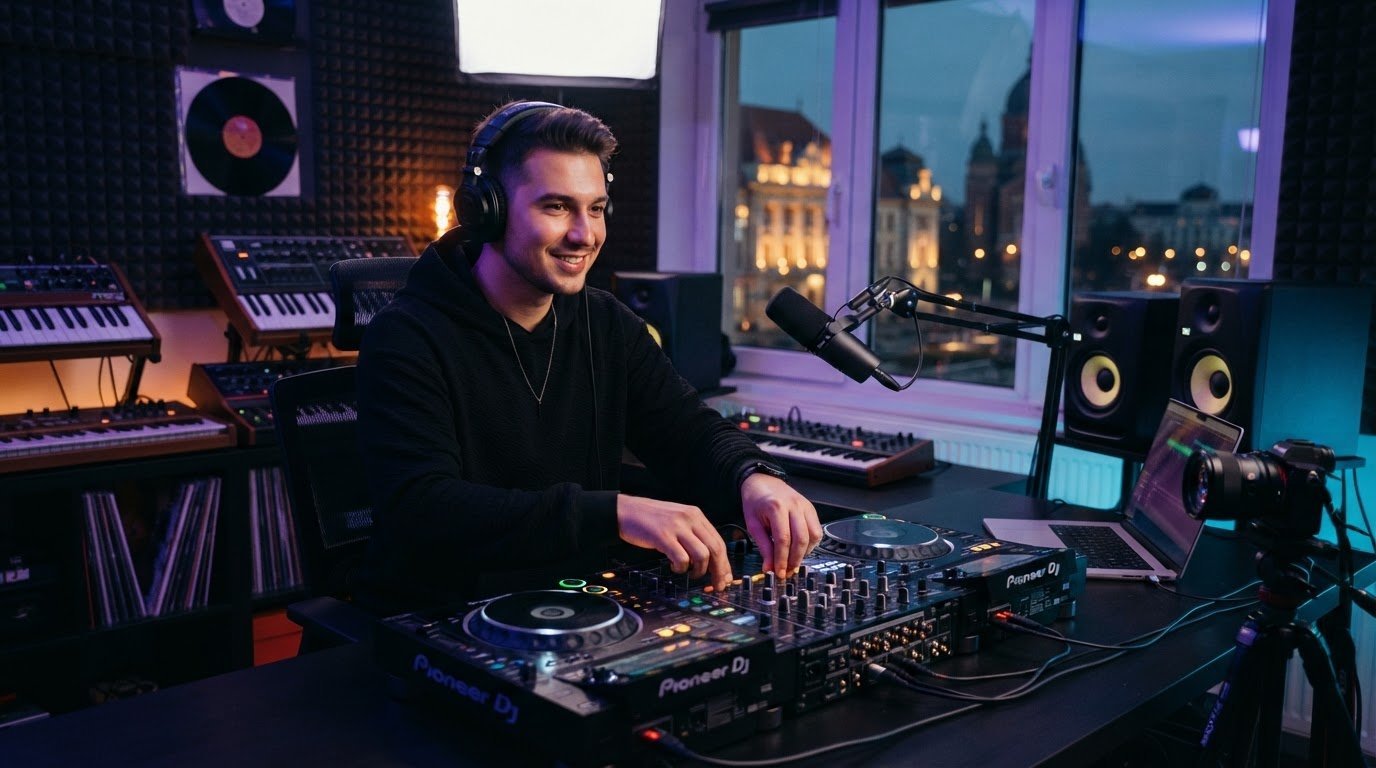
At Book a DJ Studio in Timișoara, you can rent a professional DJ studio for practice, promotional recording, and livestreaming. Book by the hour or choose a multi-session package to practise transitions, refine the arc of your set, and rehearse how you’ll introduce or close the broadcast. Treat the session as rehearsal, not a shortcut to audience growth.
Recorded sessions can reveal details that are hard to notice while you’re mixing. Listen back for pacing and audio quality, and review the video to see whether your presentation feels natural on camera. Optional audio and 4K video recording can also support promotional content, giving you material to select and shape for your own channels.
Make the next stream easier to execute
Arrive with a simple plan. Note the set’s direction, the visual mood you want, and how you’ll let people know about the stream. Keep the plan flexible enough to follow the energy in the room. Before going live, test the broadcast and confirm that your audio and visuals work together. For gear and software choices, consult current official guidance, since setup details can change.
- Set: Map the opening, energy shifts, and finish without scripting every transition.
- Presentation: Decide what viewers should see and how you’ll welcome them.
- Promotion: Prepare a clear announcement and a useful post-stream highlight.
A prepared environment can help you focus on the craft and create a session worth reviewing. If you’re working to grow your twitch channel as a dj, use each recording to spot one improvement for your next broadcast. Explore the livestream-ready DJ studio in Timișoara and its booking options when a dedicated practice or recording session fits your plans.
Make your next set the start of something stronger
A memorable DJ channel grows from more than a strong mix. Give your stream a clear identity, keep the audio clean, and help new listeners find your sets through useful clips and announcements. Welcome people naturally, then review each broadcast for one improvement you can carry into the next session.
To grow your twitch channel as a dj, focus on the parts you can shape consistently: the music, the experience, and the connection with your audience. A prepared space can make rehearsing and recording more focused. Book a DJ Studio provides a professional DJ studio in Timișoara with a livestreaming setup and optional audio and 4K video recording.
Explore a livestream-ready DJ studio session when you’re ready to practise, stream, or record your next set. Keep refining your sound, stay curious, and give your community something real to return to.
Frequently Asked Questions
How often should a DJ stream on Twitch?
Choose a schedule you can sustain. A consistent rhythm helps viewers know when to look for your next set, but no schedule guarantees growth. Test a realistic cadence and share changes clearly. Leave enough time to prepare your sets and review each broadcast, so streaming stays enjoyable and manageable.
How do DJs get more viewers on Twitch?
Make your channel recognisable with a clear musical concept, informative stream titles, and useful highlights shared beyond Twitch. Strong audio and welcoming interaction help viewers enjoy the set once they arrive. These habits may support growth, but can’t guarantee audience numbers. Results vary and take time.
Can you stream DJ sets on Twitch?
Yes, but check Twitch’s current music policies before broadcasting. The Twitch DJ Program allows enrolled DJs to use its approved catalog for live, interactive audiovisual performances, but catalog tracks aren’t allowed in VODs or clips. For other music, make sure you have the necessary broadcasting rights. Rules can change, so consult Twitch’s official guidance.
What equipment does a DJ need to stream on Twitch?
You’ll need a DJ setup, a computer or streaming device that runs your broadcast software, reliable internet, and a way to monitor outgoing audio. A camera and visual elements are optional. Check current software and platform guidance for setup requirements. DJs in Timișoara can also rent a studio with a livestreaming setup.
How can DJs keep Twitch viewers watching?
Build a coherent set arc, keep the sound clear, and make your stream format recognisable. Welcome viewers who arrive mid-set with brief context, and interact without interrupting key moments. After each broadcast, note what worked and choose one improvement for the next session. Small adjustments help refine the experience.
Should DJs post clips from their Twitch streams?
Clips can give new listeners a quick taste of your style and help regulars revisit standout moments. Choose a transition or energy shift that makes sense on its own, add a short caption, and share it where your audience is active. Check current platform features, rules, and music permissions. Clips don’t guarantee growth.