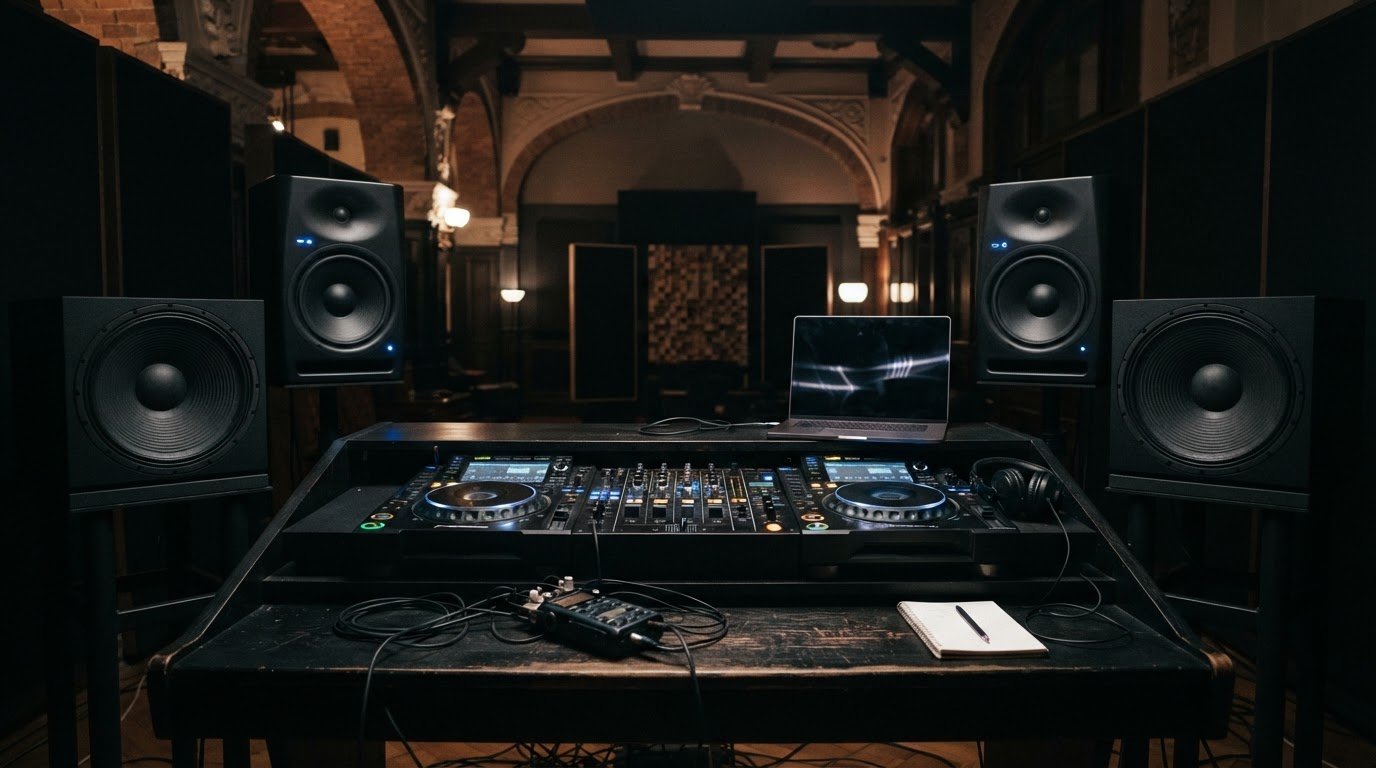

A track that hits hard in headphones can fall apart on a club rig. To test new tracks on a club sound system, listen for a clean, controlled kick and bass, tight timing, clear treble, and a balanced mix at performance level.
You know the feeling: a beat sounds huge in one room, then muddy or thin in another. A club-style sound system can reveal what headphones may hide, from bass that overwhelms the groove to bright details that turn harsh as the volume rises.
Start with familiar reference tracks, then play your own music and focus on one layer at a time. Check bass punch and timing, treble detail, and overall tonal balance. Make notes on what you hear so you can decide what to adjust before your next set.
Key Takeaways
- Listen for bass that feels powerful but stays controlled, with the kick landing cleanly in time.
- Use familiar reference tracks to spot treble that sounds clear and detailed rather than harsh.
- Judge tonal balance across the full mix, not just the low end that grabs your attention first.
- Check how bass, kick, vocals, and loudness work together before deciding a track is ready for a set.
- Build confidence through focused listening in a professional DJ studio, with audio or video recording available for your session.
1. Assessing bass punch, texture and timing
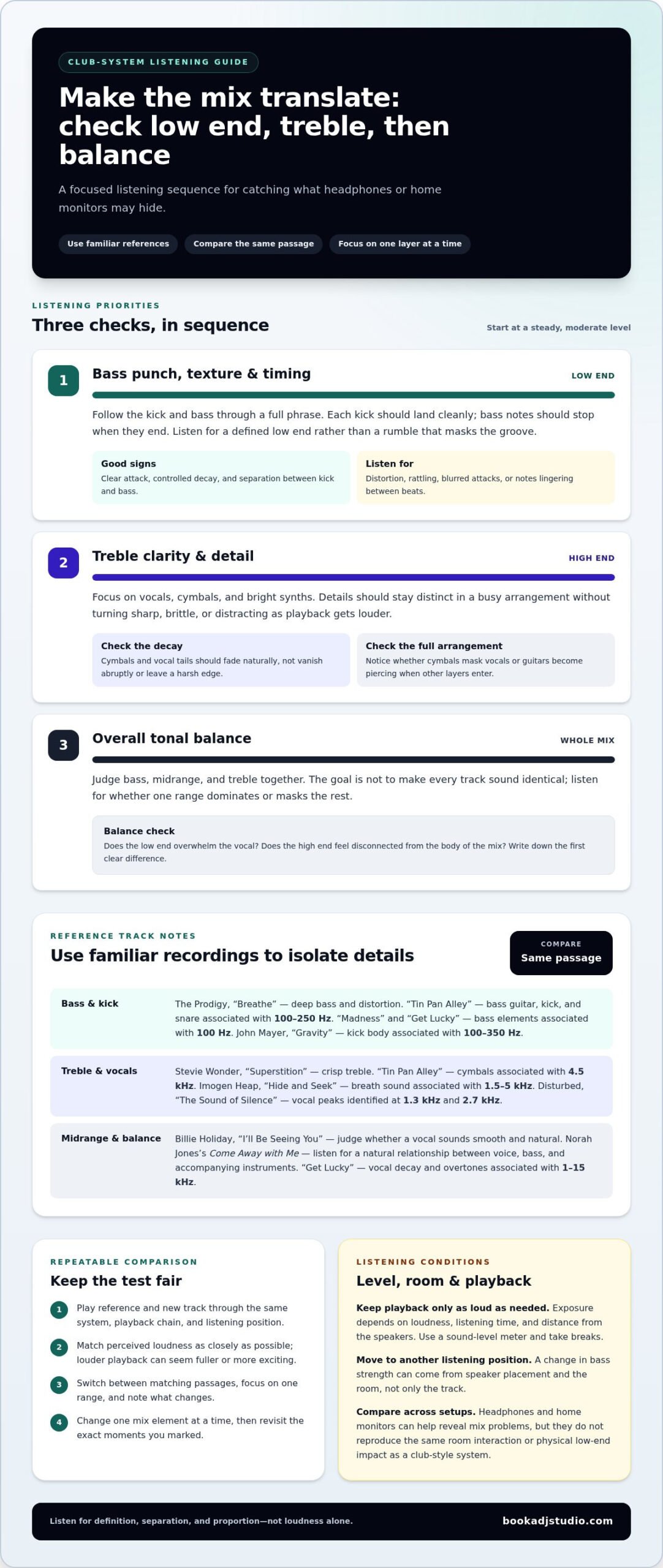
Start with the kick, then follow the bass line through a full phrase. A strong low end should feel defined, not like one long rumble masking the groove. To test new tracks on a club sound system, begin at a steady, moderate level. Notice whether each kick lands cleanly and whether the bass stops when the note ends. Distortion, rattling, or a blurred attack can point to a mix or playback issue.
A professional DJ studio with a room-filling sound system is a practical way to test music outside your usual setup. Headphones and home monitors can help you catch mix problems, but they won’t reproduce the same room interaction or physical low-end impact. Compare the same passage on each playback setup, and note what changes instead of relying on memory.
Use reference tracks to focus your testing. The Prodigy’s “Breathe” helps reveal deep bass and distortion. In “Tin Pan Alley,” the bass guitar, kick drum, and snare are associated with the 100 Hz-250 Hz range. Listen for separation: the kick should drive the beat while the bass adds weight, rather than both instruments blending into a single low-frequency swell.
Try “Madness” and “Get Lucky” as additional bass references. The bassy electronic synth in “Madness” and the bass line in “Get Lucky” are associated with 100 Hz. Compare each track with your new mix at a similar playback level. If your track’s bass seems louder but less defined, check whether its notes overlap the kick or linger between beats.
Now assess texture and timing. Play a section with repeated kicks, then listen for consistent attack and decay across the pattern. John Mayer’s “Gravity” offers a kick reference associated with the 100-350 Hz range. Hear whether the kick’s body stays distinct from the bass line. Move to another listening position; a change in bass strength can come from speaker placement and the room, not only the track.
For unreleased music, separate private evaluation from public playback. Before playing a track in a venue, secure permission from the relevant rights holders. The rights involved depend on the type of playback.
No single sound level is safe for every listener and session. Exposure depends on loudness, listening time, and distance from the speakers, so use a sound-level meter, keep playback only as loud as needed, and take breaks.
2. Evaluating treble clarity and detail
After the low end, focus on vocals, cymbals, and bright synths. Play Stevie Wonder’s “Superstition” and listen for treble that stays crisp without turning sharp. Notice whether the high percussion remains distinct as the arrangement gets busy. A dynamic track can reveal whether delicate details remain audible alongside louder elements.
Use one clear reference, then replay the same passage in your new track. In “Tin Pan Alley,” the cymbals are associated with 4.5 kHz. Listen for their shimmer and decay, not just their initial hit. If they sound brittle, distracting, or clipped, compare the master at a lower playback level before adjusting the mix. A club system can expose harshness that seemed subtle on headphones.
For vocal presence, try Imogen Heap’s “Hide and Seek.” The breath sound is associated with the 1.5 kHz-5 kHz range. Focus on whether breaths and consonants remain audible without pushing the vocal unnaturally forward. Then play Disturbed’s “The Sound of Silence”: the voice peaks in its climax are identified at 1.3 kHz and 2.7 kHz. Listen for definition through the louder passage, not only during a quiet verse.
Midrange clarity gives vocals and instruments their character. Billie Holiday’s “I’ll Be Seeing You” can help you judge whether a vocal sounds smooth and natural. Compare its phrasing with the lead vocal in your track. Does the voice retain its tone, or become nasal, thin, or buried when guitars and synths enter? Assess each layer with the full arrangement playing, since solo details can mislead you about how the complete mix translates.
Check guitar tone separately from vocal tone. A bright guitar should have clear attack without piercing the ear, while softer details should remain present beneath the lead. In “Get Lucky,” vocal decay and overtones are associated with the 1 kHz-15 kHz range. Listen as each vocal phrase ends. A clean tail should fade naturally rather than vanish abruptly or leave a harsh edge.
Make the test repeatable: use the same playback position, compare familiar recordings, and change only one mix element at a time. Mark moments where cymbals mask vocals or where guitar edges feel too bright. Then revisit those exact moments after an adjustment. A focused studio listening session gives you a consistent place to compare those details on a professional sound system.
Overall tonal balance
Frequency response describes how accurately speakers reproduce sound from low to high frequencies. A flat response means no particular range is emphasized or reduced. In a club-style room, the goal isn’t to make every track sound identical. Listen instead for whether the mix’s bass, midrange, and treble stay proportionate, or whether one range dominates and masks the rest.
To compare a new track with reference tracks at club volume, play both through the same system, using the same playback chain and listening position. Match their perceived loudness as closely as possible, then switch between familiar passages and note which frequency ranges change. This makes the comparison fairer, because louder playback can seem fuller or more exciting even when the mix itself isn’t more balanced.
Norah Jones’s album Come Away with Me can serve as a reference for overall tonal balance. Listen for a natural relationship between voice, bass, and accompanying instruments, then play your electronic track without changing the system settings. Does its low end overwhelm the vocal? Does the high end feel disconnected from the body of the mix? Write down the first clear difference.
Use a short, repeatable sequence. Play a reference passage, switch to the matching section of your track, and focus on one range at a time. Compare bass weight, then vocal or instrument body, then treble brightness. A familiar recording can help expose a tonal shift, while a rhythmic electronic reference can show whether the kick and synths sit cleanly in the mix.
Don’t treat a flat frequency response as a command to flatten your track’s character. A warm mix can be an artistic choice; the question is whether the warmth comes from the arrangement or excessive low-mid energy. If a bass line feels strong on its own but clouds chords and vocals in the full mix, reduce the masking rather than stripping away all its weight.
Check more than one listening position before making an adjustment. Speaker placement can change perceived sound, so a bass-heavy spot may not represent the room’s overall balance. Return to the same reference passage after moving, then compare again from your original position. If the tonal difference follows the listening spot, treat the room as part of the test, not as proof that your mix needs another processing change.
Focus on what the speakers reveal rather than treating a familiar recording as a target to copy. A flat frequency response means speakers reproduce frequencies without emphasizing or attenuating particular ranges. Use a reference to notice whether playback makes one part of a recording seem unusually prominent or subdued, without assuming every production should share the same tone. Listen for repeatable differences, and use them to guide questions about the mix rather than as automatic instructions to change it.
Compare speakers using recordings you know well. Familiarity makes differences easier to recognize: when a known passage sounds unlike your expectation, note what changed in the playback before deciding what to adjust. Treat the result as a listening observation, then check whether the same issue remains in your track.
4. What equipment and audio formats should I bring to test a track in a club?
Bring the final version you plan to play, plus a backup copy. Label files clearly so you can tell the approved master from earlier drafts. Include the format you normally use in your DJ workflow, and keep reference tracks on the same device for easy comparison.
Bring your headphones and USB stick, or an HDD, along with your personal record collection if you use one. Open each file beforehand to confirm it plays correctly, and remove unfinished exports from your playlist so you don’t load the wrong version. Book a DJ Studio’s equipment is powered on and ready to use.
Keep your materials simple: one folder for your track, one for references, and a note for observations. Record the file version and the passage you want to revisit after listening. This makes it easier to compare revisions without losing track of which mix you heard.
For a useful club check, carry reference audio that lets you listen to different parts of the sound without changing your setup. Keep the references accessible on the same playback device as your track, and use the same connection and playback path when comparing them. Listen at a comfortable level, then make a note of what you hear rather than relying on memory. The aim is not to make your track resemble a reference; it is to notice whether details remain clear and balanced in the room. If you use headphones to check a passage, return to the club system before deciding what to change, since the room playback is the test you came to make.
A few familiar recordings can provide specific points of comparison. The female vocal in the first verse of “Circle of Life” is identified at 689 Hz for audio system testing. The bagpipe overtones in AC/DC’s “It’s A Long Way To The Top (If you Wanna Rock ‘N’ Roll)” are associated with the 1 kHz – 4.5 kHz range for audio system testing. The spring-reverb guitar in Alabama Shakes’ “Don’t Wanna Fight” is associated with 2 kHz – 4 kHz for audio system testing. The guitar in “These Days” by Foo Fighters is associated with 400 Hz for audio system testing. A familiar vocal recording can help you assess how clearly harmonies come through during audio system testing. The acoustic guitar in the live version of “Hotel California” is associated with the 200 – 800 Hz range for audio system testing. Load only the passages you need, and compare them at a consistent playback level so you can focus on the sound rather than on switching or volume changes.
Bring references in a format your playback device can read, and check that each file opens before your session. Keep the original files unchanged; label any test export separately so it cannot be mistaken for your approved version. During playback, listen for the elements you want to assess, then write down the passage and your observation. A reference can help you notice a difference, but it cannot tell you automatically what adjustment your track needs. Make decisions in the context of the whole mix, and keep your notes with the version you tested. This gives you a practical basis for later comparisons without confusing a listening impression with a confirmed change.
5. How do I check bass, kick, vocals, and loudness on a club sound system?
Run a focused listening pass instead of judging every element at once. Play the same section of your track, then a familiar reference, keeping the playback chain and listening position unchanged. Compare the kick’s attack, the bass sustain, vocal placement, and perceived loudness. This makes differences easier to identify and helps you avoid changing the mix based on one striking moment.
Start with the kick and bass together. Muse’s “Madness” gives you an electronic kick and snare reference associated with the 180-150 Hz range. Listen for a defined kick transient and a clean gap before the next beat. If the kick loses impact when the bass enters, inspect their timing and overlapping notes. The goal is a groove where both parts drive the track without merging into a single thud.
Next, check low vocals against the rhythm section. The bass vocals in the first chorus of Pentatonix’s “Halleluja” are associated with the 100-200 Hz range. Compare that passage with your own chorus: can you follow the vocal line while the kick and bass continue? Then use the male vocal in Foo Fighters’ “These Days,” associated with 200 Hz, as a reference for vocal body. A thin or masked voice can point to competition in the mix.
Listen to “Get Lucky” for another useful vocal comparison. Its male vocal is associated with 300 Hz, while its bass line offers a separate low-frequency reference. Switch between that recording and your track at similar perceived loudness. Notice whether your vocal feels buried, overly prominent, or balanced with the instrumental. Keep the same playback level for both passages so louder doesn’t automatically seem better.
Now evaluate loudness across the full section. Compare a quiet intro, a drop, and the outro rather than judging only the loudest moment. Watch your playback or system meters for clipping, and listen for distortion, flattened transients, or a mix that becomes tiring as intensity rises. If the track seems louder but less clear than your reference, reassess its dynamics and master level instead of turning the system up again.
Finish with a short performance-style transition. Mix into and out of the track, then note whether the kick, vocals, and overall level remain consistent beside the neighbouring recordings. Take a brief ear break before a final listen, because fatigue can cloud comparisons. For a focused run-through on a professional DJ system, book a DJ studio session and assess how your track holds together at performance volume.
Book a DJ Studio: Hourly Studio Access
Book a DJ Studio gives you a professional space to test your tracks on a club sound system. Choose Hourly Studio Access for a focused listening session, or Session Packages if you want dedicated time to refine and compare several mixes. Once the sound is dialled in, Audio Recording can capture your DJ session, while 4K Video Recording lets you document the performance visually.
Bring your reference tracks and final exports, then use the session to assess how your mix translates through a powerful playback system. For your next focused test, visit Book a DJ Studio.
Turn Your Next Test Into a Stronger Set
Make each listening session part of your creative workflow. After you test new tracks on a club sound system, keep a brief mix log with the version you played, what you noticed, and the change you plan to try. That record turns instinct into a repeatable process and helps you hear whether each revision moves the track closer to your intended sound.
Then bring the updated version back into your set. Test how it sits beside tracks you already trust, and let the transition reveal what studio listening alone can’t. You’re not just polishing one mix; you’re building confidence in your choices and shaping a sound that carries through the room.
Ready to put your next track through its paces? Contact Book a DJ Studio and take the next step toward a set that hits with purpose. Keep listening, keep refining, and trust the craft you’re building.
Frequently Asked Questions
How can I book a club or rehearsal studio to test new music?
In Timișoara, book DJ studio access online through Book a DJ Studio’s website form. Select an available day and time, then prepare your music before arriving. Scan your tracks in Rekordbox before exporting them to a USB stick, which must be no larger than 32 GB, or bring an HDD. Pack your headphones and personal record collection too, so you can test your own DJ workflow.
How much does it cost to rent a club or DJ studio for sound-system testing?
Book a DJ Studio’s current pricing details are available through its website and booking form. The studio offers Hourly Studio Access and Session Packages, so choose the booking option that suits your planned testing session. Audio Recording is also available as an add-on if you want to capture your set. Review the booking details for the option you select before completing your online reservation.
What sound levels are safe when testing music in a club?
No single sound level is safe for every listener and session; exposure depends on loudness, listening time, and distance from the speakers. Use a sound-level meter, keep playback only as loud as needed, and take breaks.