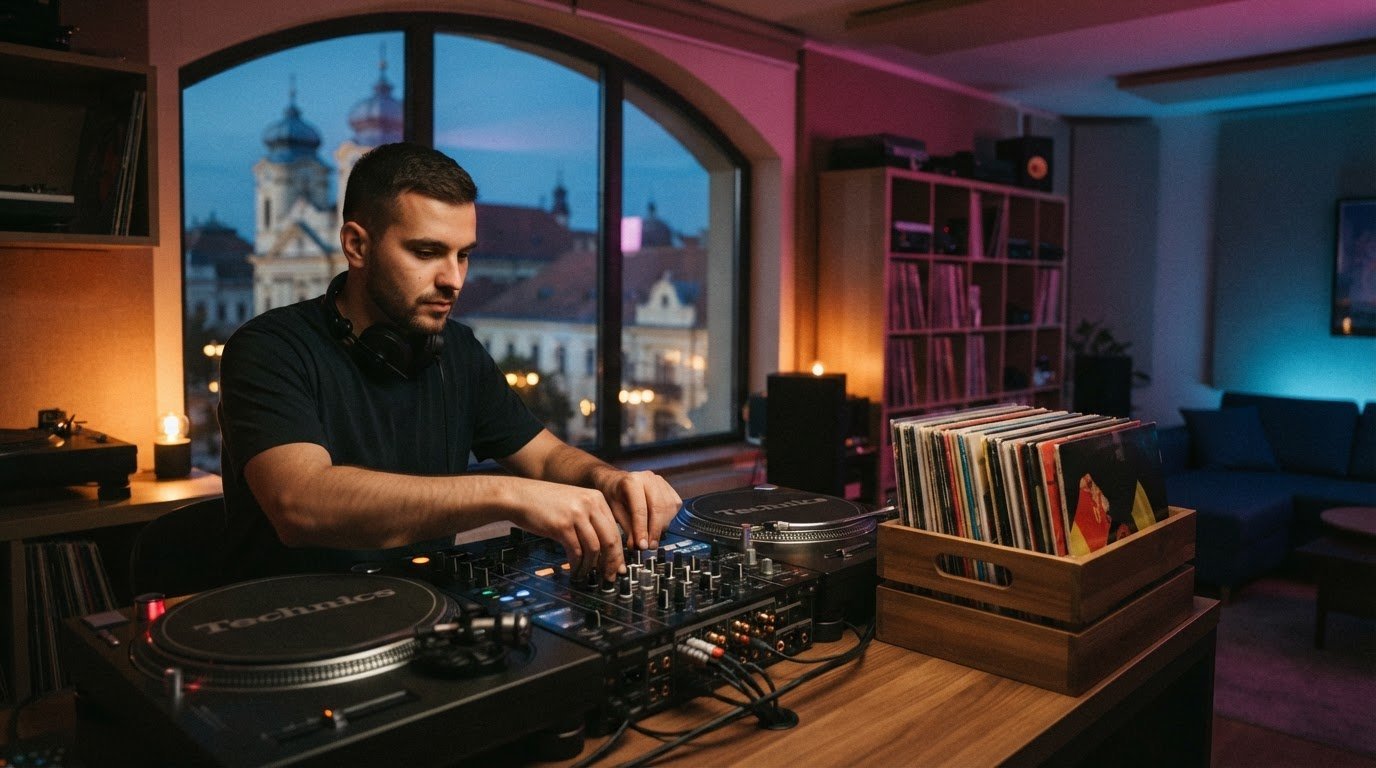

To learn how to build a DJ set from scratch, organize your library into a folder tree no deeper than three levels, then build three playlists: warm-up, main, and last hour. For a two-hour set, roughly 100 tracks can give you options for each stage. The goal isn’t to cram in every track you own. It’s to shape a journey that moves with the room.
Start with the feeling you want to create, then choose a focused genre and tempo range to guide your track selection. An organized library helps you find the right track in the moment, but pacing is what turns a collection into a set. You don’t need a huge archive to learn how to build a DJ set from scratch. You need music you know and a clear plan for how the energy will rise, shift, and settle.
Build your set step by step. Source and organize tracks, set useful genre and tempo boundaries, then choose music for each stage of the night. Refine your playlists through practice so you can trust your choices and keep the mix flowing in the booth.
Key Takeaways
- Shape playlists around the set’s energy arc, so each transition helps move the room toward the next moment.
- Build your library with tracks you know, then tag and sort them so the right choice is easy to find while mixing.
- Choose a genre and tempo range that give your set a clear identity without limiting how you respond to the crowd.
- Rehearse your track flow in a DJ studio, and use audio or 4K video recording to review your performance.
Building playlists for different set stages
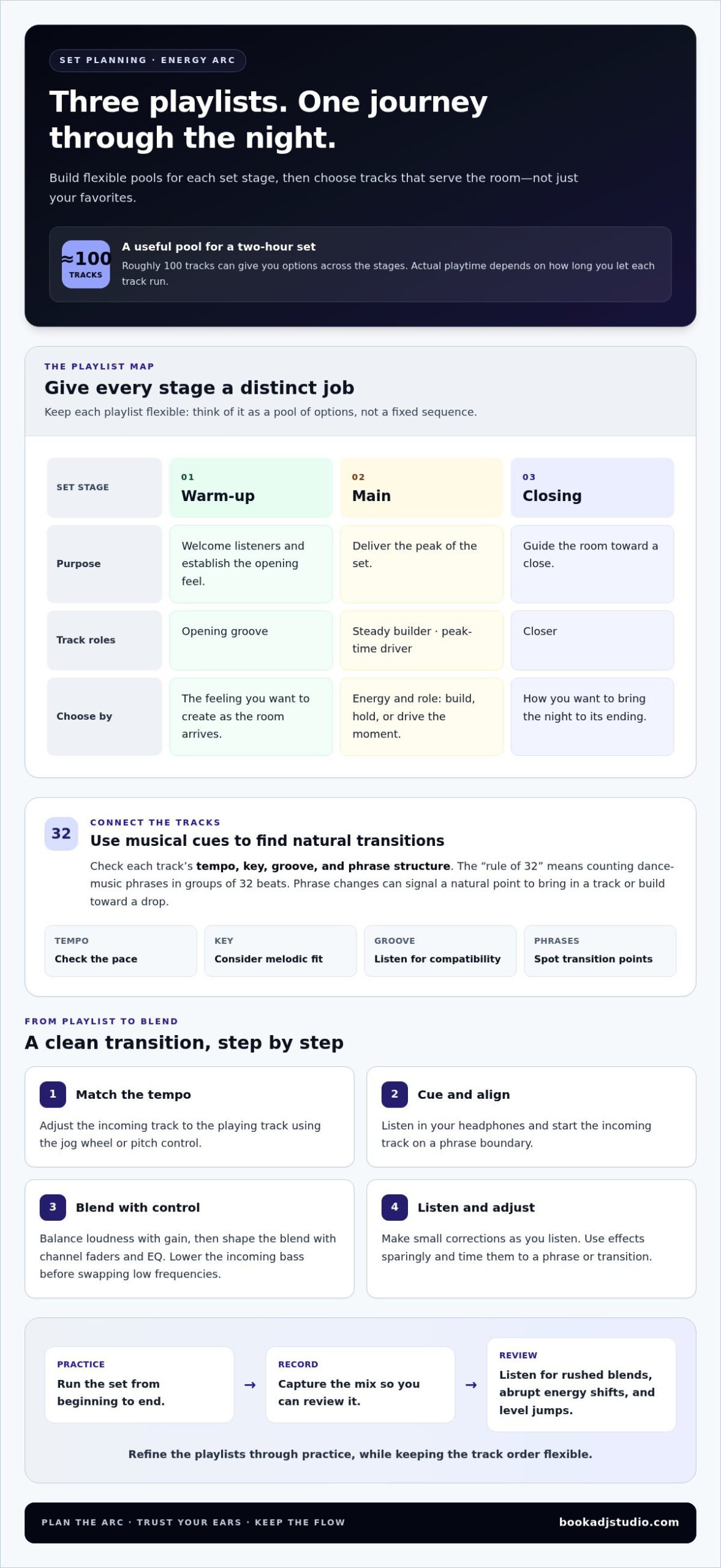
- Map the energy arc. Divide your set into warm-up, main, and closing playlists. Give each one a distinct purpose: welcome listeners, deliver the peak, then guide the room toward a close. This structure helps you choose tracks for the moment, not just because they’re favourites.
- Build options for each stage. For a two-hour DJ set, roughly 100 tracks can provide coverage across different stages of the night. Sort tracks by energy and role, such as opening groove, steady builder, peak-time driver, or closer. Treat playlists as flexible pools, not fixed sequences.
- Order tracks by musical connection. Check each track’s tempo, key, groove, and phrase structure. The rule of 32 refers to counting dance-music phrases in groups of 32 beats. Use phrase changes to spot natural points for bringing in a new track or building toward a drop.
- Beatmatch before blending. Match the incoming track’s tempo to the playing track, then use the jog wheel or pitch control to align their beats. Cue the next track in your headphones and start it on a phrase boundary. Make small adjustments as you listen rather than rushing the transition.
- Mix with controlled levels. Set gain so tracks enter at balanced loudness, then use channel faders and EQ to shape the blend. For example, lower the incoming track’s bass before swapping the low frequencies. Use effects sparingly and time them to a phrase or transition.
- Choose tools that fit your workflow. Serato DJ Pro, Traktor Pro, Rekordbox, Djay, and Virtual DJ support DVS. For a beginner controller, prioritize clear jog wheels, cue controls, and a mixer layout you can use comfortably. Total cost depends on the controller’s features and the software licensing options.
- Rehearse, record, and review. Practise the set from beginning to end, record the mix, then listen for rushed blends, abrupt energy shifts, and level jumps. A two-hour set with roughly 100 tracks offers options, but your actual playtime depends on how long you let each track run.
A beginner can start by sorting tracks into warm-up, main, and closing playlists. These three distinct groups keep selections aligned with each stage’s purpose.
Buying and sourcing music files
- Start with a focused collection. Build an initial library of 50 to 100 owned tracks that fit the sound you want to play. Choose music you know, with different moods and energy levels. A focused music library gives you a practical foundation for how to build a DJ set from scratch, without getting lost in unfamiliar files.
- Buy a small first batch. Choose 20 to 30 tracks from one or two sources. Preview each selection and ask what role it could play, such as opening groove, bridge, or closer. Avoid buying several tracks for the same moment. Keep purchase records so you can trace where each file came from.
- Keep usage permissions clear. Buying a file and having permission to use it in a public performance or published recording are separate matters. Before playing publicly or distributing a mix, secure the permissions that apply. As you learn how to build a DJ set from scratch, include music sourcing in your performance preparation.
- Organize every new track. Add consistent tags for artist, title, genre, tempo, and energy. Include a short comment such as “warm-up groove” or “peak-time vocal” to help you make quick selections. Keep your folder tree to no more than three levels, so you can browse efficiently during preparation.
- Grow and maintain the library. Add a small batch of tracks each week, then prune or archive unused files monthly. Listen to each new purchase before adding it to performance playlists, and make sure it plays correctly in your DJ software. A few hundred well-tagged tracks can cover most DJ nights without creating an unwieldy archive.
- Review new choices in a recording. A practice mix can reveal whether tracks fit together and whether your library notes help you find them. Capture a test set with studio audio recording, then note which tracks earned a place in your next crate.
Choosing genres and a tempo range
- Choose a sound that gives the set direction. Pick a primary genre you enjoy and can confidently explore, such as house, techno, or drum and bass. Then decide which related styles can support it. A house set, for example, might include vocal, deep, and more driving tracks, connected by groove rather than a sudden genre switch.
- Set a flexible tempo boundary. Use the BPM of tracks you already enjoy as your starting point. Choose a range that lets you move between compatible tracks without forcing abrupt changes. A slower opener can build toward faster selections, while a steady tempo can still feel dynamic through changes in percussion, bass, and energy.
- Check BPM and musical key in your DJ software. Analyze each track, then review its displayed tempo and key in your library. To find the BPM and key of songs for mixing, use software analysis as a guide, then listen to confirm the beat and musical fit. Tag useful values to make crate browsing faster.
- Test transitions by ear. Pair tracks with compatible grooves, phrase lengths, and energy, then audition the transition in your headphones. Matching keys can help melodies blend, but don’t guarantee a good mix. If two tracks clash, try another section, shorten the overlap, or choose a different track.
- Build contrast without breaking the flow. Give each track a purpose: hold the groove, add lift, or reset the energy. For example, move from a percussion-led track into a vocal track at a clear phrase change. Keep alternate selections ready so you can adapt while preserving the set’s identity.
What equipment do you need to build a DJ set from scratch?
- Choose your mixing format. Start with a controller, media players, or turntables paired with a mixer. Your choice affects how you prepare tracks and practise transitions. A controller provides software-based playback, while a traditional turntable setup supports hands-on vinyl techniques.
- Match your setup to your software. If you want to use digital files with traditional turntables, choose a Digital Vinyl System (DVS), which lets you control digital audio files with turntables. Serato DJ Pro, Traktor Pro, Rekordbox, Djay, and Virtual DJ support DVS.
- Prioritize the mixer’s crossfader for scratching. Choose a scratch DJ mixer with a precise, robust crossfader designed for scratch techniques. Test whether its movement feels controlled and responsive. For standard blending, focus on clear channel controls and easy access to EQ.
- Compare turntables by handling. The Technics SL-1200MK7 has pitch control and a platter designed for smooth operation. Check that your turntables are compatible with your DVS setup before buying. Consider these features in relation to your preferred mixing style.
- Add headphones and monitoring. Use headphones to cue the next track while the audience hears the current one. Connect speakers or suitable monitoring to hear how transitions sound in the room. Keep the cue level comfortable and check that every connection works before practising.
- Prepare the practical essentials. Bring your laptop and music library if your setup depends on DJ software. Pack the required cables, power supplies, and headphones together, then test playback before starting. A quick sound check can reveal routing or audio-level issues early.
- Practise on a setup built for mixing. If you want to run a full set on professional DJ equipment, book DJ studio access and focus on cueing, transitions, and mixer control.
Serato DJ Pro, Traktor Pro, Rekordbox, Djay, and Virtual DJ are software options that support DVS.
Book a DJ Studio: Hourly Studio Access
At Book a DJ Studio in Timișoara, you can rehearse your set in a dedicated studio with professional DJ equipment. Book hourly access for focused practice or choose a session package to refine your flow and transitions over repeat sessions.
Ready to review your performance? Add Audio Recording to listen back to your mix, or 4K Video Recording to capture the session visually. Recording helps you assess track choices, pacing, and how confidently you work the setup.
Take your playlist from preparation to the decks. Visit Book a DJ Studio to explore your next session.
Take Your Sound Into the Booth
Your next breakthrough won’t come from waiting for a perfect playlist. It comes from making choices, hearing how they land, and shaping your instincts through performance. Let your first set be a starting point, not a verdict on your potential. Each time you step behind the decks, you learn more about the sound that feels unmistakably yours and the moments that make a room move. Stay curious about the choices that surprise you, too. They can reveal new directions worth exploring.
Learning how to build a DJ set from scratch is really about developing your own musical point of view, one decision at a time. Keep experimenting, trust the tracks that spark something in you, and let each performance sharpen your instincts. Notice which moments feel most natural, then use that insight to guide your next creative move. If you’re ready to take that next step, contact Book a DJ Studio and bring your ideas to the decks. Your sound is waiting to come alive.
Frequently Asked Questions
How to organize a DJ music library?
Use searchable tags and notes that describe a track’s role, such as “instrumental break” or “strong outro.” Review them during practice and update them as you learn where each track fits in your set.
What is the rule of 32 in DJing?
It’s a way to count dance-music phrasing in 32-beat groups. Use the count to anticipate changes, then listen for the actual musical cue before starting your transition.
How to choose and organize tracks for a DJ set?
Choose tracks with a shared groove, then identify useful connectors between different moods. Try each pairing in rehearsal and replace transitions that feel forced.
How to structure a DJ set from opening to peak time and closing?
Let the opening establish the mood, build intensity through the middle, and give the closing stretch a clear sense of resolution. Keep alternate tracks ready for moments when the room’s energy shifts.
What DJ software and beginner controllers are best, and how much do they cost?
For a beginner controller, prioritize clear jog wheels, cue controls, and a comfortable mixer layout; total cost depends on its features and software licensing options.