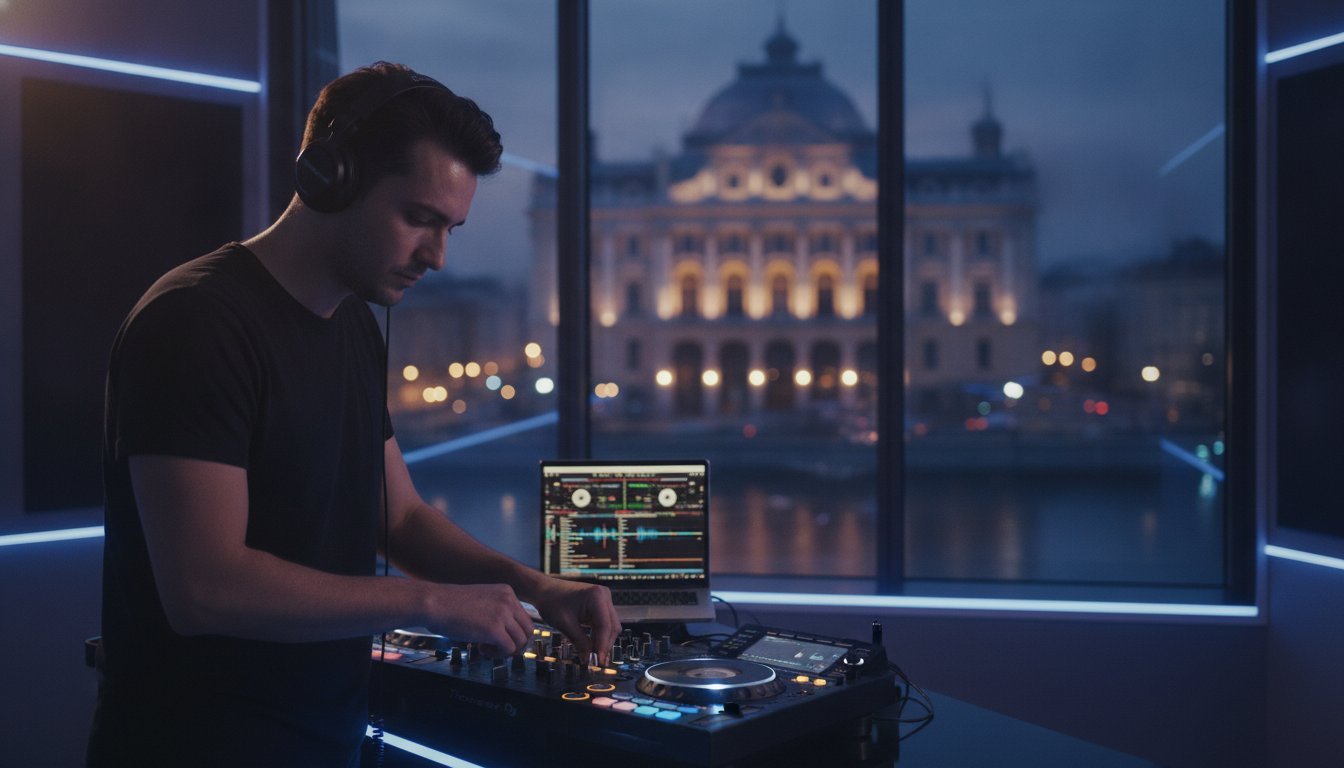

What if your next career-defining set doesn’t happen in a dark club, but on a 4K digital stage seen by thousands of global fans? 🎧 In 2026, the “Pro-Vibe” shift is officially here. This DJ livestream setup guide is designed for the artist who’s tired of technical hurdles. Talent buyers and festival bookers are no longer just looking at your local gig history. They’re watching your streams to see if you can command an audience. 📈 You’ve likely felt the sting of a copyright mute or the frustration of a lagging feed just as the drop hits. It’s exhausting to battle hardware limits when you just want to focus on the music.
You’ll master the gear, software, and strategy needed to ignite your career from any location. 🚀 We’re breaking down how to achieve crystal-clear audio, bypass those annoying platform mutes, and look like a seasoned pro. Whether you’re using a standalone system or the latest AI-powered software, we have the blueprint for success. We’re covering everything from hardware essentials to why our professional studio in Timișoara is the ultimate shortcut for your brand. Stop fighting cables. Start building your digital empire. 🔊
Key Takeaways
- Transform your craft into a global brand by using the “Global Booth” strategy to reach fans far beyond your local scene. 🌍
- Follow our DJ livestream setup guide to pick the essential audio interfaces and 4K cameras that eliminate distortion and low-quality feeds. 🎥
- Command the technical side of OBS Studio and select the best platform to protect your sets from copyright mutes while maximizing your reach. 💻
- Create an immersive visual experience with professional lighting techniques and neon aesthetics that mirror the energy of a physical club. 💡
- Discover the ultimate shortcut to a professional broadcast by utilizing a pre-configured livestreaming setup in Timișoara, letting you focus entirely on your mix. 🚀
The Digital Revolution: Why You Need a DJ Livestream Setup in 2026
Your craft deserves more than four walls. In 2026, the booth has gone global. DJ livestreaming is the high-stakes fusion of studio-grade audio and crisp, synchronized video delivered straight to your fans’ devices. It’s the foundation of any modern DJ livestream setup guide: understanding that your performance is now a digital product. You’re no longer just a local selector. You’re a broadcaster. 📡
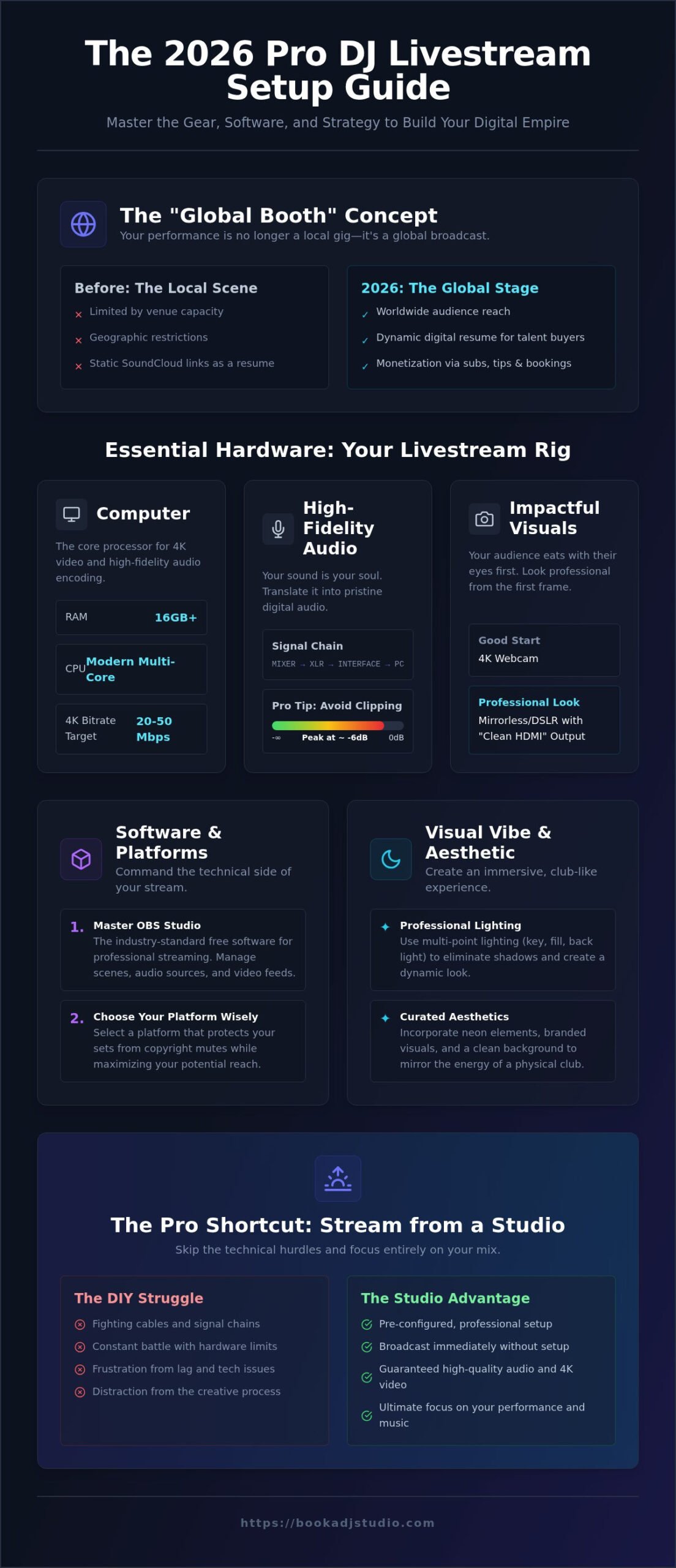
Think of this as the “Global Booth” concept. You aren’t limited by the foot traffic of a single venue in Timișoara. You’re broadcasting to a worldwide audience from a professional environment. A recorded stream is a dynamic digital resume that carries more weight than a static SoundCloud link. It proves you can handle a crowd, maintain energy, and master technical proficiency under pressure. Talent buyers today don’t just want to hear your music. They want to see your presence. ⚡
The 2026 landscape is built specifically for creators. Platforms have moved beyond basic “go-live” buttons to full-scale ecosystems with integrated monetization. Whether you’re at our professional studio or in your home rig, the goal is the same. You’re building a brand that never sleeps. It’s about taking control of your narrative and your career growth.
From Bedroom to Global Stage
Stop playing for the mirrors. It’s time to connect. Real-time interaction creates a bond that a static upload never will. You feel the energy of the chat. You see the reaction to every transition. This isn’t just practice. It’s a breakthrough. 🎧 Moving from solo sessions to a global stage is the fastest way to sharpen your skills. You’ll learn to read a digital room. You’ll build a community that follows you from the screen to the club. The transition is exhilarating. It’s the moment you stop being a hobbyist and start being an artist.
Monetization and Career Growth
Treat your stream as a 24/7 audition. Talent buyers in 2026 look at your Twitch or Mixcloud stats before they check your bio. They want to see the vibe in action. Your stream generates revenue through subscriptions, digital tips, and direct booking leads. It’s a business investment in your brand’s future. 📈 Every professional-grade broadcast is a brick in your empire. When you use a high-end livestreaming setup, you signal to the industry that you’re ready for the big leagues. Don’t just play music. Build a career that scales.
The Essential Hardware: Building Your Livestream Rig
Hardware is the physical foundation of your digital presence. This DJ livestream setup guide emphasizes one truth: your gear must be as reliable as your rhythm. If your hardware fails, your brand fails. You need a setup that handles the heavy processing of 4K video and high-fidelity audio without breaking a sweat. Modern rigs in 2026 also benefit from AI-enhanced noise cancellation and auto-framing cameras that keep you center-stage during high-energy transitions. 🚀
The bridge between your mixer and the world is the audio interface. It converts analog signals into a digital stream your computer can understand. Stick to balanced XLR cables whenever possible. They reject interference and keep your signal clean. RCA is okay for short runs, but for professional results, balanced is king. Your computer also needs muscle. Aim for at least 16GB of RAM and a modern multi-core processor to handle 4K encoding bitrates, which in 2026 often peak between 20 and 50 Mbps. 💻
Capturing High-Fidelity Audio
Never rely on your camera’s built-in microphone. Room sound is thin, echoey, and unprofessional. It kills the listener’s immersion instantly. Use a direct line-in from your mixer to your interface. Keep your levels in the “green” on your software, peaking around -6dB to avoid digital clipping. In 2026, the audio interface is the portal that translates your creative soul into digital perfection. 🎧
Visual Gear for Impact
Your audience eats with their eyes first. While a 4K webcam is a solid starting point, a mirrorless DSLR with a “clean HDMI” output provides that shallow depth-of-field look that screams “pro.” Use a stable tripod to eliminate shake. Avoid using your phone as a primary camera if you want to maintain a consistent frame rate over long sets. You can find plenty of visual inspiration by browsing our gallery. 📸
If managing bitrates and signal chains feels like a distraction from your craft, there’s a faster way. You can access a pre-configured livestreaming setup in our Timișoara studio and start broadcasting immediately. Focus on the music. We’ll handle the hardware. 🔊
Software and Platforms: Where to Broadcast Your Sound
Software is the command center of your digital performance. While your hardware provides the signal, your software determines how that signal is packaged and delivered to your fans. This DJ livestream setup guide identifies OBS Studio as the non-negotiable industry standard. It is free, open-source, and incredibly powerful. It allows you to layer your 4K video with professional overlays, social media alerts, and real-time chat widgets that turn a broadcast into an interactive event. 💻
Success also depends on your connection. Forget about download speed. For a high-definition broadcast in 2026, your upload speed is the only metric that matters. To maintain a stable 4K stream, you need a consistent upload of at least 20 to 50 Mbps. If your home internet fluctuates, your stream will buffer and your audience will leave. Stability is the foundation of professional growth. 🌐
Mastering OBS Studio
Think of OBS as your visual mixer. You’ll use Scenes to switch between different camera angles and Sources to add your logos or track IDs. In 2026, the game has changed with AI plugins. You can now run real-time noise gates and EQ directly within OBS to polish your audio before it hits the internet. Set your bitrate carefully. Aim for 6,000 to 10,000 kbps for 1080p, or go higher for 4K if your platform and connection support it. 🚀
Beating the Copyright Bot
Navigating copyright is the biggest hurdle for any digital DJ. Platforms like Instagram remain high-risk zones for mutes and takedowns. Twitch has evolved with its dedicated DJ Program, providing a label-approved catalog for creators who meet specific growth thresholds. However, Mixcloud Pro remains the ultimate safe haven. It is fully licensed, meaning you can play any track without fear of the mute button. 🎧
If you want to reach everyone at once, use a restreaming service. This allows you to broadcast to Twitch, YouTube, and Mixcloud simultaneously from a single upload stream. It is the most efficient way to scale your presence. If the technical setup feels overwhelming, our livestreaming setup in Timișoara comes pre-configured with OBS and high-speed fiber internet. Skip the troubleshooting and go straight to the music. 🔊
Visual Vibe: Lighting and Aesthetic for DJs
Your stream is a cinematic performance. A professional DJ livestream setup guide isn’t just about the audio signal; it’s about the visual story you tell. If your broadcast looks like a grainy security feed, viewers will scroll past. You want to transport them from their living room into your specific creative world. This requires a deliberate focus on set design and atmosphere. 🌌
RGB and neon accents are your best friends for building a brand. They add texture and movement to your background. Don’t just turn on the ceiling light. Use smart bulbs or LED bars to paint the room with your signature colors. This creates a “club” atmosphere that feels intentional and high-energy. It’s about building a stage, not just a desk. You’re creating an environment where your music can breathe.
The Power of Lighting
Master the three-point lighting system to look like a professional artist. Your key light is your main source, usually placed at a 45-degree angle to your face. The fill light sits on the opposite side to soften harsh shadows. Finally, the backlight shines from behind to create a rim of light around your shoulders. This separates you from the wall and adds three-dimensional depth. 💡 You don’t need expensive gear. Simple LED strips placed behind your mixer or along the floor can create a massive impact. Avoid the “flat” look by keeping your background slightly darker than your main performance area.
Camera Positioning for Engagement
Placement is everything. A “Top-Down” view of your decks builds immediate credibility. It proves the technical skill behind every transition and keep-to-the-beat moment. However, you also need an “Eye-Level” performance view. This allows you to connect with the chat and show your energy. 📸 Mixing these angles in OBS makes your broadcast feel like a high-end production. You can see how we’ve mastered these aesthetics by checking our gallery for visual inspiration.
Professionalize your feed further with digital overlays. Add your logo, social handles, and a “Now Playing” widget to the corners of your frame. This reinforces your brand identity every second you’re live. If you want to skip the trial and error of set design, book a session at our studio in Timișoara. We provide the perfect neon-soaked environment and 4K cameras so you can just show up and shine. 🔊
The Pro Shortcut: Why Streaming from a Studio Wins
Most resources in a DJ livestream setup guide assume you have a dedicated room and a massive budget for permanent gear. That isn’t always the reality. Sometimes, you need a professional result without the permanent overhead. A dedicated studio is your shortcut to an elite broadcast. You bypass the weeks of troubleshooting and the thousands spent on 4K cameras or high-end interfaces. You just bring your music and your vibe. 🎧
Studio streaming offers zero setup stress. Everything is pre-wired. The signal chain is optimized. You perform on club-standard decks, the same ones you’ll find on main stages at major festivals. This builds muscle memory and confidence that translates directly to your live gigs. Plus, you benefit from enterprise-grade internet. Forget about home connection dropouts or buffering issues during your peak hour. Stability is your new standard. 🌐
Think beyond the live broadcast. While you stream, you can utilize our 4K video recording service to create a content goldmine. These high-resolution files are perfect for chopping into high-impact clips for social media. One hour of streaming becomes a month of promotional content. It’s the ultimate efficiency for the modern artist. You’re not just playing a set. You’re building a library of professional assets. 🎥
Book a DJ Studio Timișoara
For local artists, our DJ studio rental in Timișoara provides the perfect launchpad. The “Live Streaming Setup” add-on is a total game-changer. It removes the technical friction and lets you focus entirely on your track selection and transitions. It’s a plug and play environment designed for busy professionals who value their time. You show up, connect your drive, and hit the global stage. 🚀
Ready to Go Live?
You’ve mastered the gear, the software, and the visual aesthetic. Now, it’s time to perform. Your journey from setup to first broadcast is a massive step toward your breakthrough. Don’t let technical hurdles dim your creative fire. Your audience is waiting. Don’t let tech hold you back from your potential. Book your session now and start your stream today. Your digital empire begins here. 🔊
Claim Your Global Stage
You’ve seen the technical roadmap. You now know that high-fidelity audio and 4K visuals are the non-negotiable standards for breaking through in the digital crowd. This DJ livestream setup guide provides the blueprint to build your brand from the ground up, but the most important step is hitting that “Go Live” button. Don’t let technical friction or hardware limits stall your creative momentum. 🚀
If you’re ready to bypass the lag and cable management, our space in Timișoara is waiting. We provide the shortcut to a professional broadcast with zero-lag studio internet and club-standard Pioneer gear. You can even use our 4K video recording add-ons to capture every transition for your social media growth. It’s time to stop worrying about bitrates and start focusing on the mix. 🎧
The world is ready for your unique sound. Book Your Professional Stream in Timișoara today and launch your career into the digital stratosphere. Your breakthrough is just one broadcast away. Go get it. 🔊
Frequently Asked Questions
Do I need a powerful computer for DJ livestreaming?
You need a machine with at least 16GB of RAM and a modern multi-core processor to handle real-time encoding. Livestreaming is resource-heavy because your computer is simultaneously processing audio, high-definition video, and the broadcast stream. If your CPU usage hits 100 percent, your stream will lag and stutter. For 4K streams in 2026, a dedicated GPU is highly recommended to offload the encoding tasks from your main processor.
What is the best platform for DJs to stream without copyright issues?
Mixcloud Pro is the industry safe haven because it’s fully licensed for DJ sets. You won’t face mutes or takedowns there. Twitch is a strong second choice if you join their dedicated DJ Program, which provides a label-approved catalog for creators. While YouTube and Instagram offer massive reach, they are much more aggressive with copyright bots. Always prioritize a platform that protects your creative work and keeps your audio clear.
How do I get my mixer audio into my computer for the stream?
Use an external audio interface as the bridge between your mixer’s output and your computer’s USB port. Connect your mixer via balanced XLR or RCA cables into the interface inputs. This ensures a clean, direct signal that bypasses your computer’s low-quality internal sound card. Set your levels so they peak in the green to avoid digital clipping. This is a core step in any professional DJ livestream setup guide to ensure club-standard sound.
Can I livestream using just my smartphone?
You can stream from a phone, but it’s rarely professional. Mobile microphones capture room echo rather than direct audio, and phone cameras struggle with low-light club aesthetics. If you must use a phone, use a dedicated mobile audio interface to get a direct line-in signal. For a career-defining performance, a computer-based rig with a 4K camera is superior. It allows for overlays, better lighting control, and much higher bitrates for your audience.
How much upload speed do I need for a 1080p DJ stream?
Aim for a consistent upload speed of at least 10 to 15 Mbps for a stable 1080p broadcast. If you want to push into 4K territory in 2026, you’ll need 20 to 50 Mbps to handle the increased data load. Always use a wired Ethernet connection instead of Wi-Fi. Wireless signals are prone to interference and jitter, which causes dropped frames. Test your speed before every session to ensure your fans get a smooth experience.
What is OBS Studio and is it free to use?
OBS Studio is free, open-source software that acts as your digital broadcast booth. It allows you to mix different video sources, add graphic overlays, and manage your audio levels before sending the signal to your chosen platform. It is the gold standard for creators worldwide because of its flexibility and powerful plugin ecosystem. Mastering OBS is essential for any artist who wants a polished, professional-looking stream that stands out from the bedroom hobbyists.
Why should I rent a studio instead of streaming from home?
Renting a studio in Timișoara eliminates technical friction and setup stress. You get instant access to club-standard Pioneer gear and high-speed fiber internet that home setups often lack. It’s a professional environment designed for performance, meaning you don’t have to worry about lighting or background clutter. Using our DJ livestream setup guide logic, the studio becomes your shortcut to elite quality. You focus on the music while our pre-configured gear handles the rest.
How do I promote my DJ livestream to get more viewers?
Start by announcing your stream 24 to 48 hours in advance across all your social channels. Use short video teasers and high-quality graphics to build anticipation. Consistency is the most powerful growth tool, so try to go live on a fixed weekly schedule. Interact with your viewers in real-time through the chat and use features like “raids” on Twitch to connect with other artists. Building a loyal community requires active engagement and professional presentation.