
What if your next DJ set didn’t just reach the people in the room, but thousands of fans across the globe with the crystal-clear energy of a Boiler Room session? You’ve got the talent and the tracks, but the technical barrier often feels like a brick wall. Mastering a professional DJ livestream technical setup Timisoara requires more than just a laptop and a dream; it’s about securing that perfect signal chain. ⚡ You know the pain of a killer transition getting wrecked by audio clipping or a laggy connection that makes your followers drop off. It’s frustrating to fight with OBS settings when you should be focusing on the music.
You deserve a platform that matches your ambition. This guide is your roadmap to achieving club-standard audio and 4K visuals that make booking agents take notice. We’ll show you how to eliminate the guesswork and access a turnkey studio environment right here in Timișoara. 🎧 We’re covering essential hardware requirements, software optimization, and the shortcut to a “plug and play” professional broadcast. Get ready to stop troubleshooting and start performing. Your breakthrough moment is one high-definition stream away. Let’s build your digital stage together. 🚀
Key Takeaways
- Master the signal chain. Route your Master and Booth outputs correctly to eliminate audio clipping and distortion forever. 🔊
- Upgrade your visuals. Use 4K multi-cam setups to build a high-definition professional image that attracts major bookings. 🎥
- Dial in your software. Learn the exact OBS configurations needed for a flawless DJ livestream technical setup Timisoara. ⚡
- Choose the shortcut. Access a turnkey studio in Timișoara to focus on your music while the technical heavy lifting is handled for you. 🚀
The Core Components of a Professional DJ Livestream
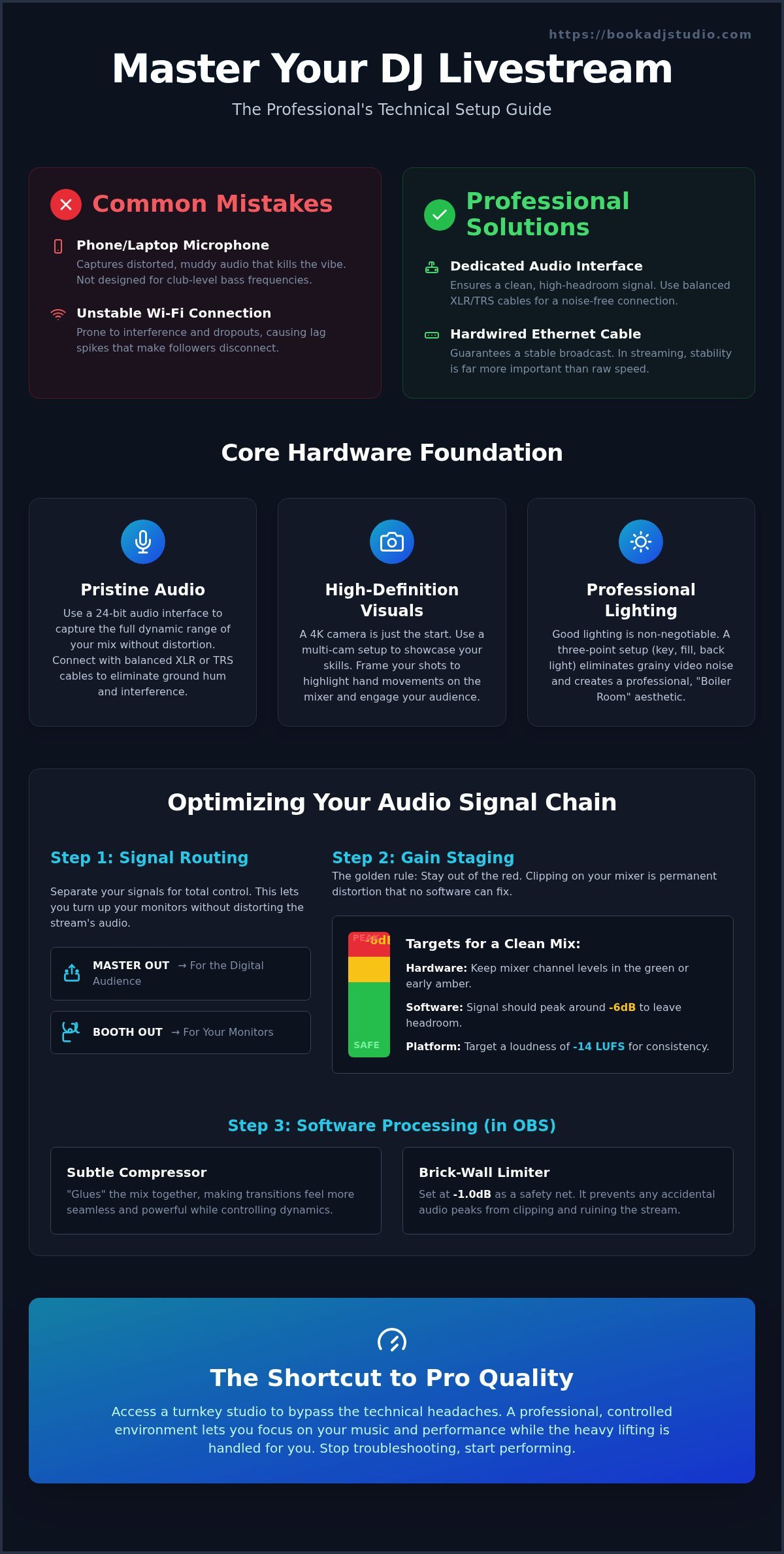
Your smartphone is a marvel of engineering, but it’s a disaster for capturing club-level frequencies. Built-in microphones are designed for the human voice, not the punishing sub-bass of a peak-time set. When you stream through a phone mic, the result is a distorted, muddy mess that kills the vibe instantly. A professional DJ livestream technical setup Timisoara requires a dedicated signal chain to translate your energy into the digital space. You need a direct path from your mixer to an audio interface, then into your encoder. This ensures every frequency reaches your fans with surgical precision. ⚡
Connectivity is the silent killer of great streams. Stop trusting Wi-Fi for your performance. Even the fastest wireless connections are prone to interference and jitter. One minor drop in signal causes lag spikes that make your followers disconnect. Always use a hardwired Ethernet connection. In the world of broadcasting, stability is far more important than raw download speed. 🌐
Audio Interface vs. Direct Input
Your laptop’s 3.5mm input isn’t built for high-fidelity music. It lacks the headroom required for professional audio, leading to immediate signal clipping. Use a dedicated audio interface to act as the bridge between your analog gear and digital software. Aim for 24-bit audio as your modern standard. This bit depth provides the dynamic range needed to capture the nuances of your mix without distortion. Stick to balanced XLR or TRS cables to keep your signal clean and free from ground hum. 🔌
Visual Presentation and Lighting
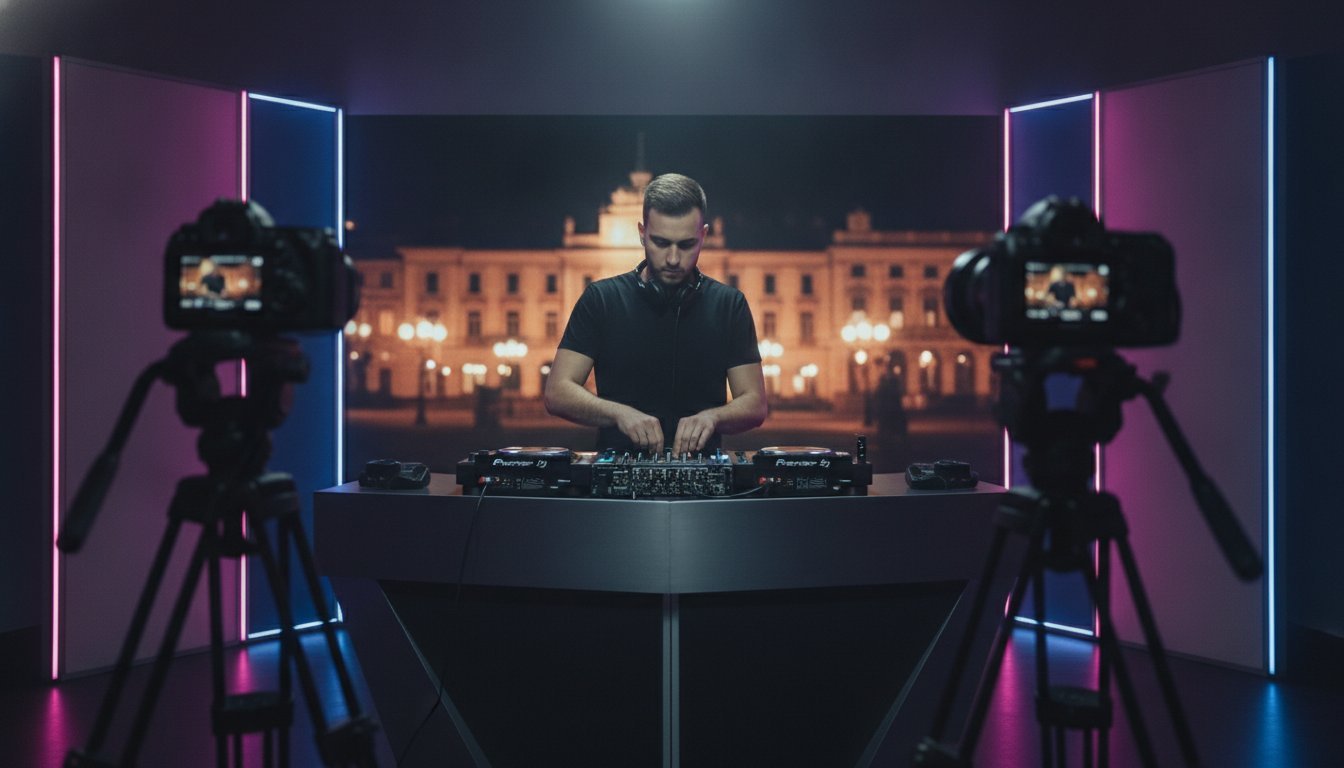
Resolution is only half the battle. Even a 4K camera looks cheap in a poorly lit room. Low light forces your camera sensor to work harder, creating visual noise that looks grainy and amateur. Use a basic three-point lighting setup to elevate your booth’s aesthetic. A strong key light defines your features, while a backlight creates that iconic Boiler Room silhouette. Frame your shot to showcase your technical hand movements on the mixer. This builds credibility and keeps your audience locked into the performance. 💡
If building this from scratch feels overwhelming, remember that you don’t have to do it alone. You can access professional-grade gear through Hourly Studio Access in a controlled environment. Focus on your track selection and let the hardware do the heavy lifting. 🚀
Optimizing Your Audio Signal for Pristine Stream Quality
Achieving a professional DJ livestream technical setup Timisoara means mastering your internal routing. Your Master output belongs to your digital audience. Your Booth output belongs to your ears. By separating these signals, you can crank your local monitors to feel the bass without distorting the broadcast signal. Use high-quality balanced cables to ensure zero electromagnetic interference. Cheap, unshielded wires act like antennas for radio noise; that’s an instant vibe killer for a pro stream. A clean signal chain is the foundation of every legendary set. 🔌
Gain Staging 101
Stay out of the red. It’s a simple rule, but it’s where most home streams fail. If your mixer is clipping, your audio interface is receiving a mangled signal that no software can fix. Keep your trim levels in the green or early orange. Match the input sensitivity on your interface so the digital levels in your software peak around -6dB. This provides the necessary headroom for the platform’s compression to work without crushing your sound profile. Precision here separates the amateurs from the artists. 📈
- Keep hardware mixer levels in the green for maximum clarity.
- Match your interface gain to the software input to avoid digital distortion.
- Target a loudness of -14 LUFS for consistent performance across platforms.
Software Audio Processing
Your raw signal is just the starting point for a broadcast-ready sound. Your DJ livestream technical setup Timisoara isn’t complete without using OBS filters or VST plugins to add a final layer of professional polish. A subtle compressor helps glue your mix together, making transitions feel seamless and powerful. Set a brick-wall limiter at -1.0dB to prevent accidental peaks from ruining the listener’s experience or triggering platform-level audio ducking. ⚡
Following livestreaming best practices ensures you stay within technical and professional standards while protecting your reputation. Don’t forget to check your sync. High-resolution video often lags behind audio due to processing time. Add a small millisecond delay in your advanced audio properties to keep your hand movements perfectly timed with the beat. If you’re tired of fighting with cables and gain levels, our Session Packages offer a shortcut to studio-grade sound without the steep learning curve. Focus on the music and let the gear do the work. 🚀
Advanced Visual Setups: Multi-Cam and 4K Performance
Visuals are the handshake of your digital performance. A single static angle is a relic of the past. To truly stand out, your DJ livestream technical setup Timisoara needs a multi-cam approach. Use a “Hero” shot as your primary angle. This front-facing view builds an immediate emotional connection with your audience. It lets them see your energy and reaction to the drop. Pair this with a “Technical” shot. A top-down camera positioned over the decks showcases your mixing proficiency and hand movements. This dual-perspective setup keeps viewers locked in. 🎥
Why 4K? It isn’t just about the pixel count. Recording or streaming in 4K gives you the freedom to perform digital zooms during your set without losing quality. You can crop into a close-up of the crossfader or the EQ knobs in real-time. This adds a cinematic feel to your broadcast. Use dynamic scene switching in OBS to rotate between these views. This prevents visual fatigue and keeps the pacing of your stream as tight as your beatmatching. ⚡
- Hero Shot: Builds human connection and showcases your stage presence.
- Technical Shot: Proves mixing skill with top-down views of the hardware.
- 4K Resolution: Allows for lossless digital zooming and high-definition content repurposing.
- Scene Switching: Maintains audience engagement by varying the perspective.
Camera Placement Strategies
Achieving the iconic “Boiler Room” aesthetic requires specific positioning. Use wide-angle lenses to capture the environment and any crowd energy behind you. This immersive view makes the viewer feel like they are in the booth with you. Always use sturdy tripods or overhead mounts. Shaky footage screams amateur, but a rock-solid frame signals professional authority. Focus on close-ups during complex transitions to prove your skills are real. 🏗️
Creating a Brand Identity
Your visuals are prime real estate for your brand. Use clean overlays to display your logo and social media handles. Don’t clutter the screen; keep the focus on the performance. Integrate track ID notifications so fans can follow your journey. This turns a simple set into a professional content piece that is ready for social media clips. For visual inspiration on how to frame your performance, check out the Book a DJ Studio Gallery. Seeing a professional booth in action helps you visualize your own breakthrough. 🚀
Software Configuration and Connectivity Requirements
Choosing the right platform is your first strategic move. Twitch offers the best community engagement, while YouTube is the king of 4K playback. Mixcloud remains the essential choice for legal security when playing licensed tracks. Once you’ve picked your stage, it’s time to master OBS Studio. This software is the engine of your DJ livestream technical setup Timisoara. Don’t let the interface intimidate you. It’s a tool designed for performance, and mastering it puts you in control of your digital destiny. 💻
Encoding is where the magic happens. If you have an NVIDIA graphics card, use NVENC encoding. This offloads the heavy lifting from your CPU, ensuring your DJ software never stutters during a heavy transition. If your GPU isn’t up to the task, x264 relies on your processor. Balance is key. You want a stream that looks sharp without sacrificing the stability of your audio performance. ⚡
The OBS Setup Checklist
Start with your canvas. Set your base resolution to match your monitor and your output resolution to what your internet can handle. Consistency is vital. Match your audio sample rate, typically 44.1kHz or 48kHz, exactly to your mixer’s output. A mismatch here causes digital artifacts that ruin the listening experience. Create dedicated scenes for your intro, your main performance, and your “thanks for watching” outro. Smooth transitions keep your audience immersed in the journey. 🛠️
Connectivity and Bitrates
Bitrate is the amount of data processed per second to determine video quality. For a crisp 1080p stream, aim for a bitrate between 6,000 and 9,000 Kbps. If you’re pushing for 4K glory, you’ll need at least 25 Mbps of consistent upload speed. Always perform a 10-minute stress test before going live. This ensures your DJ livestream technical setup Timisoara can handle the load without dropping frames or lagging. 🌐
Ready to skip the technical headache and go live with zero friction? Secure your spot with Hourly Studio Access and step into a booth where the software is already optimized for your success. Stop configuring and start playing. 🚀
Book a DJ Studio: Your Turnkey Livestream Solution in Timișoara
Building a professional-grade booth at home is a massive financial hurdle. You don’t need to own the gear to deliver a world-class performance. Step into a space equipped with club-standard players and mixers. This is your chance to master the DJ livestream technical setup Timisoara without the upfront investment in hardware. Our sound-treated environment ensures your audio is pristine, while the visual aesthetic is engineered for that high-energy “Boiler Room” vibe. 🎧
Stop wasting hours troubleshooting OBS or fighting with tangled cables. We handle the technical heavy lifting so you can focus entirely on your track selection and transitions. This is the ultimate shortcut to professional content. By booking a session, you aren’t just renting space; you’re joining the Timișoara DJ Community. It’s a platform designed for your growth and creative fulfillment. 🚀
Professional Add-on Services
Elevate your digital presence with our 4K video recording capabilities. This isn’t just about the live moment; it’s about creating high-definition assets for your YouTube channel and social media. Our turnkey livestreaming setup is an add-on service that makes broadcasting to platforms like YouTube as easy as pressing “play.” Learn more about our specialized Livestream DJ Timișoara services to see how we translate your talent into a global broadcast. 🎥
Ready to Go Live?
Your breakthrough is closer than you think. Booking your first session takes only minutes through our flexible hourly system. To prepare, simply export your latest tracks to a high-speed USB and arrive ready to perform. We’ve optimized every detail of the DJ livestream technical setup Timisoara to ensure your session is flawless from the first beat. Don’t let technical barriers hold back your career any longer. Book your livestream session now and let the world hear your sound. ⚡
Launch Your Digital Breakthrough
You have the vision and the talent to command a global audience. Now you have the technical roadmap to make it happen. Mastering your signal chain and optimizing your software are the final hurdles between you and a professional digital presence. By prioritizing high-fidelity audio and 4K visuals, you transform a simple set into a cinematic experience that captures attention. Your journey to a perfect DJ livestream technical setup Timisoara doesn’t have to be a solo struggle with cables and bitrates. ⚡
We’ve built an environment where the hardware is ready and the atmosphere is electric. With top-tier players, mixers, and turnkey livestreaming support, you can focus on what you do best: playing the music that moves people. Stop letting technical complexity slow down your career growth. The stage is set and the connection is live. Ready to go live? Book your professional studio session in Timișoara today! It’s time to step into the booth and show the world what you’re made of. Your breakthrough is waiting. 🚀
Frequently Asked Questions
What is the best software for DJ livestreaming in 2026?
OBS Studio remains the industry standard for professional broadcasts. It is open-source, highly customizable, and supports the multi-cam scenes essential for a high-energy performance. You can integrate VST plugins to polish your audio and use hardware encoding to keep your stream smooth. While other platforms exist, the flexibility of OBS makes it the top choice for any professional DJ livestream technical setup Timisoara.
Do I need a special license to livestream DJ sets in Romania?
You should check the latest regulations with local copyright bodies like UPFR or UCMR-ADA. Generally, platforms like Mixcloud pay these royalties on your behalf, which is why many professionals prefer them. If you are streaming on other social media sites, the rules can be more restrictive. Always verify your specific requirements to ensure your digital brand stays protected and compliant within the Romanian market.
How much upload speed do I need for a 4K DJ stream?
You need a consistent upload speed of at least 25 Mbps to sustain a 4K broadcast without dropped frames. Standard home Wi-Fi often lacks this stability, leading to lag that frustrates your audience. This is why a dedicated studio environment is superior for high-definition content. We provide the robust bandwidth required to ensure your visuals stay crisp and your audio remains perfectly synced throughout your entire set.
Can I record my livestream session at the studio for later use?
Yes, you can record your entire performance while you are live. We offer high-quality audio recording and 4K video recording as add-on services to help you build your portfolio. This allows you to repurpose your session into short clips for social media or full-length sets for YouTube. It is a powerful way to maximize your impact and create professional content for future club bookings.
What equipment is provided in the Book a DJ Studio livestream setup?
We provide a fully equipped booth featuring club-standard players and mixers. Our professional livestreaming setup includes high-definition cameras, studio-grade lighting, and a dedicated encoder for a “plug and play” experience. You don’t need to bring anything except your music on a USB drive. We handle the complex DJ livestream technical setup Timisoara so you can step into the booth and start your performance immediately.
How can I prevent my stream from being taken down for copyright?
Streaming on Mixcloud is the most effective way to avoid takedowns because they have legal agreements with record labels. Platforms like YouTube and Twitch use automated systems that may mute or terminate your stream if they detect licensed music. To grow your following safely, consider using platforms that support DJs or focus on creating unique edits and remixes that are less likely to trigger aggressive copyright filters.
Is multi-camera streaming difficult to set up for a beginner?
Managing multiple cameras can be technically exhausting if you are doing it alone. However, our studio simplifies the process by providing a pre-configured environment. We handle the camera positioning and scene switching for you, allowing you to achieve a cinematic look without a steep learning curve. This turnkey approach lets beginners focus on their track selection while still delivering a broadcast that looks like a professional production.
Can I use my own laptop with the studio setup in Timișoara?
You are welcome to use your own laptop if you have specific software preferences or custom controller mappings. Our booth is designed for easy integration, allowing you to connect directly to our audio interface and high-speed internet. This flexibility ensures you can work within your familiar ecosystem while benefiting from the professional acoustics and visual setup of a dedicated studio. It is the perfect balance of comfort and quality.