

A promoter should hear your sound, not wrestle with messy files. Sending your mix to promoters starts with a clear rough mix and commercial reference, then a package that’s easy to open and play.
Your music should speak for itself. Careful preparation helps its energy and intention come through.
Prepare your mix, organize the files, and write a focused message. Make the first listen easy.
Key Takeaways
- Use a rough mix to communicate your track balance and a commercial reference to point toward the sound and energy you want.
- Choose a shareable format that makes listening straightforward, and keep your audio files together in a clearly named, compressed folder.
- Keep your message to a promoter brief: introduce yourself, share your mix and SoundCloud page, and mention any released tracks that add useful context.
- Shape your demo mix around its purpose and the promoter’s submission guidance, rather than relying on an arbitrary runtime.
Providing a rough mix and commercial reference track
- Build a clear rough mix. Balance the levels and placement so the promoter can hear how the set moves. Add a commercial reference track that matches the sonic profile or energy you’re aiming for. Name both files clearly, such as “ArtistName_RoughMix” and “Reference_TrackArtist_Title.” Keep the reference separate so it guides the listening without being mistaken for your own work.
- Export cleanly. Bounce the mix at the same sample rate as your session; 48 kHz is one example. Avoid clipping above digital zero. For a mix prepared for mastering, a recommended highest peak level is between -5 dB and -3 dB. Don’t chase loudness at the expense of clear transients, vocals, or transitions.
- Keep tracks aligned and complete. If you’re sending individual audio tracks, export every track from the same start point so they stay synchronized when imported. Check that every part needed for the mix is included, and use logical names such as “01_Kick” and “02_Bass.” Start the export a second or two before the music, then leave a few seconds after the ending or fade.
- Tailor the submission to the event. For a local promoter, show how your sound fits the local night and its audience. For a festival or club, focus the rough mix and reference on the genre and energy of that specific event. Find relevant promoters through club websites, local events, and genuine Instagram interactions, rather than sending the same package to every contact.
- Time your approach and avoid easy misses. Send a concise, finished package when the event or night aligns with your sound; there’s no universal best day. Follow up with a brief chaser email a couple of weeks later. Avoid clipped audio, missing tracks, unclear filenames, unrelated references, and mass messages that ignore the promoter’s genre.
Should DJs send a private streaming link or an audio file to promoters?
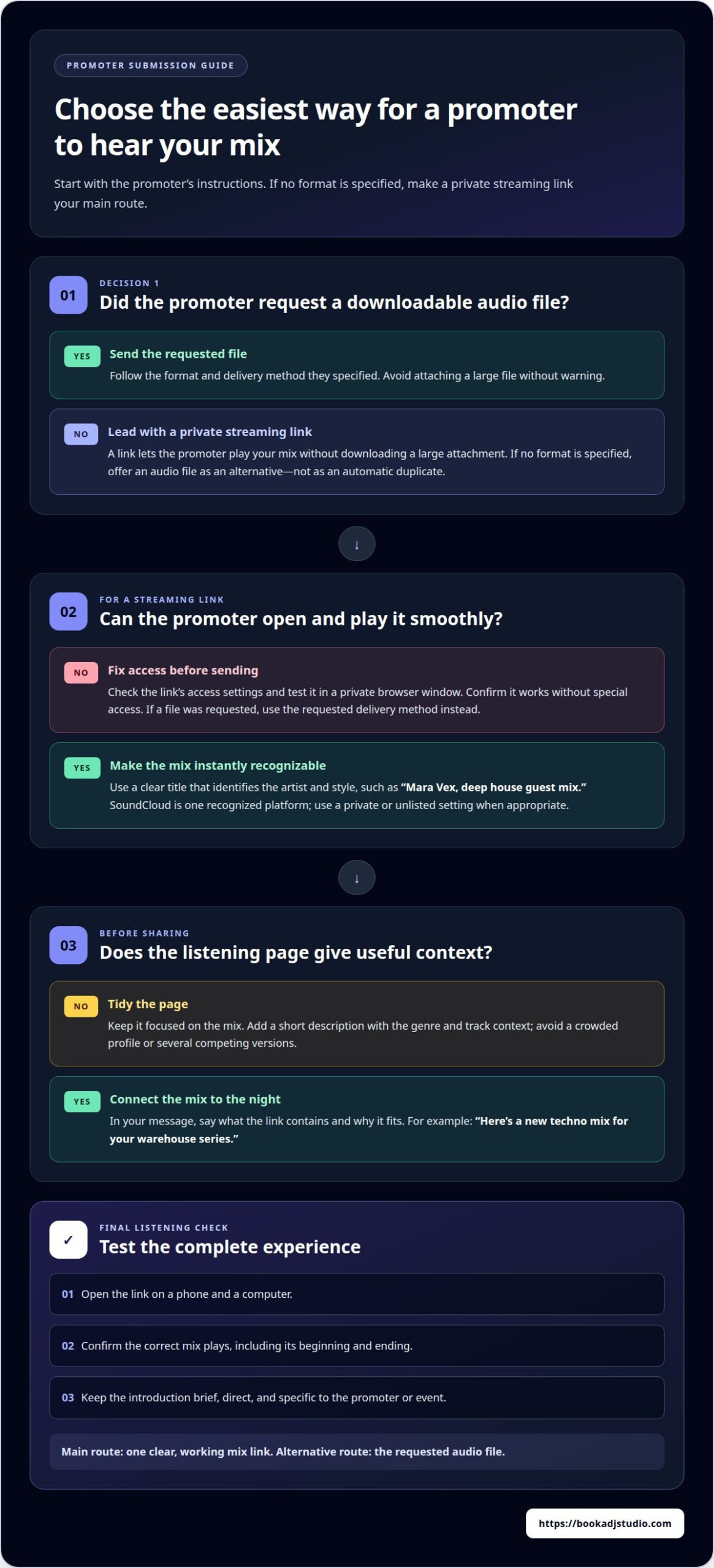
- Lead with a private streaming link. It lets a promoter play your mix without downloading a large attachment. Set access so the link opens smoothly, then test it in a private browser window. Use a clear title, such as “Mara Vex, deep house guest mix,” so the artist and style are immediately recognizable.
- Make the link easy to trust. Choose a recognized platform such as SoundCloud, and use a private or unlisted setting when appropriate. Keep the page focused on the mix, not a crowded profile. Add a short description with the genre and track context, then confirm the link works without requiring special access.
- Send an audio file when requested. A promoter may prefer a downloadable file for review or offline listening. Follow the requested format and delivery method instead of attaching a large file without warning. If no format is specified, offer the file as an alternative to your stream link, rather than sending duplicate versions automatically.
- Pair access with a direct introduction. In your email, say what the link contains and why it suits that night. For example: “Here’s a new techno mix for your warehouse series.” You can also ask for feedback, keeping the request brief and making it easy to respond. Avoid unexplained attachments, broken links, and several competing versions.
- Check the listening experience before sending. Open the link on a phone and a computer, confirm the correct mix plays, and check its beginning and ending. If you want a polished capture of your set, an audio recording session can help you prepare a shareable file. Keep the private link as the main route, unless the promoter asks for another format.
What should a DJ include in an email or message to a promoter?
- Make the subject line specific. Name yourself and the relevant night or genre, so your message has context before it’s opened. For example, “Mara Vex, house mix for Saturday’s club night” gives the promoter more to work with than “DJ submission.” Keep the wording direct and avoid hype that your mix can’t support.
- Introduce yourself in a sentence. Share your DJ name, sound, and location or scene when it helps explain your fit. For example: “I’m Mara Vex, a Timișoara-based DJ playing deep and progressive house.” A clear introduction gives the promoter useful context without turning your first message into a long biography.
- Share one easy-to-play mix link. Include your SoundCloud page or a direct link to the mix, and label it clearly. Tell the promoter what they’re about to hear, such as “a deep-house set built around melodic transitions.” Avoid sending several unrelated mixes; choose the one that best represents your sound for that event.
- Add relevant release information. Mention released tracks if they strengthen your pitch, and include a link to the music. For example, name one recent single that reflects the style of the mix. Keep this detail brief. The purpose is to show the promoter more of your work, not to bury the set beneath a discography.
- Show why you chose that promoter. Refer to a specific club night, event, or sound you genuinely connect with. A sentence about attending a local event or appreciating a particular lineup makes the message personal. Close with a simple offer to share more or answer questions, then sign off with your DJ name and SoundCloud page.
Before sending, check that your mix includes every needed audio track. Build relationships beyond the inbox by attending events and saying hello to promoters in person.
How long should a demo mix be when pitching to promoters?
- Follow the promoter’s stated format. Use the requested duration when a club, festival, or event shares submission guidance. That instruction takes priority over a generic demo length. If the promoter gives no limit, choose a runtime that lets your strongest transitions and style come through without stretching the set with tracks that don’t support your pitch.
- Match the mix to the booking. A club night focused on deep house calls for a different showcase than a high-energy festival slot. Build your selection around the event’s genre and audience. For example, a techno pitch should reveal how you shape momentum, not wander into unrelated styles simply to make the recording longer.
- Start with your strongest opening. Give the listener a clear sense of your sound early. Choose an opening track that establishes the mood, then sequence into a few deliberate transitions. A promoter reviewing your demo should be able to recognize your direction before the mix reaches its midpoint.
- Let the sequence decide the endpoint. End after a satisfying musical arc, not during an awkward transition. If a shorter cut captures your approach, send that as the main demo and keep a longer recording available if requested. Label each version by its purpose, such as “Club booking demo” or “Extended set.”
- Edit with care. Don’t remove sections so aggressively that the transitions sound abrupt or the energy jumps without reason. Listen from the first beat to the final fade. Check that the mix demonstrates consistent selection, phrasing, and control, rather than relying on runtime alone to make the case.
- Capture the set cleanly. A focused recording makes it easier to review your pacing and prepare a finished demo. Use a professional DJ recording setup to capture a set you can share with promoters.
Book a DJ Studio
Book a DJ Studio gives you space to prepare and capture a polished set before sharing it with promoters. Use Hourly Studio Access or Session Packages to practice your flow, tighten transitions, and shape a performance that reflects your sound. Audio Recording creates a shareable capture of your set, while 4K Video Recording adds a visual option for your artist profile or promotional content. Turn to the studio when you’re ready to move from a home practice session to a focused recording in a professional DJ environment. Bring your track selection and a clear idea of the energy you want your demo to carry. Ready to prepare your next set? Contact Book a DJ Studio.
Make Your Next Set Count
Before sending your demo, choose tracks that show the sound and direction you want promoters to remember. Listen through the mix and check that the transitions feel natural. Then write a clear, personal message to accompany the link. Treat each submission as a chance to present your music thoughtfully and make it easy for promoters to understand what you’re sharing.
Keep developing your set, listen back with fresh ears, and use what you hear to guide your next recording. When you’re ready to prepare your next performance, contact Book a DJ Studio. Review your set, make any needed changes, and prepare the mix and message before sending them to promoters.
Frequently Asked Questions
How do DJs send a mix to promoters professionally?
Send a brief, personalized message with one working mix link and a clear introduction. Before sending, open the link in a private browser window and confirm it plays without sign-in or access requests. Use a filename and page title that identify your DJ name and set style. When sending your mix to promoters, explain why your sound suits that specific event.
What audio file format and bitrate should a DJ mix use when sending it to promoters?
If a promoter requests a downloadable mix, send a stereo WAV rather than an MP3, unless they specify another format. WAV is uncompressed, so it doesn’t use an MP3-style bitrate setting; its audio quality depends on export settings such as sample rate and bit depth. Follow the promoter’s stated requirements, and use a private streaming link when no audio attachment is requested.