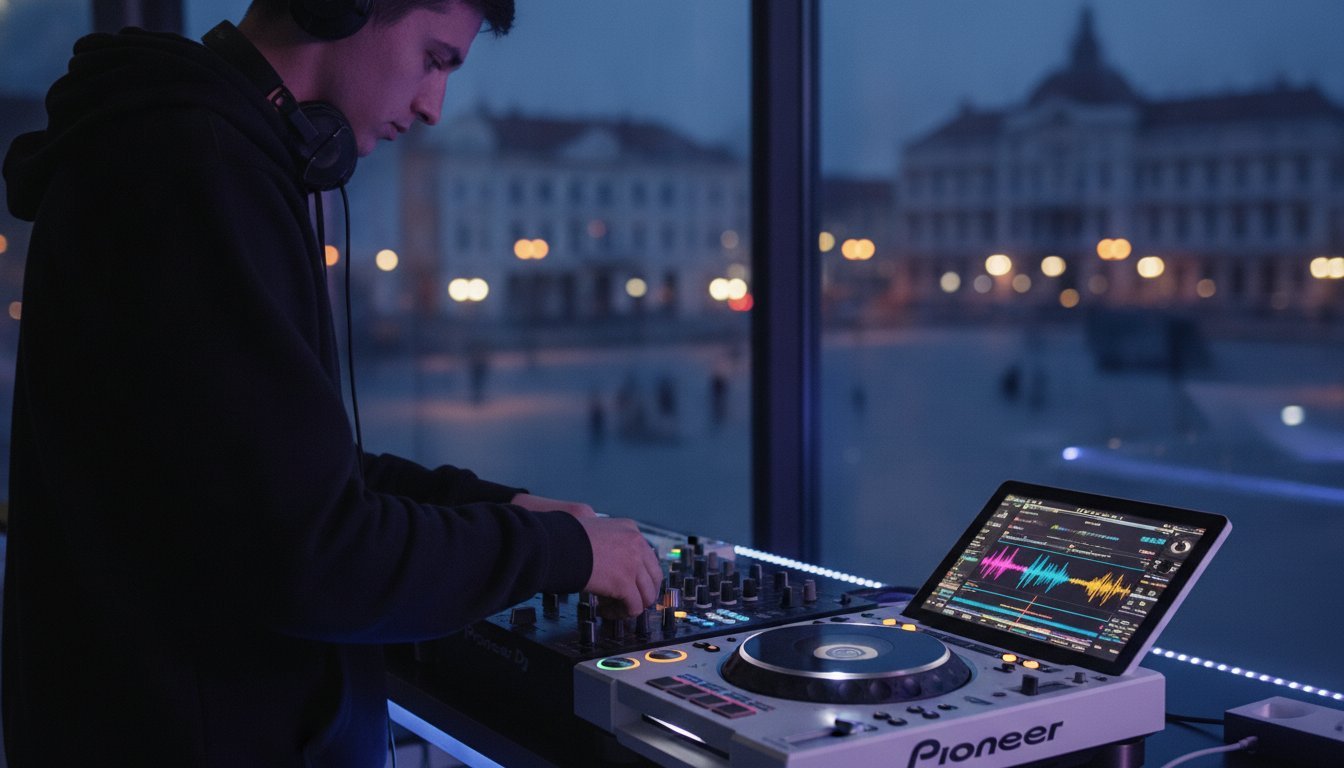
Imagine stepping into the booth under the neon glow, the crowd is pulsing, and the energy is electric, but your USB drive refuses to load. It’s the ultimate nightmare for any artist ready for their big break. Mastering the art of preparing a DJ set on CDJ-3000s is the difference between a panicked technical failure and a legendary performance that gets you rebooked. You need those stacked waveforms locked and your touch-preview ready to go the second you plug in. 🎧
We know the weight of playing on $2,549 flagship players. You deserve to feel like a professional powerhouse, not an amateur fumbling with a touch-screen while the promoter watches. This guide is your roadmap to total booth confidence. 🚀 We’ll dive into the essential Rekordbox 7.2.16 workflow, explain why sticking to firmware 3.22 is vital for your library stability, and show you how to leverage the dual MPU-driven interface for flawless transitions. You’ll learn to use the Touch Preview and Stacked Waveform features to stay three steps ahead of the mix. Let’s make sure your next gig is glitch-free and ready for the 4K cameras. ⚡
Key Takeaways
- Understand why the MPU and 9-inch touch screen make the CDJ-3000 the ultimate club standard for stability and visual feedback. 🖥️
- Master the essential Rekordbox workflow for preparing a DJ set on CDJ-3000s, ensuring your waveforms and cues are optimized for the high-res display. 💿
- Learn to use Touch Preview and Touch Cue to audition tracks instantly without affecting the master output, keeping your mix seamless. 🎧
- Eliminate “laptop dependency” by practicing on professional booth hardware to build muscle memory for button tension and layout. 🚀
- Discover how to use pro studio sessions and 4K video recording to create high-quality promo content and ensure you’re gig-ready. 📹
Why the CDJ-3000 is the New Club Standard in 2026
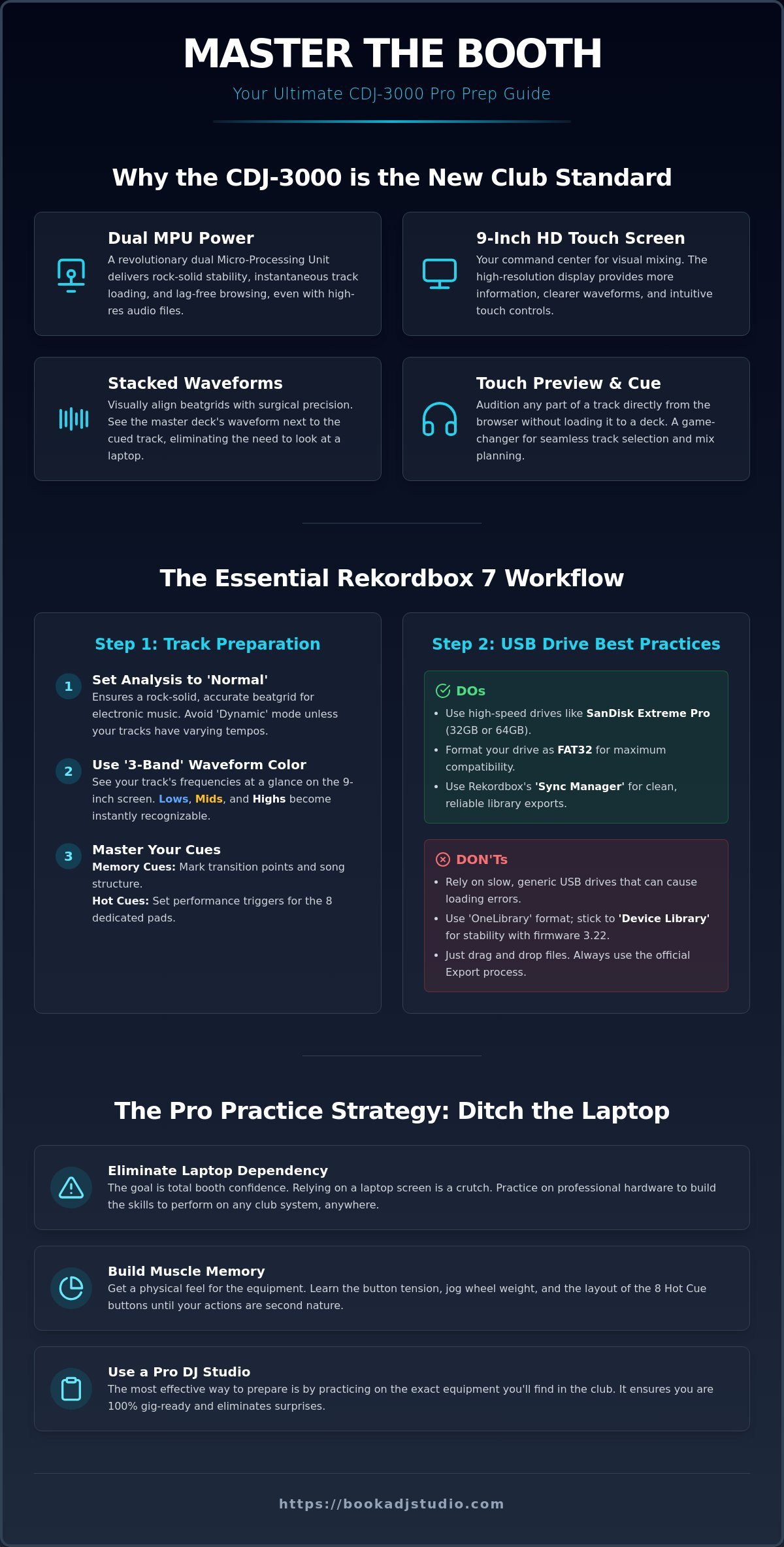
The CDJ-3000 isn’t just a minor update; it’s a high-performance computer built for the stage. Since its debut, it has redefined what we expect from the industry standard for DJ players. For serious artists in Timișoara, the shift from the 2000NXS2 to the 3000 is a move toward absolute stability. When you’re preparing a DJ set on CDJ-3000s, you’re working with hardware that finally matches the speed of your creative flow. 🎧
To see these features in action and learn how the interface handles real-time mixing, watch this helpful video:
The Power of the Internal MPU
Stability is the foundation of a flawless set. The CDJ-3000 features a revolutionary dual MPU (Micro-processing unit) system that handles the heavy lifting. This means track loading is instantaneous, even when you’re pushing heavy FLAC or AIFF files. The enhanced audio processing delivers better time-stretching and key-shifting, keeping your sound crisp even at extreme tempos. Crucially, the MPU eliminates the frustrating browser lag found in older units, making the interface feel snappy and reliable. ⚡
Visual Feedback and Performance Layout
The 9-inch high-resolution touch screen is your new command center. Stacked waveforms allow you to beatmatch visually with incredible accuracy, removing the need for a laptop screen entirely. You also get the game-changing Touch Preview feature. This allows you to listen to any part of a track directly from the browser without loading it into a deck. Accessing this level of Professional DJ Equipment in Timișoara ensures you’re ready for the club standard. 🚀
Mastering the gear is about more than just software. It’s about tactile muscle memory. The button tension, the weight of the mechanical jog wheel, and the layout of the 8 Hot Cue buttons require physical familiarity. Moving away from a laptop-based setup forces you to engage with the music through your ears and hands. This physical connection is what separates the amateurs from the pros who dominate the booth. 👊
Rekordbox Workflow: Technical Prep for the CDJ-3000
Preparing a DJ set on CDJ-3000s starts long before you reach the booth. It begins in Rekordbox 7.2.16. You need to optimize your library to feed the 3000’s powerful dual MPU. Don’t just dump files on a drive; curate your experience for maximum performance. This player is a beast, but it only performs as well as the data you give it. 💻
Export Mode Essentials
Open your Rekordbox settings and head to the Analysis tab. Ensure your ‘Track Analysis Mode’ is set to ‘Normal’. Avoid ‘Dynamic’ analysis for electronic music; it’s designed for tracks with shifting tempos like live funk or disco. For a modern club set, ‘Normal’ ensures your beatgrid is rock solid. Next, switch your waveform color to ‘3-Band’. This allows you to see the frequency breakdown visually. Lows are blue, mids are amber, and highs are white. This is a game changer for visual mixing on the 9-inch screen. 🌈
Leverage the physical layout of the 3000. Use Memory Cues to mark your transition points and structure. Use Hot Cues for performance triggers. With 8 dedicated buttons now positioned directly under the screen, your Hot Cue game should be more creative than ever. You can find more about how these software tweaks translate to the hardware in this in-depth technical review. It breaks down why the MPU makes these visual features possible without any lag.
USB Drive Formatting and Speed
Your hardware choice matters. The SanDisk Extreme Pro is the industry favorite for a reason. It offers the high read speeds required for the CDJ-3000’s Touch Preview feature to work instantly. Stick to 32GB or 64GB drives. While the 3000 can handle larger capacities, smaller drives load your library faster and reduce the risk of database corruption. ⚡
- Format: Use FAT32 for universal compatibility across all Pioneer gear.
- Library Format: Ensure you are using the ‘Device Library’ format. Avoid ‘OneLibrary’ for now to stay compatible with the stable v3.22 firmware.
- Exporting: The ‘Sync Manager’ is your friend for mirroring playlists, while ‘Export’ refers to the manual process of dragging tracks directly to the device.
Don’t forget to configure ‘My Settings’ in Rekordbox. You can pre-set your Jog Display, Master Tempo, and Auto-Cue preferences. When you plug your drive into the 3000, it will ask to load your settings. You’ll look like a seasoned pro the moment you step into the booth. To dial in these settings before your next big show, consider booking a session to test your USB on the real deal. 🚀
Mastering the Interface: Touch Screen and Navigation
The 9-inch high-resolution screen is your new cockpit. It’s not just a display; it’s a tactile interface that changes how you interact with your music. When you’re preparing a DJ set on CDJ-3000s, mastering these touch gestures is what gives you that effortless flow in the booth. You aren’t just scrolling; you’re performing. 🚀
Two features define this new era: Touch Preview and Touch Cue. Touch Preview allows you to tap the waveform in the browse menu to hear the track in your headphones without loading it to a deck. This is a massive time-saver during a high-energy set. Touch Cue takes it further. You can tap the waveform of the track currently playing out loud to hear a later part in your headphones. It’s like having a crystal ball for your transitions. This level of control is why many call it the new flagship media player for the modern age. 🎧
Advanced Browsing Techniques
Finding the right track shouldn’t be a struggle. Use the on-screen QWERTY keyboard to search your library in seconds. The ‘Master Player’ filter is another pro tool. It automatically suggests tracks that match the Key and BPM of the deck currently playing. If you find a track you like but aren’t ready for it yet, hit the ‘Tag List’ button. This creates a temporary digital crate you can pull from later in your set. This keeps your momentum high without losing your creative train of thought. ⚡
Performance Controls and Looping
The physical layout has evolved for the better. You now have a dedicated bank of 8 Hot Cue buttons positioned directly under the screen. This linear layout is far more intuitive than the older vertical styles. It encourages you to play the CDJ like an instrument. For looping, stick to the dedicated 4-beat and 8-beat buttons. They offer a more reliable, tactile click than the rotary encoder when you’re in the heat of a mix. 👊
Mastering these features takes time and physical practice. You can’t learn button tension or screen latency from a video. If you want to Master Your Mix in Timișoara, you need hands-on time with the club-standard setup. Get comfortable with the ‘Shortcuts’ button to toggle between your Browse and Tag lists instantly. Every second you save on navigation is a second you can spend connecting with the crowd. 🕺
The Pro Practice Strategy: Using a DJ Studio to Prep
Bedroom controllers are perfect for learning the basics, but they often create a dangerous ‘laptop dependency.’ When you’re constantly staring at vertical waveforms on a computer screen, you stop listening with your ears. Preparing a DJ set on CDJ-3000s requires a different mental state. You need to look ahead at the decks, not up at a screen. Stepping into a professional booth forces you to engage with the hardware and trust your preparation. 🎧
Bridging the Gap from Home to Club
The ‘Big Gear’ feel is real. The height of the decks, the weight of the mechanical jog wheels, and the specific tension of the Play/Cue buttons are impossible to replicate on a plastic controller. In a studio environment, you get to pair those 3000s with a flagship mixer like the DJM-V10 or DJM-900NXS2. This is your chance to master the four-band EQ or the dedicated filter knobs before the club lights go up. ⚡
Simulating the club environment also means dealing with professional monitoring. Using high-output speakers like the Pioneer XPRS series at performance volumes changes how you hear your mix. It highlights EQ clashes and volume inconsistencies that you might miss on small home monitors. This zero-distraction zone is where you build the confidence to play anywhere. Preparing a DJ set on CDJ-3000s in this setting ensures your muscle memory is locked in for the main stage. 🚀
Recording and Reviewing Your Set
Recording your practice session is the fastest way to kill bad habits. Use the studio’s 4K video recording to analyze your stage presence. Are you looking at the decks too much? Is your body language matching the energy of the track? Reviewing the audio helps you identify phrasing errors and ensures your transitions are tight. For a DJ in Timișoara, a high-quality recorded set isn’t just practice; it’s a professional business card that proves you’re ready for the booth. 📹
Don’t leave your performance to chance. If you want to ensure your USB is gig-ready and your skills are sharp, book your hourly studio access and start practicing on the industry standard today. 👊
Book Your CDJ-3000 Session at Book a DJ Studio
Your journey from the bedroom to the main stage deserves the best environment possible. Preparing a DJ set on CDJ-3000s isn’t just about the files on your USB; it’s about the atmosphere where you hone your craft. At Book a DJ Studio in Timișoara, we provide the exact flagship setups found in the world’s most iconic clubs. You’ll have access to Pioneer CDJ-3000 players paired with the DJM-V10 or DJM-900NXS2 mixers, ensuring you’re ready for any booth on the planet. 🌍
We offer more than just a place to play. Our studio is a content powerhouse. Use our 4K video recording add-on to capture your performance for social media or promoters. If you want to engage your community in real-time, our live streaming setup is ready to broadcast your sound with professional clarity. This is where your preparation meets professional production, turning a standard practice session into a career-defining promo set. 📹
Ready to Level Up?
Don’t just take our word for it. Check out our Gallery to see the pro booth and lighting in action. Our studio is the preferred choice for both touring professionals passing through Timișoara and local rising talent looking to sharpen their skills. We’ve built an optimized environment that removes the distractions of home practice, allowing you to focus entirely on your artistic growth. 🚀
Booking your first session is simple. Choose between hourly studio access or one of our intensive session packages for long-term growth. When you arrive, just bring your Rekordbox-ready USB and your headphones. We handle the rest, providing a plug-and-play experience that mirrors the world’s best club booths. 🎧
Conversion and Next Steps
We believe in supporting the local scene. Ask about our multi-session packages designed for artists who are serious about preparing a DJ set on CDJ-3000s for an upcoming tour or residency. If you have custom recording needs or want to host a specialized livestream, reach out for custom details. The stage is set and the decks are waiting for your signature sound. 👊
Book your CDJ-3000 session now and take the first step toward your next breakthrough performance. 🕺
Own the Booth: Your Breakthrough Starts Now
True performance is built on the work you do before the house lights dim. Mastering the 3-band waveforms and high-speed navigation of the 3000s gives you the creative freedom to focus entirely on the dancefloor. When you’re preparing a DJ set on CDJ-3000s, you aren’t just making a playlist; you’re designing a high-performance experience. You’ve mastered the software workflow and the interface secrets. Now it’s time to lock that muscle memory into your hands. 🎧
Don’t leave your reputation to chance. Our centrally located Timișoara studio puts club-standard Pioneer CDJ-3000 units at your fingertips. Capture your progress with high-quality 4K video recording and walk into your next gig with absolute technical certainty. The bridge between your bedroom practice and club success is right here. 🚀
Crush your next gig; Book your CDJ-3000 practice session at Book a DJ Studio today!
The stage is waiting. Your sound is ready. Go out there and dominate the night. 👊
Frequently Asked Questions
Can I use a USB formatted on a Mac for CDJ-3000s?
Yes, you can use HFS+ (Mac OS Extended) for your drives, but FAT32 remains the global club standard for universal compatibility. If you format as HFS+, only Mac-based systems and Pioneer hardware will read it. Stick to FAT32 to ensure your drive works on every player from an old 2000NXS to the latest 3000. 💿
Do I need to analyze my tracks in Rekordbox specifically for the 3000?
You absolutely should analyze your tracks in Rekordbox 7.2.16 to unlock the full potential of the hardware. Preparing a DJ set on CDJ-3000s requires generating the 3-band waveform data and Touch Preview metadata. Without this specific analysis, the players will fall back to older waveform styles, and you’ll miss out on the frequency-based visual feedback. 📊
What is the difference between the CDJ-2000NXS2 and the CDJ-3000?
The CDJ-3000 replaces the physical disc drive with a powerful MPU and a massive 9-inch touch screen. You get 8 Hot Cues in a linear layout, stacked waveforms for visual beatmatching, and the game-changing Touch Preview. It’s a faster, more stable computer designed for the booth, whereas the 2000NXS2 relies on older processing architecture. ⚡
Can I play tracks directly from my laptop on the CDJ-3000s?
Yes, you can connect your laptop via USB-HID mode or use ‘Link Export’ with an Ethernet cable. However, pro DJs favor the ‘Studio-to-Stage’ mindset by using stand-alone USB drives. This eliminates laptop crashes and keeps your booth setup clean. It’s the best way to ensure your performance remains focused on the crowd. 💻
What happens if my USB drive isn’t high-speed?
Using a slow USB drive causes frustrating lag when browsing and can break the Touch Preview feature. The CDJ-3000’s MPU expects high-speed data transfer to render waveforms instantly. If your drive is slow, you might experience ‘freezing’ screens or even audio dropouts during heavy looping. Always use high-performance drives like the SanDisk Extreme Pro. 🚀
Does Book a DJ Studio provide headphones or do I need my own?
You need to bring your own headphones to your session. We provide the flagship players and mixers, but your headphones are a personal tool for hygiene and sound familiarity. Using your own pair ensures you know exactly how your EQ adjustments will translate to the club’s main system. 🎧
How do I record my set at the Timișoara studio?
Our Timișoara studio makes it easy to capture your performance. You can record high-quality audio directly during your session. For those looking to build their brand, we offer 4K video recording as a dedicated add-on. This allows you to walk away with professional-grade content ready for YouTube or social media. 📹
Is the CDJ-3000 compatible with older Rekordbox versions?
The CDJ-3000 is backwards compatible, but using older software versions limits your features. To get the most out of preparing a DJ set on CDJ-3000s, use Rekordbox 6 or 7. These versions support the high-resolution waveforms and metadata required for the 3000’s advanced display. Always check that your firmware is at the stable v3.22 for the best experience. 🛠️