

What if every cue and loop in your set had a clear purpose? A mistimed trigger or an awkward repeat can break the flow, even when the tracks fit. Learning how to use hot cues and loops effectively means preparing your moves, then trusting your ears when it’s time to mix.
Build a cue layout that feels natural, choose loops that support the music, and practise transitions until they sound intentional. This guide gives you a repeatable way to prepare, test, and refine your moves before your next set.
Key Takeaways
- Give each hot cue a clear musical purpose, and keep its role consistent so you can act without second-guessing.
- Choose loop lengths by listening to the phrase, then check that the loop repeats cleanly and exits without disrupting the groove.
- Practise the entry, loop control, and exit as separate steps, changing one variable at a time.
- Test your timing in Timișoara at Book a DJ Studio, with 2 Pioneer CDJ-3000X players and 1 Pioneer DJM-V10 mixer.
What Hot Cues and Loops Do in a DJ Set
Use hot cues to jump to intentional entry points. Use loops to hold a section in place and create musical space while you prepare what comes next. A hot cue is a saved point in a track that lets you return to a chosen moment. A loop is a passage that repeats until you change or exit it. Together, they give you more options in a mix, but each move should serve the music.
Neither tool does the listening for you. You still need to hear the beat, recognise the phrase, track the energy, and make room for the incoming track. A cue can land on the right musical moment yet feel abrupt if you trigger it at the wrong time. A loop can buy you time, but it won’t fix a transition that clashes with the next track.
For a quick visual walkthrough, watch this video on building a practical hot-cue system:
When a hot cue helps you act quickly
A hot cue gives you a fast route back to a moment you’ve chosen, such as the start of an intro, a vocal entrance, a breakdown, or another useful section. That can help when you want to line up a specific part of a track without searching through the waveform during a mix. Think of each cue as a clear instruction to your future self.
Give every cue a musical job. If you can’t explain why you’d trigger it, it may not need a pad. Also, don’t assume every player or software platform handles cue slots and controls in exactly the same way. Learn the setup you’re using and practise its behaviour before relying on it live.
When a loop creates useful musical space
A loop can keep a drum groove or another suitable passage moving while you prepare a transition. For example, extending a steady section may give you time to bring in the next track and shape the blend. Repetition draws attention, though. If the loop cuts through a vocal line or interrupts harmonic movement, it can sound distracting rather than supportive.
Listen across the repeats. Does the loop still feel like part of the track? Does it preserve the phrase’s momentum, and can you exit without jolting the mix? If not, choose a different passage or let the track progress naturally. That’s the practical test for how to use hot cues and loops effectively: let cues take you to a moment and loops hold musical space, while your ears guide the timing.
How to Place and Organize Hot Cues That Make Sense
A reliable cue layout starts with your ears, not an empty pad grid. Give each marker a clear purpose, then test it in playback so it works as a musical shortcut, not just a visual bookmark. Use the same preparation sequence for each track: listen, decide, set, replay, and adjust.
- Listen: Play through the track and notice where its phrases, vocals, and energy changes actually begin.
- Choose a purpose: Decide whether the cue marks an entry, a feature moment, or a transition point.
- Set the cue: Place it on the moment you intend to trigger, checking the audible beat as well as the waveform.
- Replay: Jump to the cue several times and listen to what happens immediately after it.
- Adjust: Move the point if it lands before a pickup, clips a vocal, or misses the phrase you meant to catch.
Choose cue points by musical function
Keep your cue vocabulary compact across your library. For example, use one role for a track entry, one for a defining feature, and one for a transition or exit point. Where possible, mark a clear phrase beginning, but listen for pickups or vocals that start before the main beat. Consistent roles reduce decisions during a set and make your layout easier to recall.
Don’t assign every slot a new meaning just because it’s available. A cue should answer a useful question: “Where can I bring this track in?” or “Where does this feature begin?” If you can’t name its job, skip it. A small layout you understand beats a crowded one you have to decode mid-mix.
Test cue timing and keep the layout readable
Trigger each cue repeatedly over the same backing track. Listen for whether the entrance locks to the beat and lands where the phrase makes sense. If it feels off, separate the diagnosis: check the saved point first, then check when you’re triggering it. Waveform peaks can help you locate transients, but they don’t tell you whether a vocal pickup or phrase boundary sounds right.
Test each cue from its trigger point before relying on it live. If your software and workflow support cue colours or labels, use them consistently so roles are easy to scan. Don’t build a colour system you can’t see or use on your setup. After a practice run, listen back and refine only the cues that caused hesitation or an awkward entrance. This completes the loop from preparation to performance and back again.
To hear how your cue layout holds up on booth equipment, explore DJ studio practice at Book A DJ Studio in Timișoara.
How to Choose Loop Lengths and Exit Them Musically
The right loop length gives you enough time to shape a transition without making the track feel stuck. Short loops offer tighter rhythmic control, while longer loops preserve more of the original passage’s character and movement. Neither is automatically better. Choose by listening to what repeats, what changes around it, and where you want the track to go next.
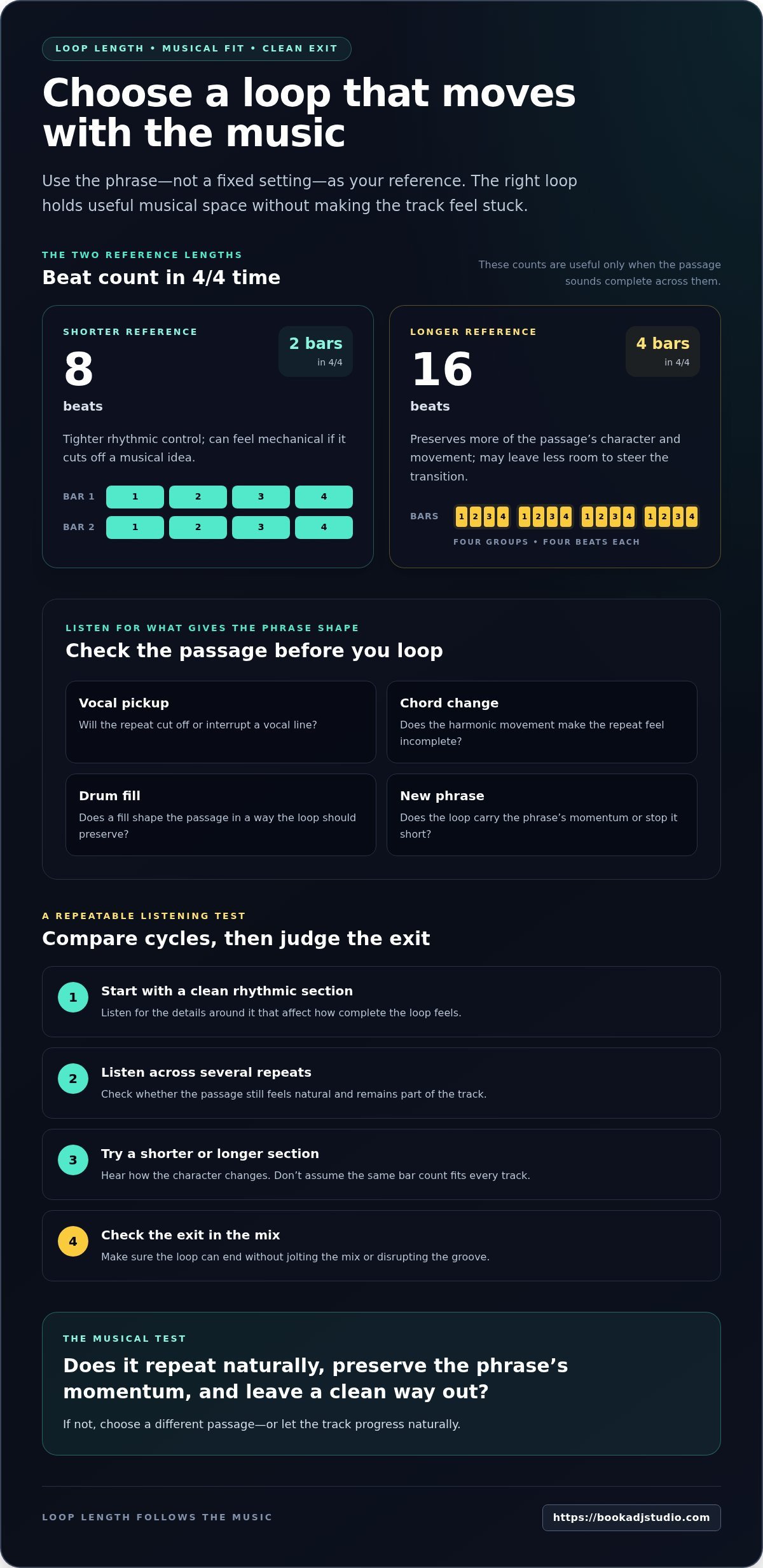
Use the phrase as your reference point, not a fixed loop setting. An 8-beat loop covers two bars in 4/4 time, while a 16-beat loop covers four, but those counts are only useful if the passage sounds complete across them. Match the loop length to the musical phrase you’re repeating.
Match the loop to the passage
Start with a clean rhythmic section, then listen for the details that give it shape: a vocal pickup, a chord change, a drum fill, or the start of a new phrase. A very short loop can isolate a groove for precise control, but it may feel mechanical if it cuts off a musical idea. A longer loop can retain more context, though it may leave less room to steer the transition.
Compare loop options by listening across several cycles. Does the passage still sound natural on each repeat? Does a new vocal or chord arrive in a way that makes the loop feel incomplete? Try a shorter or longer section and hear how the character changes. Don’t assume a particular bar count will fit every track, even when the beatgrid looks tidy.
Plan the loop exit before activating it
Before you engage the loop, decide what should follow it. You might return to the next phrase in the same track, move into a prepared cue, or use the loop to create a steady bed while the incoming track takes over. Knowing your destination helps you choose a loop that can lead there, rather than leaving you scrambling when the repetition starts to feel stale.
Practise disengaging the loop and listen for the track’s clean return. An abrupt exit can land in the middle of a phrase, disturb the next musical idea, or expose an awkward transition. If it does, adjust where you exit or choose a loop that gives you a clearer route back into the arrangement. Test the loop and the exit on their own before adding extra effects. Keep the performance simple until both moves feel controlled.
That listening-first approach is central to how to use hot cues and loops effectively. Treat each loop as a temporary arrangement choice: hear what it adds, know where it leads, and release it when the music is ready to move forward.
A Repeatable Practice Routine for Cue-and-Loop Transitions
Turn cue and loop work into a short rehearsal you can repeat, not a full-set guessing game. Prepare two tracks, focus on one planned entry, and build the transition in stages. This helps you identify whether a problem comes from cue placement, timing, or the loop exit instead of changing everything at once.
Rehearse the transition in small passes
Start with the basic handover. Choose one entry cue on the incoming track, then practise bringing it in as the outgoing track approaches its planned transition. Listen for phrase alignment and whether the new track arrives with purpose. Repeat the same move until the timing feels dependable.
Next, add a loop to the outgoing track only after the handover works without one. Decide when you’ll engage it, how long it needs to support the mix, and where you want to exit. Keep the drill focused:
- Prepare both tracks and identify the entry cue and intended transition point.
- Practise the handover without a loop, listening for beat and phrase alignment.
- Add the loop and rehearse its entry, duration, and exit.
- Repeat the transition, changing only one variable on each pass.
If the entry lands late, leave the loop alone and adjust your cue timing or trigger point. If the entrance is solid but the loop exit feels awkward, keep the cue unchanged and work on the exit. This makes each practice pass useful: you know what you’re testing and what to listen for.
Review the result and adjust deliberately
Listen back when you can. A recording can reveal things that are hard to catch while you’re mixing, such as an entrance that drifts behind the phrase, a vocal cut short by the loop, or a repeated section that stays in play after it has served its purpose. Note one issue, make one adjustment, and run the transition again.
Hands-on booth practice also helps you become familiar with the controls you’ll use during a performance. If you’re rehearsing on unfamiliar equipment, leave time to learn how cue and loop actions respond before adding extra techniques. For more context on recording a practice mix and reviewing your transitions, see this DJ studio practice and recording resource.
Build your routine from preparation to playback review, then repeat it with different tracks. To put the drill into practice in a DJ booth, book studio access online. A focused session can help you hear whether your cue timing and loop exits hold together across a complete transition.
Practise Hot Cues and Loops in a Real DJ Booth
Home practice helps you learn a transition. A real booth adds another layer: you can rehearse cue timing and loop exits on equipment designed for DJ practice and performance-style sessions. Focus on one prepared transition, repeat it, then listen back for details that are easy to miss while your hands are busy.
Book A DJ Studio in Timișoara has 2 Pioneer CDJ-3000X players and 1 Pioneer DJM-V10 mixer. Bring your own headphones and prepared music on a USB stick with a maximum capacity of 32 GB, or on an HDD. Scan your tracks in Rekordbox before exporting them to the USB stick.
Prepare your tracks before the session
Give your practice time a clear target. Choose two tracks for a specific transition drill, such as triggering an entry cue while extending a clean section with a loop. Avoid loading a large playlist without a plan. A focused selection makes it easier to repeat the same move and hear whether your timing improves.
Before you export, scan your tracks in Rekordbox and check that your planned cue points are ready. Pack your headphones and USB stick or HDD, then head to the studio with a sequence you can rehearse. Book online through the website form, selecting an available day and time.
Turn practice into a performance-ready routine
Run the transition from start to finish. Trigger the incoming track’s cue, manage the loop on the outgoing track, and listen for a clean exit into the next phrase. Repeat the same sequence before adding another cue or creative variation. This lets you focus on how your timing feels on the booth equipment, rather than juggling several new moves at once.
A wired recorder is provided, so you can review the mix and assess the transition after the session. Recorded mixes are emailed a few days after recording. On playback, listen for a cue that lands early or late, a phrase that feels interrupted, or a loop that stays active longer than it needs to. Then adjust one move and rehearse again.
That preparation, booth practice, and review cycle can turn how to use hot cues and loops effectively into a repeatable part of your set prep. If you’re ready to sharpen your transitions in Timișoara, explore the DJ studio and book online through the website form.
Make Your Next Transition Feel Intentional
Your next step is to turn preparation into instinct. Choose a transition you want to sharpen, give each cue and loop a clear purpose, then rehearse until you can focus on the feel of the mix instead of searching for the right control. That’s how to use hot cues and loops effectively: build reliable moves that leave you free to respond to the room and the music.
Keep experimenting, but make each change deliberate. If a cue lands awkwardly or a loop pulls attention away from the track, listen back, adjust one thing, and try again. Small refinements add up. Your goal isn’t to make every transition complicated. It’s to make every move sound like it belongs.
Ready to put your next practice run into motion? Explore the DJ studio and book online. Bring your ideas, trust your ears, and keep shaping a set that feels unmistakably yours.
Frequently Asked Questions
What is the difference between a hot cue and a loop?
A hot cue takes you to a saved position; a loop keeps a section repeating. They can work in sequence, but they aren’t interchangeable: one changes where playback goes, the other controls how long a passage continues. Exact controls vary by software and equipment, so practise on your setup. For example, trigger a cue to reach a vocal passage, then start a loop on the instrumental groove beneath it.
How many hot cues should I set on each track?
There’s no required number. Start with only the points that support a clear entry, feature, or transition, then add another only if it helps you make a better decision. A cue for a percussion break may be useful in one track, while another needs only an entry point. Keep roles consistent across your set, and test each point by listening instead of filling every available slot.
Should a hot cue always land exactly on the first beat of a phrase?
No. A phrase beginning can be a useful launch point, but the best cue depends on the sound you want to bring into the mix. A vocal pickup, breath, or short instrumental lead-in may begin before the obvious downbeat. Trigger the cue and listen to the entrance in context. If it feels rushed, clipped, or disconnected from the groove, move the point or change when you trigger it.
Can I use hot cues and loops creatively without making a mix sound cluttered?
Yes, if each move has a musical purpose and leaves enough room for the track to breathe. Start with one cue or loop action, then listen to how it changes the energy and focus of the blend. Hold off on extra variations until the timing and phrasing feel controlled. Restraint makes your performance choices clearer and gives a strong vocal or rhythmic moment space to land.
Do hot cues stay saved when I move a track to another device?
It depends on the DJ software, device, track preparation, and export workflow, so don’t assume every cue will carry over exactly as expected. Before performing, load your prepared tracks on the setup you plan to use and test the points you rely on. A consistent preparation routine for your chosen system helps catch missing or misplaced cues before you’re in front of an audience.
How can I practise loop exits before using them in a live set?
Choose a clean passage, start a loop, and decide in advance where you want playback to return to the arrangement. Repeat the exit and listen for whether the next musical event arrives naturally or feels cut off. Practise the exit on its own first, without effects or extra cue tricks. Once the return feels predictable, add it to a transition and check how it sits against the incoming track.