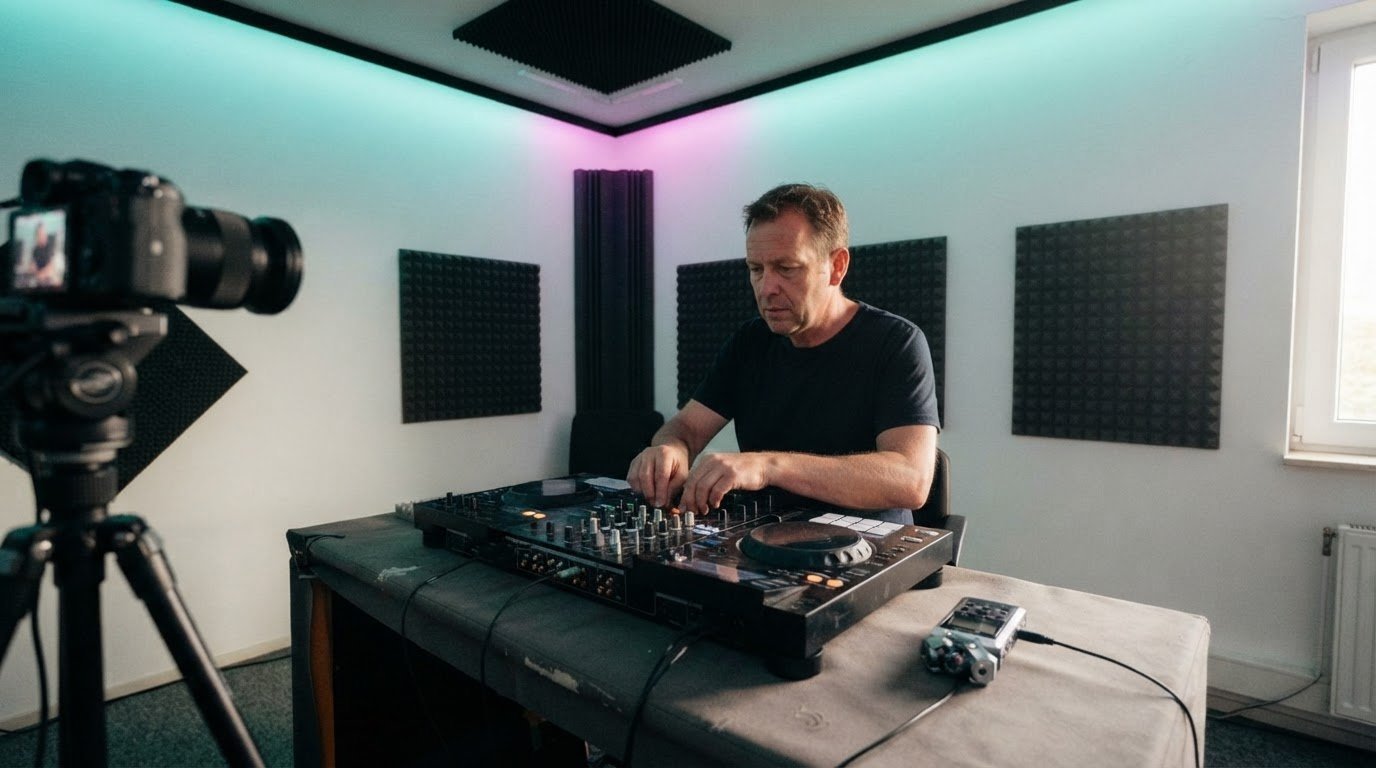

To look professional in a DJ video, keep your hands and decks clearly in frame, use restrained overlays, and capture clean audio. Choose landscape for YouTube or portrait for Instagram Reels and TikTok. Start with a steady shot that keeps your performance in focus.
Your mix brings the energy. Thoughtful visuals help viewers connect with your performance and artist identity without distracting from the music.
Plan the track details, choose a frame that suits your platform, and prepare a practical filming setup. Then bring your own style into the shot.
Key Takeaways
- Keep track details readable and restrained so viewers can follow the set without losing sight of your performance.
- Match the frame to the platform: use landscape for YouTube and portrait for Instagram Reels and TikTok.
- Build a clean filming setup with a stable mount, soft lighting and audio captured directly from your DJ setup.
- Choose camera-friendly clothing that feels like you, sits comfortably while you mix and doesn’t pull focus from the set.
Adding track information and text overlays
- Choose a camera angle that makes your technique easy to follow. A front-facing camera slightly above deck height and tilted down can show your hands and decks together. Keep your performance as the visual anchor. If you’re learning how to look professional in a DJ video, make sure every graphic supports the action rather than competing with it.
- Shape the booth before recording. Clear away distracting clutter, but keep purposeful details such as headphones or a controller in view. Avoid making the background feel either busy or completely bare. A short test clip can reveal shadows, messy edges, or areas where your setup blends into the background.
- Place track details in open space, away from your hands, mixer, and controls. A compact overlay with the artist and track title gives viewers useful context without blocking the mix. Keep its position and style consistent throughout the set, so the graphics feel like part of one deliberate visual identity.
- Show information only when it adds context. For example, display a track title during a transition, then remove it when the performance needs the focus. Avoid covering the decks with long tracklists or decorative text. A screen recording of DJ software can show waveforms when viewers need to follow a specific technique.
- Perform for the lens as you would for a room. Stay engaged with your mix, move naturally, and don’t force constant eye contact. Rehearse your opening transition before filming; familiar cues help you focus on timing rather than the camera. That ease is part of how to look professional in a DJ video.
- Keep the audio clean and edit with intention. Keep DJ levels out of the red to prevent clipping and distortion. If you record audio separately, sync it by matching a clear kick in the waveform. Trim unnecessary lead-in so viewers get to the action quickly, then review the finished clip for distracting overlays.
Choosing portrait or landscape orientation
- Choose the platform before setting your camera. Use landscape 16:9 for a full YouTube DJ set, where the wider frame can show your performance and booth together. Pick portrait 9:16 for Instagram Reels and TikTok, where vertical framing suits the viewing format. One orientation won’t serve every upload equally well.
- Frame for the format, not just the camera. In 16:9, keep your body and the important controls inside the central area, leaving room to crop shorter clips later. In 9:16, arrange the shot vertically so your face, hands, and active decks remain visible together. Check the full frame before recording.
- Choose a camera angle that makes your performance easy to follow. A front-facing view can show both you and the setup, while a side angle can highlight your hands at the mixer. Keep the decks prominent, avoid cutting off your hands, and make sure your body doesn’t block key controls.
- Plan separate compositions when one crop can’t do both jobs. Record a landscape take for YouTube, then capture a portrait version for Instagram Reels or TikTok. A square 1:1 frame or horizontal 16:9 can suit other social media and professional updates. For short vertical clips, the recommended duration is 15 to 60 seconds.
- Review the composition on the device your audience will use. Check that your face and mixer stay visible in portrait, and that the wider landscape frame doesn’t leave distracting empty space. A test take also shows whether the camera angle makes your transitions clear. For a polished set, plan your framing before your next DJ video session.
Portrait video is a practical choice for Instagram and TikTok. Plan the composition from the start: place yourself and the active parts of the setup within the upright frame, then check that the performance reads clearly. If you also need another format, assess that crop separately rather than assuming one framing will work for both. Preview the shot before recording the full take, and adjust the camera or your position if anything important slips out of view. This keeps the composition intentional instead of relying on a later crop.
Essential equipment for filming DJ videos
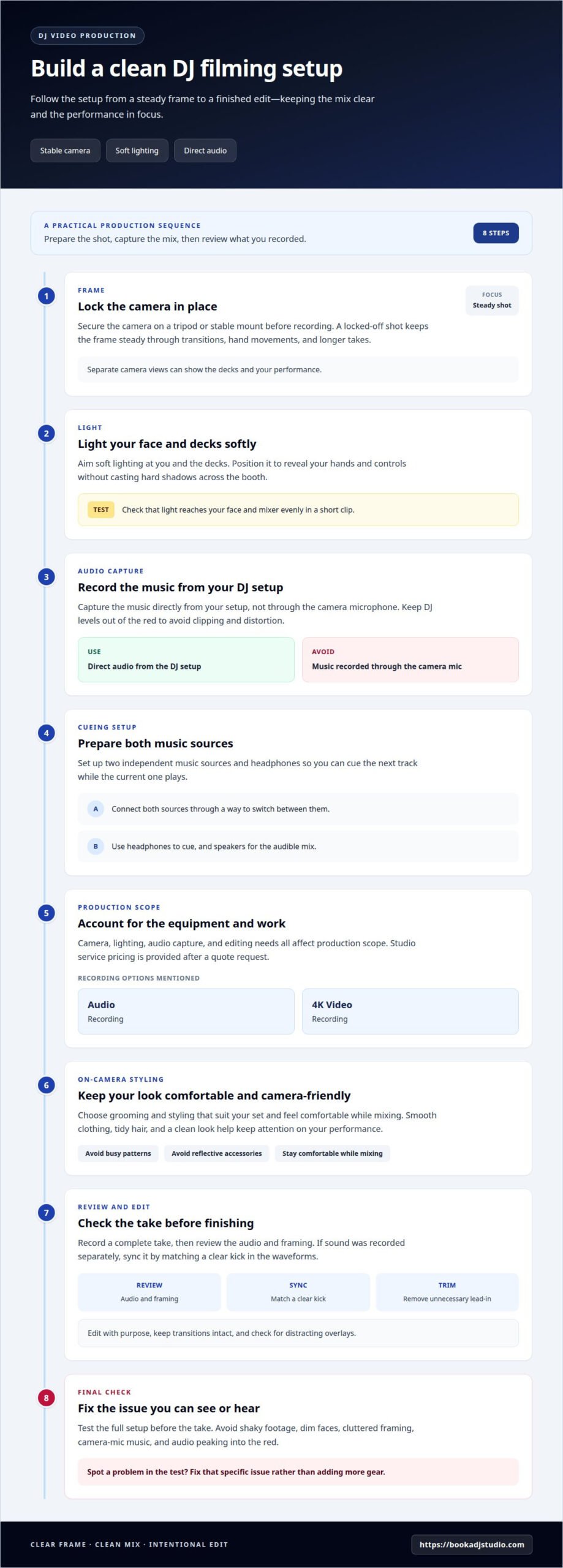
- Secure your camera on a tripod or stable mount before pressing record. A locked-off shot keeps the frame steady through transitions, hand movements, and longer takes. Separate camera views can show the decks and your performance.
- Use soft lighting aimed at you and the decks. Position it to reveal your hands and controls without casting hard shadows across the booth. A short test clip shows whether the light reaches your face and mixer evenly.
- Record the music directly from your DJ setup, not through the camera microphone. The camera mic may capture speech, but it won’t give the mix the same clarity. Keep your levels out of the red to avoid clipping and distortion.
- Set up two independent music sources and headphones so you can cue the next track while the current one plays. Connect both sources through a way to switch between them, then use speakers for the audible mix. These essentials help the performance flow smoothly on camera.
- Plan your production costs around the equipment and work involved. Camera, lighting, audio capture, and editing needs all affect the scope; studio service pricing is provided after a quote request. Audio Recording and 4K Video Recording are options for capturing a session.
- Choose grooming and styling that suit your set and keep you comfortable while mixing. Smooth clothing, tidy hair, and a clean look help keep attention on your performance, whether you style it yourself or get cleaned up at Straight 8 Barbers before recording. Avoid busy patterns or reflective accessories that compete with the decks under video lighting.
- Record a complete take, review the audio and framing, then edit with purpose. Sync separately recorded sound by matching a clear kick in the waveforms. Trim unnecessary lead-in so the clip opens on the action, and check that transitions remain intact.
- Avoid shaky footage, dim faces, cluttered framing, camera-mic music, and audio peaking into the red. Each can distract from your mixing. Test the full setup before the take, then fix the specific issue you spot rather than adding more gear.
What should a DJ wear to look professional on camera?
- Choose clothes that reflect your DJ identity and suit the set’s mood. A minimalist house mix might pair well with a plain black shirt, while a colourful, high-energy set can suit a bolder jacket. Keep the look intentional, not like a costume chosen just for the camera.
- Prioritise fit and movement at the decks. Raise your arms, reach across the mixer, and turn toward your controller before recording. A fitted overshirt that pulls at the shoulders or sleeves that catch on controls can interrupt your flow. Pick clothes that let you cue, blend, and move comfortably.
- Consider colour and pattern against the background. If you’re filming against a dark booth, a lighter top can separate your outline from the setup. Busy checks, tiny stripes, and dense prints may compete with moving hands and controls. Try the full outfit in a test frame before committing.
- Keep accessories deliberate and secure. A watch or chain can add character, but loose jewellery may swing as you perform or reflect bright highlights. Choose pieces that stay in place when you lean toward the mixer. Keep headphones accessible, since they’re part of the working setup.
- Finish with camera-ready grooming that still feels like you. Smooth creased fabric, check your collar, and make sure your hair won’t fall across your face during a transition. If you wear makeup, aim for a finish that looks natural under the recording light. A quick mirror check catches distractions before the take.
- Review your look in motion, not just in a mirror. Record a short section while cueing and mixing, then check whether clothing, jewellery, or hair distracts from your hands. Adjust only what gets in the way. Ready to bring your on-camera style into a polished set? Plan your next DJ video session.
Keep the background balanced: clear distracting clutter without leaving it overly bare. If you speak to camera, a phone’s built-in microphone may be adequate for speech, while the music should be recorded separately. In the edit, start clips with the action rather than unnecessary lead-in. Use text overlays only when they add value without distracting from the performance.
Book a DJ Studio: Hourly Studio Access
Book a DJ Studio gives you a dedicated space to practise, record a promotional set, or film your performance. Choose Hourly Studio Access for a focused session, or Session Packages if you want multiple visits to build and capture your content.
For a polished mix, add Audio Recording to capture sound directly from the DJ setup, or 4K Video Recording to film your set. These options suit DJs who want to concentrate on performance while recording, rather than assembling a filming setup themselves.
Ready to shape your next set for camera? Visit Book a DJ Studio and explore the studio booking options.
Make Your Next Set a Signature Performance
Your next DJ video can do more than document a mix. Use it to build a visual identity viewers recognise, then refine that identity with each performance. Choose one creative detail to make your own, such as a distinctive transition, a recurring opening, or a colour mood that fits your sound. Let the music lead, and connect every production choice to the set.
Learning how to look professional in a DJ video is an ongoing part of shaping your artist presence. Review each recording with fresh ears and eyes. Notice what feels authentic, then carry that strength into your next session. Progress comes from performing, reflecting, and creating again.
Ready to take your next set from idea to recording? Contact Book a DJ Studio and take the next step toward sharing your sound with confidence.
Frequently Asked Questions
Why Add Visuals to Your DJ Mixes?
Visuals help viewers connect your sound with your performance and artist identity. A camera can show how you build a transition, work the decks, or shape a set’s mood. For example, a close view of a live blend can make a technique easier to follow. Keep the visuals aligned with the music, so the video feels like an extension of your set.
What camera and audio equipment do DJs need for video shoots?
Start with a camera, a stable mount, soft lighting, and a clean audio feed from your DJ setup. A phone can capture video and speech, while a separate recording captures the music more clearly. Add another camera if you want both a performance view and a close-up of your hands. Before filming, record a short test and review picture and sound together.