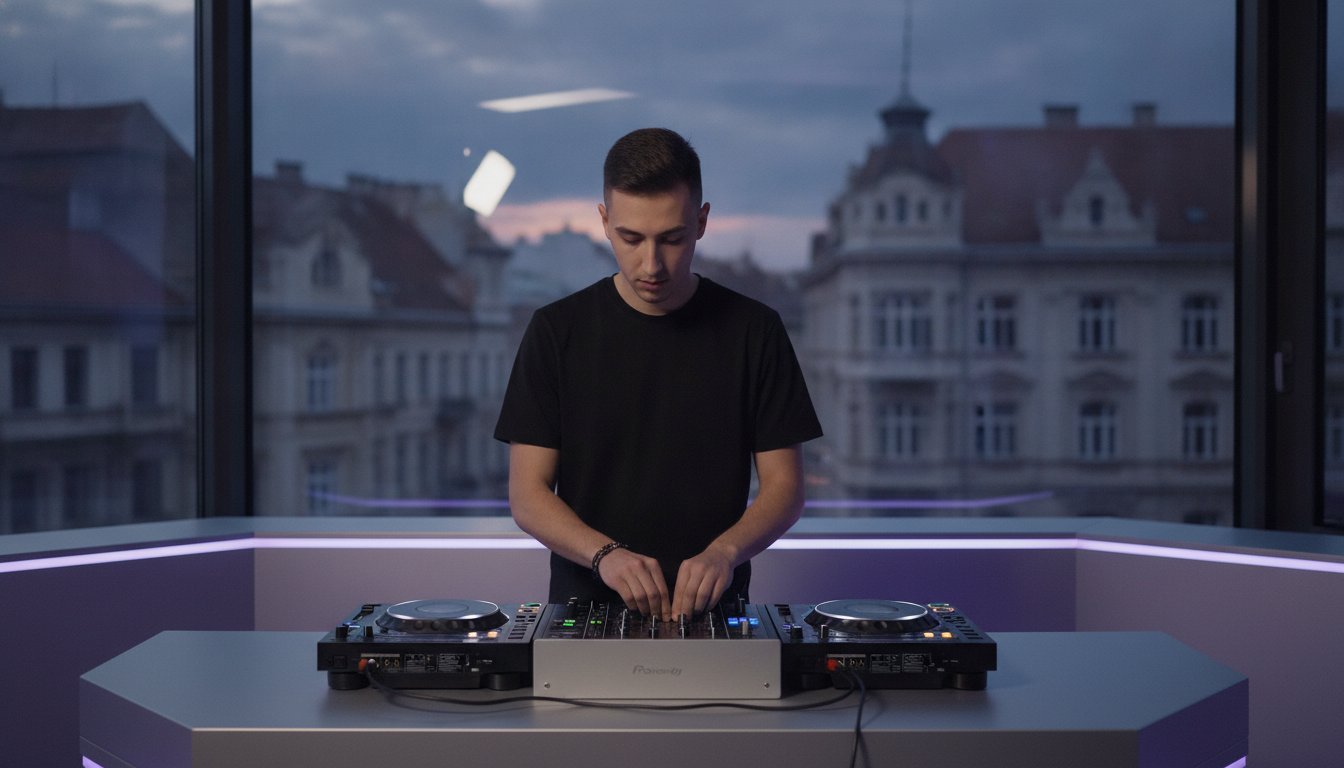

You don’t pay for studio time to practice your transitions. You pay to capture your peak performance. It’s a common trap to treat the booth like your bedroom, but that’s how you waste budget. We know the stress of standing in front of club-standard CDJs while the clock is ticking. The fear of a corrupted USB or a technical glitch can kill your flow before you drop the first beat. Learning how to prepare for a DJ studio session is the difference between a frustrating hour of troubleshooting and walking away with a flawless 4K recorded set for your socials.
You’re on the verge of a massive breakthrough. We’ve built this guide to give you the exact technical workflow used by the pros. Whether you’re aiming for gig readiness or building a professional portfolio in Timișoara, we’re here to bridge the gap. It’s time to step up and treat your craft with the respect it deserves. You provide the talent; we provide the platform for your growth.
Here is your roadmap to a flawless session. ⚡️ Technical library audits for Rekordbox compatibility. 📁 Gear-specific settings to crush booth anxiety. 🎚️ Time-management hacks to maximize our 4K video and audio recording tools. Let’s turn that creative vision into a reality.
Key Takeaways
- Define your mission before you step into the booth to ensure every minute counts toward your creative goals. 🎯
- Discover how to prepare for a DJ studio session by optimizing your Rekordbox library and formatting USBs for total hardware compatibility. 💻
- Pack like a pro with a checklist that covers everything from your primary headphones to the essential “Golden Adapter” for the mixer. 🎧
- Elevate your brand by using 4K video and audio recording add-ons to create high-impact content for your social media channels. 🎥
- Master the “10-Minute Rule” to eliminate technical anxiety and dive straight into a high-energy performance. ⚡️
Defining Your Mission: Practice, Record, or Stream?
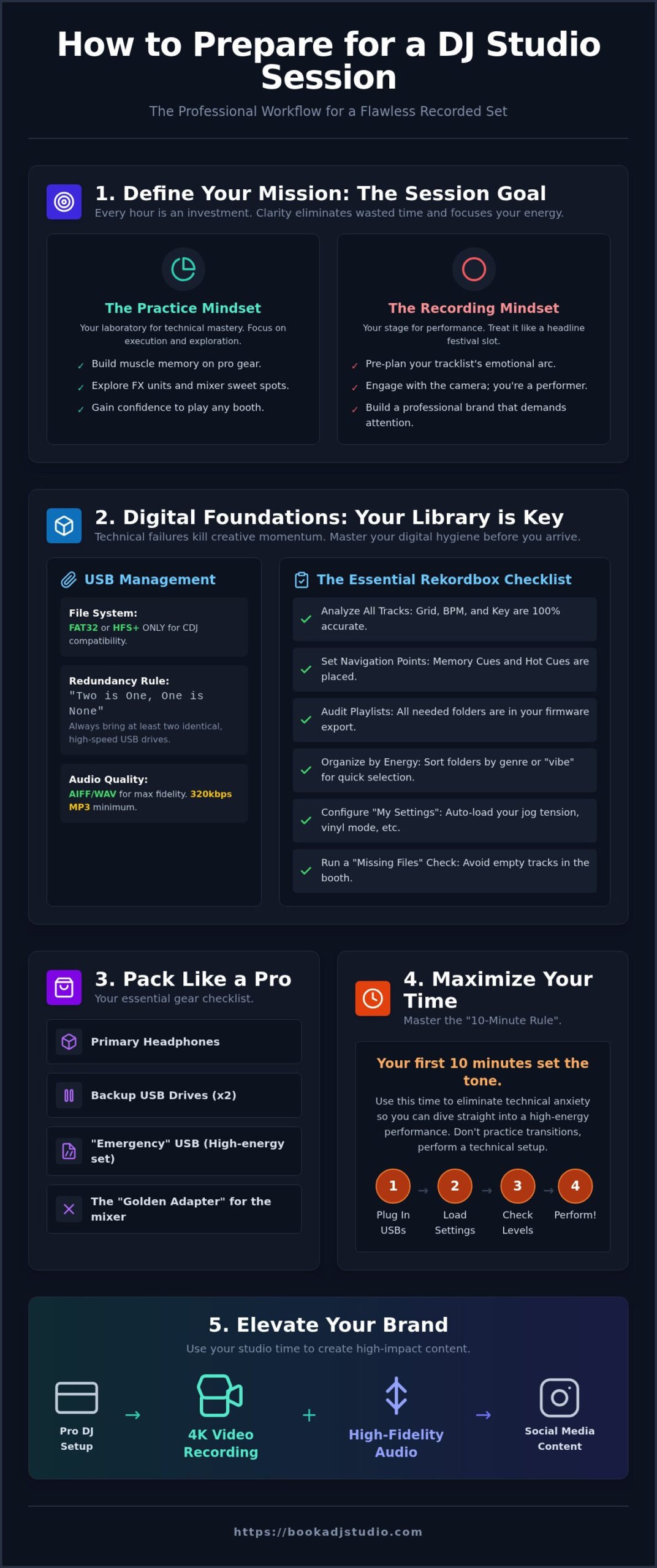
Stop booking sessions without a plan. You wouldn’t walk into a gym without a workout routine, and the DJ booth is no different. Every hour you spend in a professional environment is an investment in your career. To truly master how to prepare for a DJ studio session, you must first define your win for the day. Are you here to break in new tracks, or are you here to build your digital portfolio?
Setting a specific Session Goal changes your entire energy. If your goal is to master a complex four-deck transition, your focus remains on technical execution. If you’re recording a 30-minute set, your focus shifts to the emotional arc of the music. This clarity dictates how much time you book and which add-ons you select. Knowing your mission eliminates the “What do I do now?” paralysis that wastes precious minutes. You’re here for a breakthrough, not just a play-through.
There’s a massive psychological benefit to separating your learning hours from your performing hours. When you treat the studio as a bridge to the club, you train your brain to switch into professional mode the moment you touch the faders. This professional mindset is what separates the hobbyists from the headliners.
The Practice Mindset
This is your laboratory. Focus on building the muscle memory required to handle professional DJ equipment in Timișoara without looking down. Use the studio’s high-fidelity monitoring system to hear details in your tracks that your home speakers miss. Don’t fear the mistakes; push the equipment to its limits. Explore the FX units. Find the sweet spot of the mixer’s gain staging. This is where you gain the confidence to play any booth in the world. Master the hardware here so you can focus on the crowd later.
The Recording & Streaming Mindset
When the red light is on, the practice ends. Treat these sessions like a headline slot at a festival to build authentic energy. Pre-plan your tracklist to ensure a smooth emotional arc, but leave room for the spontaneity that makes a set stand out. If you’re using our 4K video recording service, remember that people listen with their eyes too. Practice your camera face. Engage with the lens. Look up from the decks. You’re not just a selector; you’re a performer building a professional brand that demands attention.
Digital Foundations: Mastering Rekordbox and USB Management
Technical failure is the ultimate killer of creative momentum. If your USB doesn’t load, your session ends before the first drop. Mastering how to prepare for a DJ studio session starts with your digital hygiene. You must format your drives to FAT32 or HFS+. These are the only formats that guarantee total compatibility with club-standard CDJs. Don’t let a “Format Error” message ruin your flow when you’re ready to perform.
Adopt the “Two is One, One is None” rule immediately. Always carry at least two identical, high-speed USB 3.0 drives. If one drive fails or the hardware link between players drops, your backup is ready to go. This redundancy is a non-negotiable standard for any professional artist. It’s about protecting your time and your reputation.
The Essential Rekordbox Checklist
Analysis isn’t optional; it’s your foundation. Open Rekordbox and ensure every track has its grid, BPM, and key locked in with 100% accuracy. Use these steps to finalize your export:
- Set Navigation Points: Verify that Memory Cues and Hot Cues are placed for every track.
- Audit Your Playlists: Double-check that your firmware-ready export includes every folder you need.
- Organize by Energy: Sort your folders by genre or “vibe” to speed up your selection process under pressure.
Leverage the “My Settings” feature in Rekordbox. Configure your preferences for jog wheel tension, vinyl mode, and master tempo. When you plug in, the hardware automatically adapts to your style. This small step makes a professional booth feel like home instantly.
Hardware Compatibility Tips
Your sound quality defines your brand. Stick to AIFF or WAV files for the highest fidelity; if you must use MP3s, ensure they are at least 320kbps. High-grade monitoring systems will expose low-quality files immediately. Run a “Missing Files” check in your library before you hit the export button to avoid empty tracks in the booth. Always pack a third “emergency” USB loaded with a generic, high-energy set. This is your safety net for the unexpected. Once your digital library is bulletproof, you’re ready to book your hourly studio access and show the world what you’ve got.
The Essential DJ Gear Checklist: What to Bring
Walking into a professional booth with just your USBs is a rookie mistake. Even when the hardware is top-tier, your personal kit is what keeps the creative flow uninterrupted. Knowing how to prepare for a DJ studio session involves a physical audit of your gear bag. Start with your primary headphones; they are the lens through which you hear your mix. If you have a spare pair, bring them. Cables fail, and a backup ensures your session doesn’t end in silence.
Never forget the “Golden Adapter.” Always carry your own 1/4 inch to 3.5mm jack adapter. It’s the most lost item in the industry, and having your own ensures you’re never scrambling at the start of your hour. Bring a notebook or a tablet too. Use it to log how specific tracks perform on the professional monitoring system or to jot down transition ideas that spark mid-set. These notes are the blueprints for your future club performances.
Your physical comfort is a performance factor. Pack these essentials:
- Hydration: Bring water to stay sharp under the studio lights.
- Small Towel: High-energy sets get physical; stay dry and focused.
- Ear Protection: Use high-fidelity earplugs for after your set to protect your long-term hearing.
Cables and Connectivity
Technical redundancy is the mark of a pro. Bring a wired connection for your phone or laptop as an emergency backup music source. While our studio provides high-quality audio recording, some artists prefer bringing a portable recorder for a secondary master file. Before you pack, check our gallery to visualize the exact booth layout. Seeing the space helps you decide exactly what needs to be in your bag.
Wearable Prep
Performance is physical. Wear comfortable, supportive shoes because you’ll be standing and moving for the entire duration of your booking. If you’ve opted for our 4K video recording, consider your “DJ Brand” outfit. Choose something that reflects your artist persona and looks sharp on camera. Avoid loose jewelry or hanging chains that might snag on faders or knobs during a fast transition. Your focus should be on the music, not your wardrobe. Dress for the breakthrough you’re about to have.
Preparing for the Spotlight: Recording and Livestreaming Tips
When the 4K cameras start rolling, your technical skills are only half the story. You are no longer just a DJ; you are a performer building a global brand. Understanding how to prepare for a DJ studio session that involves recording means thinking like a director. Check your branding assets before you arrive. Ensure your social media handles and logos are ready for the livestream overlay. This professional polish is what separates a viral set from a forgotten one.
Engagement is the currency of the digital age. Practice your “camera face” at home. It feels unnatural at first, but looking into the lens instead of just staring at the decks creates a direct connection with your audience. If you are doing an interactive stream, prepare a “shout-out” list. Acknowledging your supporters by name builds community and keeps viewers locked in. To maximize your impact, study the professional DJ set recording process so you can utilize the full potential of our 4K output.
Visual Preparation
The camera sees everything. Clean your equipment! A smudge-free mixer and glossy jog wheels look significantly better in high definition. While our studio environment is optimized for lighting, your energy is what completes the frame. Practice your “intro” and “outro” specifically. Having a clear, high-energy start and a professional sign-off makes the final video edit-ready and saves you hours in post-production. 🎥
Livestreaming Technicals
Copyright strikes are the fastest way to kill a session. Audit your tracklist for copyright-safe music if you plan to archive the performance on YouTube or social platforms. Have a backup plan for interacting with your chat. Whether it’s a tablet on a stand or a dedicated moderator, don’t let technical distractions break your mixing flow. For a deeper dive into the hardware requirements, check our livestream DJ guide for advanced setup tips. ⚡️
Your breakthrough performance is waiting to be captured. Don’t leave your visual brand to chance. Book your professional studio session today and start building the portfolio your career deserves.
Maximizing Your Studio Time in Timișoara
Your studio booking is a high-stakes environment where every second counts. Arrive 10 to 15 minutes early to settle your mind and get your gear ready. This pre-session buffer ensures you aren’t rushing when the clock starts. Once you’re in the booth, apply the “10-Minute Rule.” Use this initial window for technical checks, gain staging, and a quick warm-up mix. This isn’t just about gear; it’s about syncing your ears to the room’s acoustics. Mastering how to prepare for a DJ studio session means respecting the schedule as much as the craft.
Record everything. Even if you’re just practicing transitions, capturing the audio provides an objective perspective on your progress. Reviewing these files later helps you identify tiny flaws in your EQing or timing that you might miss while performing. Beyond the booth, you aren’t alone. Engage with the Timișoara DJ community. Share your experiences, trade tips, and grow alongside fellow artists who are just as driven as you are. This is how a local scene turns into a professional movement.
Efficient Workflow
Use a timer to stay on track. If you have five specific transitions to master, allocate ten minutes to each. This prevents you from getting stuck on one track and losing the rest of your hour. Save your “experimental” mixing, those wild ideas that might not work, for the final ten minutes of the session. Most importantly, follow the professional DJ code: leave the studio exactly as you found it. Reset the faders, clear your USBs, and keep the space ready for the next artist. Professionalism is a habit, not an act.
Next Steps for Your Career
The work doesn’t end when you pull your USB. Review your recorded set immediately while the tracks and feelings are fresh in your mind. Take notes on what worked and what needs more polish. To maintain your momentum, book your next session before you even leave the building. Consistency is the only path to mastery in this industry. Ready to level up? Book your session now and keep the fire burning. You’re on the path to a breakthrough; don’t let the engine cool down.
Step Into Your Future Booth
Your creative breakthrough isn’t a matter of luck; it’s a result of your preparation. You’ve learned how to define your mission, lock down your digital foundations, and pack your kit like a seasoned pro. By mastering how to prepare for a DJ studio session, you’ve turned a simple practice hour into a high-octane performance opportunity. Every transition you nail on club-standard gear and every 4K set you record brings you one step closer to the main stage.
We’ve built an environment designed for your growth. With our club-standard CDJ and mixer setup and crystal-clear 4K video recording, you have everything needed to bridge the gap between your bedroom and the booth. Don’t let your talent stay hidden behind closed doors. It’s time to show the community what you’re capable of in a motivational space that respects your craft.
The faders are waiting. Go out there and claim your spotlight.
Frequently Asked Questions
What is the best USB format for professional DJ players?
Format your USB drive to FAT32 or HFS+ to ensure every CDJ in the booth reads your library instantly. This is a crucial step in how to prepare for a DJ studio session. Use Rekordbox to analyze your tracks so your cues and loops are ready to fire. ⚡ High-speed USB 3.0 drives are your best friends here. Don’t let a slow drive kill your creative momentum when the vibe is peaking.
Do I need to bring my own headphones to the studio?
Bring your own headphones to every session for the best experience. Using your own gear ensures you’re comfortable with the frequency response and fit while you’re in the mix. 🎧 It’s also a matter of hygiene and professional habit. Having your familiar tools helps you focus entirely on your performance rather than adjusting to new gear. Grab your 1/4 inch adapter too. You’re here to dominate the booth.
Can I record my session in 4K at Book a DJ Studio?
You can capture your performance in stunning 4K at Book a DJ Studio. We offer 4K Video Recording as a premium add-on to help you build a high-end visual portfolio. 🎥 Show the world your technique with crystal-clear footage that makes you look like a mainstage headliner. It’s the ultimate way to showcase your talent to promoters in Timișoara and beyond. Turn your practice into professional content today.
What should I do if my USB drive is not recognized by the CDJs?
If a CDJ doesn’t recognize your drive, stay calm and check the file system first. It must be FAT32 or HFS+. Ensure you’ve exported your playlist correctly via Rekordbox rather than just dragging and dropping files. 🛠️ Sometimes a simple re-insertion or trying a different port does the trick. Knowing these technical fixes is part of learning how to prepare for a DJ studio session like a seasoned industry professional.
Is it possible to livestream my DJ set directly from the studio?
Yes, you can broadcast your talent to the world! We provide a dedicated Live Streaming Setup so you can go live on YouTube or social media platforms instantly. 🌐 It’s the perfect way to engage your fans and grow your digital presence while playing on club-standard gear. Share your sound with the global community from our creative hub in Timișoara. Your breakthrough moment is just one button away.
How much time should I book for my first studio session?
We recommend booking at least a two-hour session for your first visit. This gives you plenty of time to get comfortable with the club-standard layout and dial in your settings without feeling rushed. ⏱️ Use the first hour to warm up and the second to record your set or perfect your transitions. Our flexible Session Packages make it easy to come back and keep your skills sharp as you grow.
Do I need to be a professional to rent a DJ studio in Timișoara?
You don’t need to be a pro to step into our booth. Book a DJ Studio is the bridge between your bedroom and the club. Whether you’re just starting or you’re a veteran in the Timișoara scene, our space is built for your growth. 🚀 We provide the professional environment you need to sharpen your skills and gain confidence. Everyone with a passion for music and a drive to learn is welcome.
What happens if I encounter technical issues during my session?
Don’t worry about technical hiccups. We’re here to ensure your session runs smoothly from start to finish. If you run into any trouble with the hardware or software, help is always available to get you back on track. 🔧 Our equipment is maintained to club standards so you can focus on the music. Your success is our priority, and we’ve built an environment where you can perform with total peace of mind.