


A smooth DJ set isn’t built by matching keys alone. A practical starting point for harmonic mixing for beginners is to choose tracks in the same key, a neighbouring Camelot number with the same letter, or the same number with the other letter. Then match the tempo and trust your ears to decide whether the blend feels right.
A great set needs more than technically tidy transitions. The next track should carry the mood forward, lift the energy, or create a moment of contrast. Key compatibility is a useful map, not a rulebook that overrides your musical instinct.
Learn to read the Camelot Wheel, use key-detection tools, and shape transitions without losing the feel of the room. You’ll also see where key matching matters most, when a clash can be creative, and how to build a set that sounds intentional, fluid, and unmistakably yours.
Key Takeaways
- Use key compatibility as a guide, then let the track’s mood and the dancefloor shape your selection.
- Read the Camelot Wheel to spot same-key, neighbouring-key, and relative-major-or-minor matches.
- Use key-detection tools to organise your options, but listen closely before committing to a transition.
- Pair compatible keys with matched BPM, and use EQ or filters to help manage tension when tracks clash.
Balancing key compatibility with creative track selection
Key compatibility can smooth a transition, but your next track still needs to serve the set. Use theory as a guide, then consider the melody, rhythm, and energy you want to create.
Pitch-shifting tracks into compatible keys
Pitch-shifting changes a track’s pitch, which can help its key work more smoothly with the track already playing. If a favourite track clashes with your current selection, shifting it to a compatible key may help you keep both tracks in the set. Make the adjustment, then listen to the blend: a matching key should still sound natural and preserve the track’s character.
Mixing melodic and percussive tracks
Melodic tracks carry clear notes, while percussion-led tracks may have little harmonic information to clash. A drum-focused transition can help when two melodies feel crowded. Break harmonic rules when the percussion, phrasing, or crowd’s energy creates a stronger transition than a strict key match. In a live set, the audience’s response can matter more than the key label.
Finding track keys with DJ software
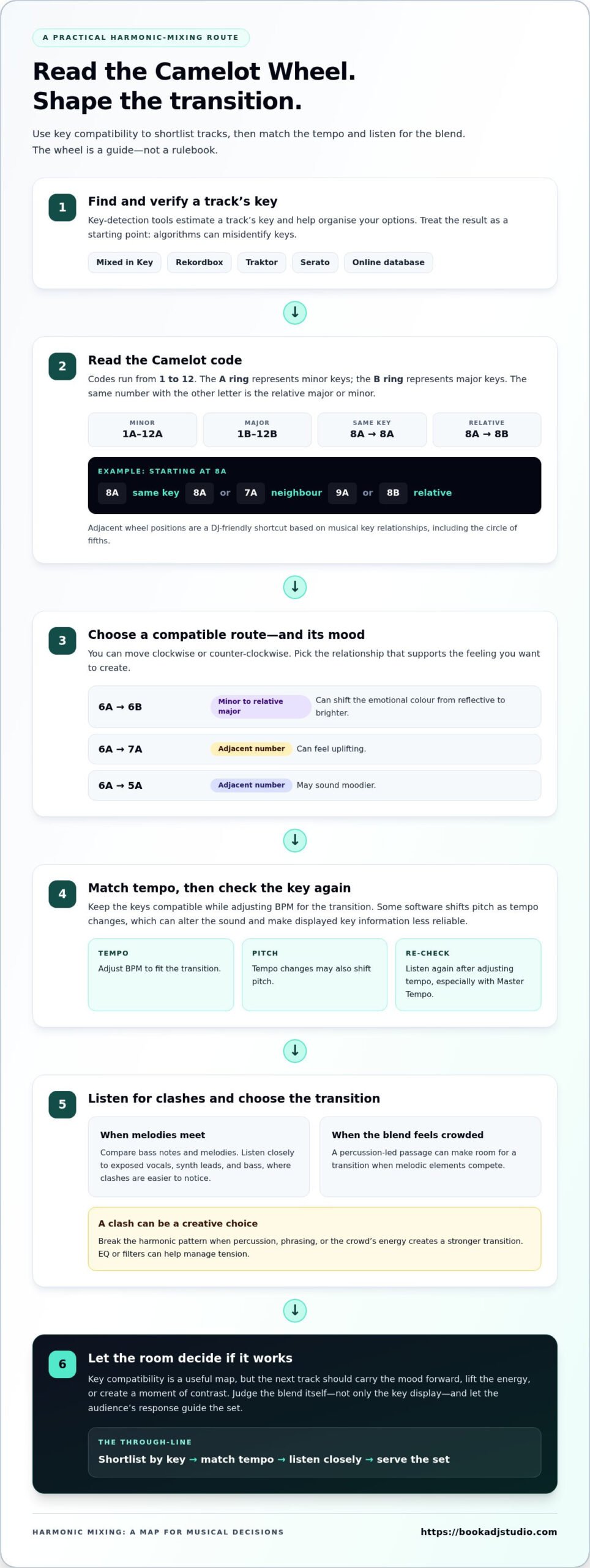
Key-detection software analyses a track and estimates its key, helping you organise tracks before a set. Mixed in Key, Rekordbox, Traktor, and Serato can support this preparation. Algorithms can misidentify a key, so treat each result as a starting point: compare candidate tracks, listen for clashing notes, and trust what you hear.
Managing tempo changes while preserving harmony
To mix tracks at different tempos without losing harmonic compatibility, keep their keys compatible while adjusting the BPM for the transition. Some DJ software shifts pitch as tempo changes, which can alter the sound and make displayed key information less reliable. Listen again after adjusting the tempo, especially when using Master Tempo, and judge the blend itself rather than relying only on the key display.
How does the Camelot Key Wheel show us what keys sound good together?
The Camelot Wheel turns musical relationships into a quick reference for DJs. Use its codes to shortlist compatible tracks, then listen for the mood your transition creates.
Reading the Camelot Wheel
The Camelot Wheel labels keys from 1 to 12, with A for minor and B for major. The inner circle holds minor keys; the outer circle holds major keys. A track marked 8A can match 8A, move to 7A or 9A, or switch to 8B. These nearby codes help determine a smooth route without reading traditional notation.
Connecting the wheel to the circle of fifths
The Camelot system adapts the circle of fifths into a DJ-friendly map of key relationships. Keys connected by a perfect fifth differ by one note, which helps explain why neighbouring positions can blend well. Instead of calculating intervals mid-set, use the wheel’s adjacent numbers as a visual shortcut. Moving from 8A to 9A follows that practical logic.
Using the Camelot Wheel in DJ mixes
Use the wheel to plan a transition that supports the audience’s energy. Matching codes maintains a familiar harmonic feel; changing from 6A to 6B shifts from minor to relative major. Moving from 6A to 7A can feel uplifting, while 6A to 5A may sound moodier. You can move clockwise or counter-clockwise, then break the pattern when the music calls for contrast.
Prepare a short run of compatible tracks before you play. Traktor can display key information in your library, making it easier to spot a possible next track, but listen before committing. A David Guetta anthem might suit a high-energy moment, but let its Camelot code and your mix’s mood guide the pairing, not the artist name alone.
To test how planned transitions feel in a live mix, try a focused DJ studio practice session.
Based on the circle of fifths, the Camelot Wheel is a practical map for harmonic mixing that links its positions to musical relationships. In this system, the A ring represents minor keys and the B ring represents major keys. Keeping the number while changing the letter indicates the relative major or minor. For a harmonic mix, choose a direction around the wheel, clockwise or counter-clockwise, and follow it.
How do DJs approach harmonic mixing?
Same-key, adjacent-key, and relative-major-or-minor changes can all work. Choose the match that serves the transition. Don’t rely blindly on key detection, ignore BPM, or force a match that weakens the musical phrase.
Identifying keys with software and AI
Key-detection software and AI analyse musical patterns to estimate a track’s key, helping you sort options before mixing. Rekordbox, Serato, and Traktor include key-detection systems, while an online database can provide another reference. Treat every result as a useful cue, not the final word: compare the suggested key with what you hear, especially when two tracks seem incompatible.
Recognizing keys by ear
Ear training means listening for the notes and tonal centre that give a track its sense of resolution. Practise with a short phrase, then compare its bass notes and melody with another track. Music theory can explain why notes fit, but repeated listening builds practical recognition. Check your impression against software, then revisit passages where the estimate and sound disagree.
Matching compatible keys and notes
Compatible keys share enough notes for melodies and sustained sounds to blend without distracting clashes. For example, A minor can work with E minor or D minor. Listen for exposed vocals, synth leads, and bass notes, where clashes are easier to notice. Percussion-heavy passages can create room for a transition when melodic elements would compete.
Moving between major and minor keys
Moving between a minor key and its relative major keeps the same key signature while changing the tonal centre and emotional colour. This can shift a set from reflective to brighter without an abrupt harmonic leap. Try the transition at a phrase change, then listen to the incoming melody and bass together. Let the audience’s response guide whether that contrast belongs in the set.
Harmonic mixing in DJ sets
In a DJ set, harmonic mixing is a technique for shaping musical flow, not a playlist rule. Compatible keys can reduce dissonance between overlapping melodies, while matched BPM keeps the rhythm steady. Your ears still decide whether a transition sounds right. A key display can guide track selection, but it can’t measure phrasing, tension, or the room’s energy. A useful approach to harmonic mixing for beginners is to treat each suggested match as a creative option.
Try this progression as a planning example: F minor, C minor, G minor, D minor, then A minor, repeating each key twice. It creates a route through related sounds while leaving room to adjust your playing. Prepare alternatives at each point, so a change in audience energy doesn’t lock you into one musical direction. Your set should respond to the room, not simply follow a prepared sequence.
Key compatibility alone won’t create a smooth blend. Align the BPM, choose an appropriate phrase, and listen to the bass and lead parts together. If both tracks have strong melodies, bring the incoming one forward gradually. A percussion-led passage can create room when melodic elements compete. The right balance depends on what you hear during the transition, so make adjustments while monitoring the mix.
DJ software can help organise tracks by key, but tempo changes may affect pitch and make displayed information less accurate. Master Tempo can preserve perceived pitch as you adjust the tempo, but listen to the blend instead of relying only on the screen. If dissonance appears, use EQ or filters to reduce competing frequencies. For harmonic mixing for beginners, reviewing a recording can reveal whether those choices worked across the set.
Most electronic dance music is written in minor keys, but that doesn’t make every minor-key transition automatically compatible. Test your planned sequence while playing, and notice where the sounds feel tense or release. Record a practice mix, then review transitions that feel forced. Practice and record your DJ set to hear how your harmonic choices land across a session.
Book a DJ Studio: Hourly Studio Access
Book a DJ Studio gives you space to practise harmonic transitions, refine your track flow, and hear how your set works from opening blend to final track. Choose Hourly Studio Access for a focused practice session, or Session Packages if you want multiple sessions to develop and repeat your mix.
Ready to capture the result? Add Audio Recording to review your transitions later, or 4K Video Recording to document your performance visually. A recorded set can help you notice where key changes feel smooth and where the musical energy shifts.
Bring your playlist, test your transitions, and shape the sound in a dedicated studio setting. Visit Book a DJ Studio to explore your next session.
Shape Your Next Set with Confidence
Your next step is to turn preparation into a sound that feels like yours. Treat harmonic mixing for beginners as a creative practice, not a test of perfect theory. Make choices that support the emotion you want to build, and leave room for surprise. A bold contrast can become part of your signature when it feels intentional.
Choose a short section of your playlist and focus on its progression. Notice where you want the energy to rise, where a pause would help, and which transition deserves a more daring choice. Then listen back with fresh ears. Each practice session can reveal a new direction for your set and help you trust your instincts behind the decks.
Ready to make your next mix take shape? Contact Book a DJ Studio and keep building your sound. Your next defining transition starts with the choice you make today.
Frequently Asked Questions
Can you mix tracks in different keys?
Yes. A drum break or a gap between vocals can help you blend tracks whose melodies might clash when played together.
Should you DJ in key?
Use key matching as a tool, not a rule. Choose the track that best fits the set’s energy and timing.
What kind of DJs mix in key?
DJs playing melodic, vocal, or chord-heavy tracks may find key matching especially useful. Percussion-led sets may rely on it less.
What is harmonic mixing in DJing?
It’s the practice of choosing tracks based on how their musical keys interact, helping shape a set’s mood and flow.
Which DJ software and apps detect musical key accurately?
Mixed in Key, Rekordbox, Traktor, and Serato can estimate a track’s musical key, but their results aren’t always accurate. Check suggested matches by listening.