


What if the fix for a distorted transition isn’t turning down the master, but balancing each level before the signal gets there? When a channel or master meter jumps into the red, a strong set can quickly lose its punch. Learning how to properly gain stage a dj mixer gives you a repeatable way to keep tracks clean without making the mix unnecessarily quiet.
Gain, channel faders, and the master control all affect level, but at different points in the signal path. Turning down the wrong control may lower the overall volume without correcting distortion earlier in the chain.
This guide follows the signal from the source through the channel to the master output. You’ll learn how to set consistent levels, identify possible clipping, and review your mix after a practice session. The same checks work across different mixers, even when their meters and controls look different.
Key Takeaways
- Follow the signal from the source through the channel and into the master output.
- Use your mixer’s meters to guide channel gain, mix balance, and output checks. Do not assume every mixer uses the same target.
- Learn how to properly gain stage a dj mixer with a repeatable check from source preparation to master output.
- When you hear distortion or see an overload warning, identify whether the problem begins at the channel input or the master output.
- Practise with tracks at different loudness levels, then review a recording to hear how levels hold up through transitions.
What Gain Staging on a DJ Mixer Actually Means
Gain staging means managing signal levels through each point in an audio chain to help keep the sound clean and avoid distortion. On a DJ mixer, trace the signal from its source through the channel and out of the master output. A healthy level at one stage does not guarantee that the next stage is clear.
For a foundation in the audio-engineering concept, see What is Gain Staging?
Here’s a walkthrough of setting gain on a mixer:
Gain, channel fader, and master level: what each control does
Trim or gain sets an individual channel’s input level. The channel fader controls that track’s level in the mix. It does not undo distortion that has already occurred at the input. The master control adjusts the combined output rather than the level of one channel. Knowing where each control acts is central to how to properly gain stage a dj mixer.
Why a clean signal matters for mixes and recordings
Distortion can occur at one stage even if another sounds clean. Headphones alone cannot confirm that the master output or recording is clear, so check the relevant meters and listen to the output you are using. Mixer labels and meter layouts vary, so follow the indicators on the equipment in front of you. Also remember that a clean channel reading does not guarantee a clean master level when two tracks overlap.
How to Set DJ Mixer Gain Levels Step by Step
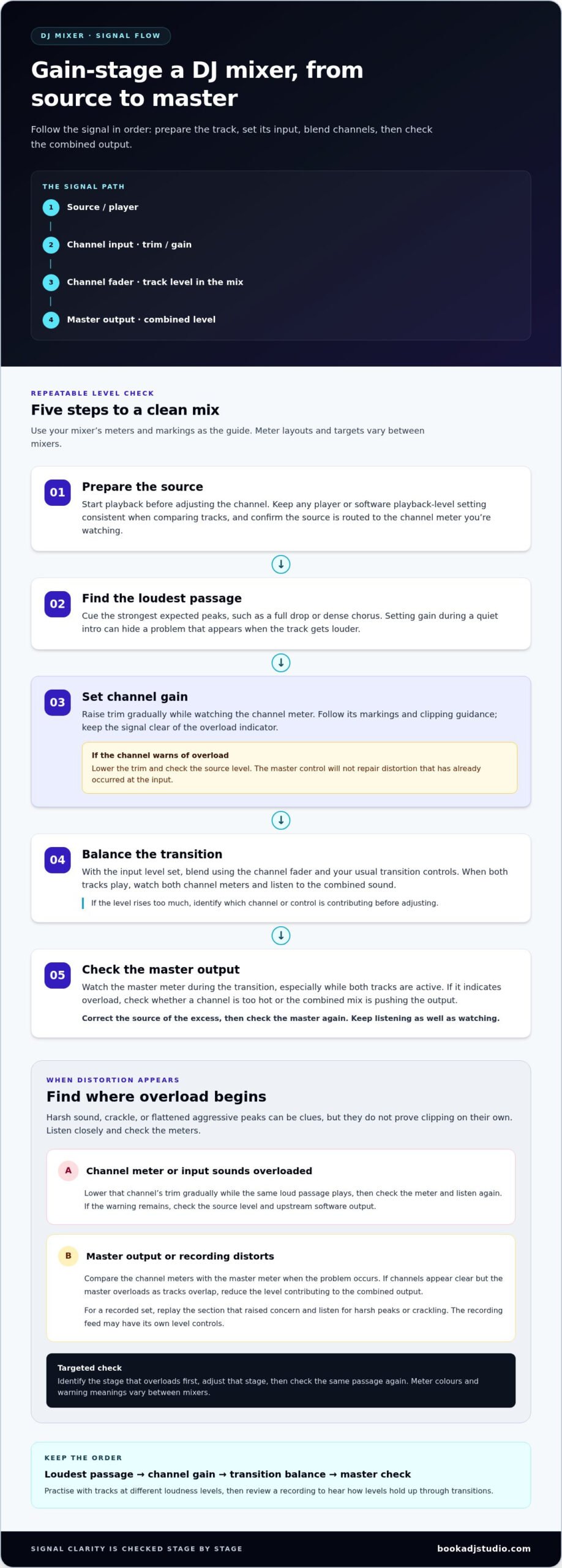
Work through the signal in order: prepare the source, set its input level, balance the channels, then check the combined output. Use your mixer’s meters as the main visual guide, but read their markings rather than relying on one target for every model. Sound On Sound’s guide to Optimizing Audio Signal Levels offers a useful overview of level management across an audio chain.
- Step 1: Prepare the source. Load the track and start playback before adjusting its channel. If your software or player has a playback-level control, keep its setting consistent as you compare tracks. Confirm that the source is routed to the channel whose meter you are watching.
- Step 2: Find the loudest passage. Cue the section with the strongest expected peaks, such as a full drop or dense chorus. Setting gain during a quiet intro can hide a problem that appears when the track gets louder.
- Step 3: Set channel gain. Raise trim gradually while watching the channel meter. Follow that mixer’s meter markings and clipping guidance, and keep the signal clear of its overload indicator. If the channel warns of overload, lower the trim and check the source level instead of trying to solve the problem with the master control.
- Step 4: Balance the transition. Once the input level is set, use the channel fader and your usual transition controls to blend the track. With both tracks playing, watch both channel meters and listen to the combined sound. If the level rises too much, identify which channel or control is contributing to the increase before making an adjustment.
- Step 5: Check the master output. Watch the master meter during the transition, especially while both tracks are active. If it indicates overload, check whether a channel is already too hot or whether the combined mix is pushing the output. Correct the source of the excess, then check the master again. Keep listening as well as watching.
This sequence makes how to properly gain stage a dj mixer easier to repeat: set each track using its loudest passage, blend with the channel faders, then check the master during real transitions. Practise the routine on different mixers in a DJ studio in Timișoara, where you can focus on the meters as the mix changes.
How to Spot and Fix Clipping at Each Stage
Clipping may sound harsh, crackle, or make peaks seem flattened and aggressive. These clues are useful, but they do not prove clipping on their own. Listen closely and check the meters. Find where the signal first becomes overloaded, then adjust that stage rather than turning down controls at random.
When the channel meter or input sounds overloaded
If one channel’s meter signals overload, or that track sounds distorted on its own, start at the input. Lower that channel’s trim gradually while the same passage plays, then check the meter and listen again. Use the loudest part of the track for this test. A quiet intro can conceal a problem that appears later.
If lowering trim does not clear the warning, check the source level and any upstream software output. A signal that is already too hot before it reaches the mixer can arrive distorted. Turning down the mixer’s master will not repair that damage. It only lowers the level leaving the mixer.
When the master output or recording distorts
Compare the channel meters with the master meter at the moment the problem occurs. If a channel shows overload first, correct that channel’s input level. If the channels appear clear but the master indicates overload as tracks overlap, reduce the level contributing to the combined output. Avoid changing unrelated controls, such as lowering a channel that is not causing the buildup.
Recording a set? Check the captured audio as well as what you hear through headphones or speakers. The recording feed can distort even when live monitoring sounds clean because the recording path may have its own level controls. Replay the section that raised concern and listen for harsh peaks or crackling.
Meter colours, warning lights, and their meanings vary between mixers. Follow the indicators and guidance for the mixer in front of you instead of applying a universal numerical threshold. This stage-by-stage approach is central to how to properly gain stage a dj mixer: identify where the overload begins, make a targeted adjustment, then check the same passage again.
A Practical Gain-Staging Routine for Practice and Performance
Make level checks part of your set preparation, not a last-second rescue. A consistent routine helps you catch routing mistakes, compare tracks with different loudness, and stay focused on the music once you start mixing.
Before you start your set
- Confirm routing. Check that each player or source feeds the intended mixer channel. Adjusting gain will not help if you are watching the wrong channel meter.
- Check prepared tracks. Play the loudest expected passage of each track and watch its channel meter. If one track reads much hotter or quieter than the others, adjust its input level carefully before mixing.
- Check the master. Play a track through the full signal path and confirm that the master meter responds as expected. If recording or streaming is part of the session, make a short test and listen back before starting a full set.
Use contrasting tracks to practise. Move from a dense, loud track into a softer one, then back again. Match their perceived levels with deliberate channel adjustments rather than assuming the same fader position will suit every source.
During transitions and playback checks
As you blend, watch both channel meters. Two individually healthy signals can create a stronger combined level when they overlap. If the master level rises sharply, identify what is driving the increase. Use trim to correct an input that is too hot, and use the channel fader to shape the track’s place in the mix.
After practice, replay the test recording. Listen for distortion, abrupt jumps in loudness, or a track that disappears during a transition. A recording can reveal problems you missed while concentrating on the mix. For broader context on setup choices, explore this professional DJ equipment guide, then apply the same checks to the gear in front of you.
Keep refining how to properly gain stage a dj mixer by repeating the routine with different tracks and transitions. You can practise your set in a professional DJ studio and review an audio recording to hear how your levels hold together from start to finish.
Build Confident Gain-Staging Habits in a DJ Studio
Confidence comes from repetition. Run the same signal check each time you practise, and the steps become easier to carry into a new session or onto a different mixer. Studio access gives you room to build that habit on professional players and mixers, even when the layout differs from the equipment you usually use.
Practise the signal chain, not just the transition
Before mixing, play a short test track and follow its level through the setup in order: confirm the source, check the channel meter, watch the master output, then verify the recording or livestream feed if you are using one. Repeat with tracks at different loudness levels. Adjust the input level deliberately, and compare what you see on the meter with what you hear.
Then rehearse a real transition. Blend a quieter track into a louder one and notice how the channel and master levels respond while both tracks play. This gives you a practical way to apply how to properly gain stage a dj mixer instead of memorising controls in isolation. A professional DJ studio session gives you space to repeat the routine on studio equipment.
Review your mix and make one adjustment at a time
Record a short practice mix and listen back. Pay attention to distorted peaks, sudden jumps in loudness, or a section that feels unusually quiet. Audio or 4K video recording can help you review a performance, while a livestream setup lets you practise checking how your levels carry through that setup.
Make one change at a time. If a channel input is too hot, adjust its trim. If the track is simply too prominent in the blend, work with its fader. Run another short test and listen again. Changing several controls at once makes it harder to tell which adjustment helped.
Build the habit across sessions: check the source, follow the meters, listen, and review. To put the routine into practice, explore DJ studio practice in Timișoara.
Make Clean Levels Part of Your DJ Craft
Great gain staging is not about chasing one perfect meter reading. It is about managing the signal from each source through the channels and master output, then checking how the whole mix behaves during transitions. Know which control to adjust, watch for signs of overload, and trust your ears alongside the meters.
Learning how to properly gain stage a dj mixer gives you a repeatable way to keep your set clear and consistent. Practise with tracks at different loudness levels, then listen back to catch jumps or distortion you may miss while mixing. Each session helps you build sharper instincts.
Put that routine into action with professional DJ studio access in Timișoara. Optional audio and 4K video recording, along with a livestreaming setup, can help you review how your mix translates. Book a DJ studio session and put your gain-staging routine into practice.
Frequently Asked Questions
What is gain staging on a DJ mixer?
Gain staging means managing the audio level as it passes through each part of your setup. Start with the source, set the input level for each mixer channel, balance tracks in the mix, then check the master output. This helps reduce the risk of distortion and keeps levels more consistent. Learning how to properly gain stage a DJ mixer means checking the whole signal path, not just turning down one control.
Should DJ mixer gain be set before or after the channel fader?
Set the channel’s input gain before using the channel fader to balance it in the mix. Play the track’s loudest section and adjust trim while watching the channel meter. Once the input level is healthy, use the fader to bring the track in or balance it against another track. The master control comes later in the signal path and adjusts the combined output, not an individual channel’s input.
How do I stop my DJ mixer from clipping?
Find where the overload starts, then lower the level at that point. If a channel meter indicates overload, reduce that channel’s trim and check the source output too. If channel meters look clear but the master indicates overload during a transition, reduce the level contributing to the combined output. Test again using the same loud passage. Meter indicators vary, so follow the guidance for your mixer rather than relying on a universal target.
Should DJ mixer levels peak in the red?
No. Treat a red or clipping indicator as a warning to investigate, not a target to hit. Reduce the level at the stage showing overload and check the signal again. Meter colours and markings vary between mixers, so use the device’s own indicators and guidance. Do not aim for a particular colour simply to make the mix look louder. A clean, controlled signal is more useful than a meter pushed into its warning range.
Why does my DJ mix sound distorted when the meters look fine?
A clean-looking meter does not rule out distortion elsewhere in the signal path. The source or software output may already be too loud, an EQ boost may raise the signal, or the recording path may be overloaded separately. Harshness or crackling can be clues, but they are not proof on their own. Check each stage, listen through another monitoring point if available, and replay a recording to locate where the distortion appears.
How do I set levels when recording a DJ mix?
Check the mixer’s channel and master meters, then make a short test recording and listen back before recording a full set. Watch for distortion, unexpected loudness jumps, or sections that sound too quiet, especially during transitions with two tracks playing. The recording feed may have its own level control, so check that path as well as live monitoring. In Timișoara, studio access with optional audio recording gives you a place to practise and review your mix.