

What if the biggest upgrade to your DJ set isn’t new gear, but a cleaner signal path? You’ve built the crate, nailed the transitions, and shaped the energy. Yet distorted playback or uneven levels can pull listeners out of the moment. Understanding why clean audio is crucial for djs means treating sound quality as part of your craft, not as a detail to fix later.
You want your mixes to sound the way you intended, whether you’re behind the decks, recording a promo set, or streaming live. Clean audio helps listeners hear the details and lets you perform without second-guessing your levels. You don’t need a complicated setup to protect it. You need a repeatable routine.
Common sources of noise and distortion include poor-quality files, faulty connections, clipping, aggressive EQ, and effects that push levels too far. A few practical checks can help you follow your signal path, set levels, and keep recordings consistent. If you’re in Timișoara, a focused DJ studio session can also give you space to listen critically and refine your sound.
Key Takeaways
- Learn how clarity helps listeners follow your transitions and feel the energy of your set.
- Trace your signal path to find where unwanted noise, distortion, or uneven levels can creep in.
- Build a quick pre-play check that tests connections, levels, and sound across quiet and loud passages.
- Understand why clean audio is crucial for djs, and why expensive gear or louder playback alone won’t guarantee better sound.
- Use focused practice and recorded playback to catch details you might miss while performing.
Why clean audio matters for every DJ set
Clean audio is clear, controlled sound without avoidable distortion, background noise, or sudden level changes. It lets the music come through as intended: a kick stays defined, a vocal remains intelligible, and a transition doesn’t disappear under harshness. For a DJ, that clarity is part of the performance. Your track choices create the story; sound quality helps the audience hear and feel it.
Great audio can’t make an uninspired selection compelling, and a technically spotless mix can still lack energy. But when musical direction and clean sound work together, each detail has room to land. That’s why clean audio is crucial for djs: it supports your choices without competing with them. Clean sound helps a set feel intentional and well handled.
How sound quality shapes the listener’s experience
Distortion pulls attention away from the music. A clipped vocal or brittle high end can make a carefully timed blend feel rough, even when the transition is well executed. Consistent levels matter too. If one track suddenly jumps forward or drops back, listeners have to adjust instead of settling into the set’s momentum. Clear, steady playback helps them follow changes in rhythm, texture, and energy.
Musical taste remains your signature. Clean sound simply gives that signature a fair chance to connect, whether someone hears your set through a club system, headphones, or a stream.
Clean audio is part of the performance
Listening closely is a performance skill, not an advanced engineering exam. During a blend, notice whether the incoming track overwhelms the outgoing one, whether the bass builds up, or whether an effect makes the sound harsh. The role of an audio engineer includes balancing and adjusting sound sources. DJs use the same basic awareness in real time: hear what’s changing, then make a measured adjustment.
Make a sound check part of your practice, gig preparation, recording, or livestream routine. Play a familiar track at a sensible level and listen as it moves from a quiet passage into a louder section. Does the mix stay balanced? Can you hear the transition clearly? These quick checks can catch issues before they distract an audience or become part of a recording.
Keep the musical vision front and centre. Choose tracks that move you, shape your transitions, and listen back with a critical ear. Clean audio won’t guarantee bookings or audience growth, but it helps your performance come across with greater clarity and confidence.
Where clean or distorted sound begins in a DJ setup
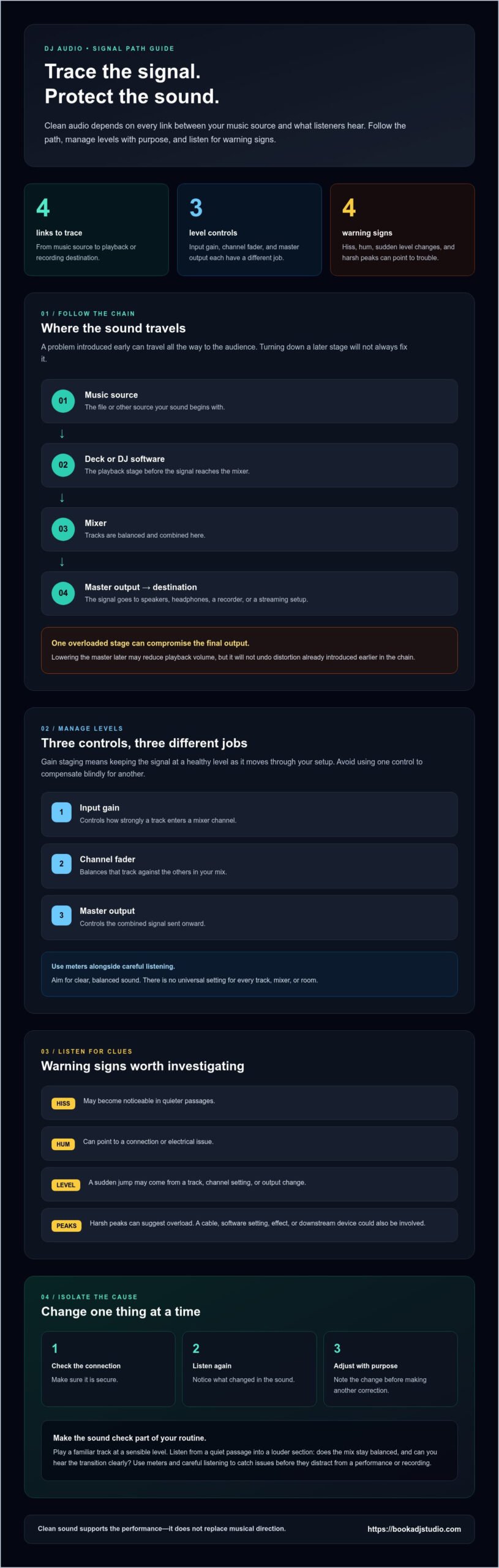
Audio travels through a chain, and every link can shape what you hear. It starts with a music file or another source, passes through the deck or DJ software, then reaches the mixer. From there, the master output feeds speakers, headphones, a recorder, or a streaming setup. A problem introduced early can travel all the way to the audience, and turning down a later stage won’t always fix it.
One overloaded stage can compromise the final output, even if every stage after it is set carefully. That’s why clean audio is crucial for djs: follow the signal from source to destination instead of treating the speakers as the only place to investigate.
Gain staging without the jargon
Think of gain staging as keeping the signal at a healthy level as it moves through your setup. Input gain controls how strongly a track enters a mixer channel. The channel fader balances that track against others in the mix. The master output controls the combined signal sent onward. Each control has a different job, so don’t use one to compensate blindly for another. Aim for a clear, balanced sound, using meters alongside careful listening. There’s no universal setting for every track, mixer, or room.
Clipping happens when a signal is pushed beyond the clean range a stage can handle. It may sound like a harsh crackle or flattened, abrasive peaks, especially when a loud section hits. Lowering the master later may reduce playback volume, but it won’t undo distortion already introduced earlier in the chain. Processing can also change a signal’s character; Shure’s explanation of digital signal processing in audio offers useful context for how sound can be adjusted along the way.
Noise, clipping, and other audible warning signs
Listen for clues, then narrow the search. Hiss may become noticeable in quieter passages; hum can point to a connection or electrical issue; a sudden level jump may come from a track, channel setting, or output change. Harsh peaks suggest overload, but don’t assume the mixer or music file is automatically at fault. A cable, software setting, effect, or downstream device could also be involved.
Change one thing at a time. Check that a connection is secure, then listen again. Adjust a level only after noting what changed. This simple method helps you isolate the source instead of making several corrections at once and losing track of what worked.
Build that habit during practice, before recording, and when preparing a stream. A focused session at a DJ studio in Timișoara gives you access to a professional booth with players and mixers, so you can practise tracing the signal and hear how each adjustment affects your mix.
Common clean-audio myths DJs should leave behind
It’s easy to blame sound problems on the gear or assume a louder set will hit harder. Both ideas can lead you away from the real fix. Equipment matters, but clean audio also depends on setup, level management, and attentive listening. Understanding why clean audio is crucial for djs starts with separating useful tools from assumptions that don’t hold up in practice.
Does better gear guarantee better sound?
Capable equipment gives you tools to shape and deliver a mix, but it can’t automatically prevent harsh sound, noise, or uneven levels. Even a strong setup needs sensible gain, secure connections, and settings that suit the music and listening environment. Before you upgrade, learn what your current players, mixer, and monitoring setup can do. Familiarity helps you make deliberate adjustments instead of hoping new gear will solve a problem you haven’t identified.
That doesn’t mean equipment is irrelevant. A damaged connection or a component that can’t meet your needs may limit your results. Diagnose the issue first. If the sound turns harsh only when a certain channel peaks, investigate that channel’s levels. If noise appears when you connect a particular cable, check that connection. A specific clue is more useful than assuming every rough-sounding mix calls for an expensive upgrade.
Why louder is not the same as cleaner
Turning up the volume can make a mix seem more powerful at first, but loudness and clarity aren’t the same thing. Push levels too far and peaks can become harsh or distorted. Dense sections may lose definition, and the set can feel tiring rather than energetic. Controlled dynamics let quieter details and bigger moments coexist. Your goal isn’t to make every sound hit at maximum intensity. It’s to keep the musical impact clear and balanced.
Check your mix at a realistic listening level. If the kick and bass blur together, or vocals become uncomfortable, lowering the volume may reveal that the issue is balance or overload, not lack of power. Compare sections at a consistent level so a louder passage doesn’t trick you into thinking it automatically sounds better.
Headphones are useful, but they’re not the whole picture
Headphones help you cue tracks, hear details, and judge a transition while preparing the next blend. But they can’t show you exactly how the mix will translate through speakers or in a recording. Room acoustics, speaker placement, playback level, and the recording or streaming path can all affect what listeners hear. Use headphones as one reference, then check the sound through the system you’re preparing for whenever possible.
Build a balanced habit: understand the equipment you have, listen at sensible levels, and compare what you hear in more than one monitoring situation. New gear can expand your options, but your ears and setup choices turn those options into a cleaner, more confident mix.
A practical clean-audio check before you play or record
A quick, repeatable sound check helps you catch small issues before they become part of your set, recording, or stream. Treat it like a performance habit, not a technical deep dive. Follow the same sequence each time. You’ll know what to listen for and where to start if something sounds off.
Check the setup before the first track
Start with the physical setup, then bring the sound in gradually. Knowing where your connections and level controls are makes it easier to check them calmly. A focused DJ studio practice session gives you space to build that routine around a professional booth.
- Inspect connections. Make sure cables are seated securely at the source, mixer, and output. Check left and right channels where applicable.
- Start moderately. Begin playback at a comfortable level, then raise it carefully while listening. Avoid jumping straight to a loud master output.
- Play a familiar track. Choose music you know well so changes in tone, balance, or distortion stand out.
- Check the meters and your ears. Watch for unexpected peaks, but don’t rely on meter colours alone. Listen for harshness, hiss, hum, or an uneven stereo image.
Listen back with a purpose
Don’t judge the signal from one moment alone. Test a quieter passage, then a louder section with fuller bass or vocals. Notice whether the sound stays balanced, whether peaks turn harsh, and whether either side seems weaker. Keep the listening level realistic so you can assess detail without mistaking sheer volume for clarity.
If you hear a problem, change one thing at a time. For example, reseat one connection, replay the same passage, and listen again before adjusting another control. This makes it easier to identify what helped. Rechecking the same section gives you a consistent reference instead of relying on memory.
Preparing a promotional set? Record a short test passage and listen back through the recording, not just your headphones. Playback can reveal level changes or details you missed while mixing. For your full set, a professional DJ booth with recording options can support a focused recording session. Make the check part of your routine, then step into the mix with confidence.
Build cleaner mixes through focused practice and recording
Practice with a clear listening goal, not just a longer playlist. Repeating a transition helps you hear whether the incoming track takes over too quickly, whether the bass becomes muddy, or whether the energy shifts smoothly. It also makes level inconsistencies easier to spot because you’re comparing familiar moments instead of reacting to a new mix each time.
Turn a practice session into a listening session
Choose one detail to work on during each run. Focus on a transition, a channel that tends to jump in level, or an effect that changes the mix more than you intend. After practising, listen back and note specific moments, such as “the vocal gets buried at the blend,” rather than deciding the whole set sounds vaguely off.
That focused approach turns each session into useful feedback. In Timișoara, Book a DJ Studio offers a professional booth for practice. Use the space to concentrate on your set, listen critically, and refine one choice at a time.
Prepare audio for recordings and livestreams
A recording or stream can only work with the mix it receives. If the source mix is unbalanced or already distorted, that issue carries into the final playback. A short test lets you check how the set translates through the recording or livestream setup before you commit to a full performance.
Record a brief passage that includes both a quieter moment and a fuller section. Listen back for changes in balance, rough blends, or details that were easy to miss while you were cueing and mixing. For a livestream, monitor the test from the listening side too, so you’re checking what reaches the audience rather than only what you hear at the booth.
Book a DJ Studio supports practice, promotional set recording, and livestreaming in Timișoara, with audio recording and a livestream setup available. A focused studio session gives you room to practise, capture a set, or prepare a broadcast. That repeatable listen-and-adjust cycle is a practical way to apply why clean audio is crucial for djs to your own workflow: hear the issue, make a considered change, and check the result.
Ready to put that routine into action? Explore the studio booking options and plan a session around your next practice, recording, or livestream goal.
Make your next set your clearest yet
Let your next practice run be a chance to sharpen how you listen. Choose one transition, monitor its balance, and trust what your ears tell you. That steady attention is why clean audio is crucial for djs: it helps your musical choices come through with intention and gives you more confidence behind the decks.
In Timișoara, Book a DJ Studio gives you a fully equipped professional booth with players and mixers for focused practice. You can also add high-quality audio recording, 4K video recording, or a livestream setup to capture and share your session.
Book a focused DJ studio session in Timișoara and give your next mix the space to grow. Keep listening, keep refining, and bring your sound forward with confidence.
Frequently Asked Questions
Why is clean audio important for DJs?
Clean audio lets listeners focus on your track choices instead of being distracted by rough playback. Understanding why clean audio is crucial for djs also helps you protect the identity of your set: subtle percussion, vocals, and changes in energy can get lost when playback sounds harsh or uneven. It won’t replace strong selection or timing, but it helps your musical decisions reach the audience as intended.
Can bad audio ruin a DJ set?
Bad audio can seriously distract from a set, but it doesn’t automatically erase every strong moment. The effect depends on the problem and how long it lasts. A brief rough transition may pass unnoticed, while persistent distortion or a channel that keeps dropping in level can pull attention away from the music. If an issue appears mid-set, make a calm, small correction rather than rushing through several controls at once.
How do DJs avoid clipping and distortion?
Keep headroom at each stage and avoid trying to fix a weak channel by pushing the master harder. Before a set, test the loudest track or section you expect to play, since a quieter intro won’t reveal every peak. If distortion appears, reduce the level feeding the overloaded point, then listen again. Effects and heavy EQ can also raise peaks, so check the sound after applying them.
What causes noise or hum in a DJ setup?
Noise can come from different points, including a loose audio connection, a noisy source, nearby electrical interference, or a configuration issue. A hum that changes when you move or disconnect one cable gives you a clue, but it doesn’t prove the cable is the cause. Isolate the setup in stages: mute or disconnect one source at a time, then see whether the noise changes.
How can I check if my DJ mix sounds clean?
Listen on more than one playback system if you can. A mix that sounds balanced in headphones may feel bass-heavy or thin through speakers, so compare the same section at a comfortable level. Pay attention to vocals, bass definition, and whether one side sounds different. You can also ask a trusted listener to describe what stands out before telling them what you intended to hear.
Do DJs need a studio to record clean audio?
No. A familiar home setup can produce a clean recording if you monitor the signal and make a test capture before the full set. A studio can offer a focused environment when you want to practise or create promotional content. In Timișoara, Book a DJ Studio has recording and livestreaming options alongside studio access, giving local DJs a space to prepare and capture a session.