


What if the cleanest transition on your DJM-750MK2 uses less effect, not more? When you’re using effects on a djm 750mk2, it’s easy to reach for Echo or Reverb and end up with a muddy mix or a sudden jump in perceived volume. The key is to treat each effect as a timed performance gesture, not decoration.
Effects can add tension, space, and impact, but the result depends on which section you apply them to and how strongly. Beat FX and Sound Color FX work differently, so knowing their roles makes it easier to choose the right tool and keep a transition clear.
This guide takes you through a practical workflow, from choosing an effect and assigning its source to setting its timing and intensity. You’ll also get a repeatable way to practise transitions, troubleshoot common problems, and review what you hear. Work one adjustment at a time so you can tell what each change does.
Key Takeaways
- Give each effect a clear job in the transition instead of adding processing without a musical purpose.
- Use a consistent control-reading sequence: choose the effect, set its source and timing, then adjust its intensity.
- When using effects on a djm 750mk2, audition one effect at a time so you can hear how each setting changes the mix.
- If an effect sounds muddy, harsh, or out of time, check its source, intensity, timing, and whether it’s still active.
- Build confidence with a repeatable practice drill: test one transition, record your observations, and review a practice pass for clarity.
Using effects on a DJM-750MK2 starts with a clear musical purpose
Give every effect a job. Use it to shape a transition, frame a phrase, or emphasise a specific moment. Don’t use it to cover a mismatch in tempo, phrasing, or level. Effects are a way to process audio, not a substitute for a clean mix. Before touching a control, decide what you want the listener to feel: more tension, a softer handover, or a sharper accent.
That intention helps you choose the right effect and use it with restraint. Choose the effect that serves the musical moment, then keep the mix clear enough for the tracks to lead. A DJ mixer brings together channel controls and performance tools, including effects, to shape how tracks meet. Think of the DJM-750MK2’s effects as part of your mix rather than another layer to pile on.
Beat FX and Sound Color FX: what each is for
Beat FX are designed around rhythmic timing, so they’re useful when you want processing to interact with a track’s pulse. Sound Color FX shape the tone or texture of a selected channel, offering a direct way to alter its character. These effects have different roles. The DJM-750MK2 manual provides the reference for its effect options and control labels.
Imagine handing over from one track to another. A brief Beat FX Echo can let a rhythmic phrase trail into the transition. A Sound Color FX Filter can instead change the outgoing channel’s tone as you ease it out. One uses rhythmic timing; the other shifts the channel’s sound. In both cases, listen for whether the effect supports the incoming track or competes with it.
Choose the moment before touching the controls
Listen to both tracks before adding an effect. Notice where the outgoing phrase resolves, when the incoming groove becomes clear, and whether the mix already has enough detail. Then name your goal: build tension, soften the handover, or punctuate a phrase. That decision narrows your options and helps you avoid adding processing just because a control is within reach.
If you want a vocal or rhythmic phrase to linger as the next track enters, try a restrained Echo. If the outgoing track needs to recede without leaving a rhythmic tail, a Filter may suit the moment better. These are starting points, not fixed recipes. Use the manual to confirm the effect names and operation on your mixer.
Keep the gesture short enough for the next musical event to land cleanly. Bring the effect in around the phrase you identified, then listen to the transition as a whole. If the handover loses impact or the tracks blur together, the effect may be working against your goal. Reset and try a lighter touch, choose another approach, or leave the effect out. For a wider overview of how effects fit into the DJ mixer workflow, use that context to sharpen your decisions at the decks.
Understand DJM-750MK2 effect selection, source, timing, and intensity
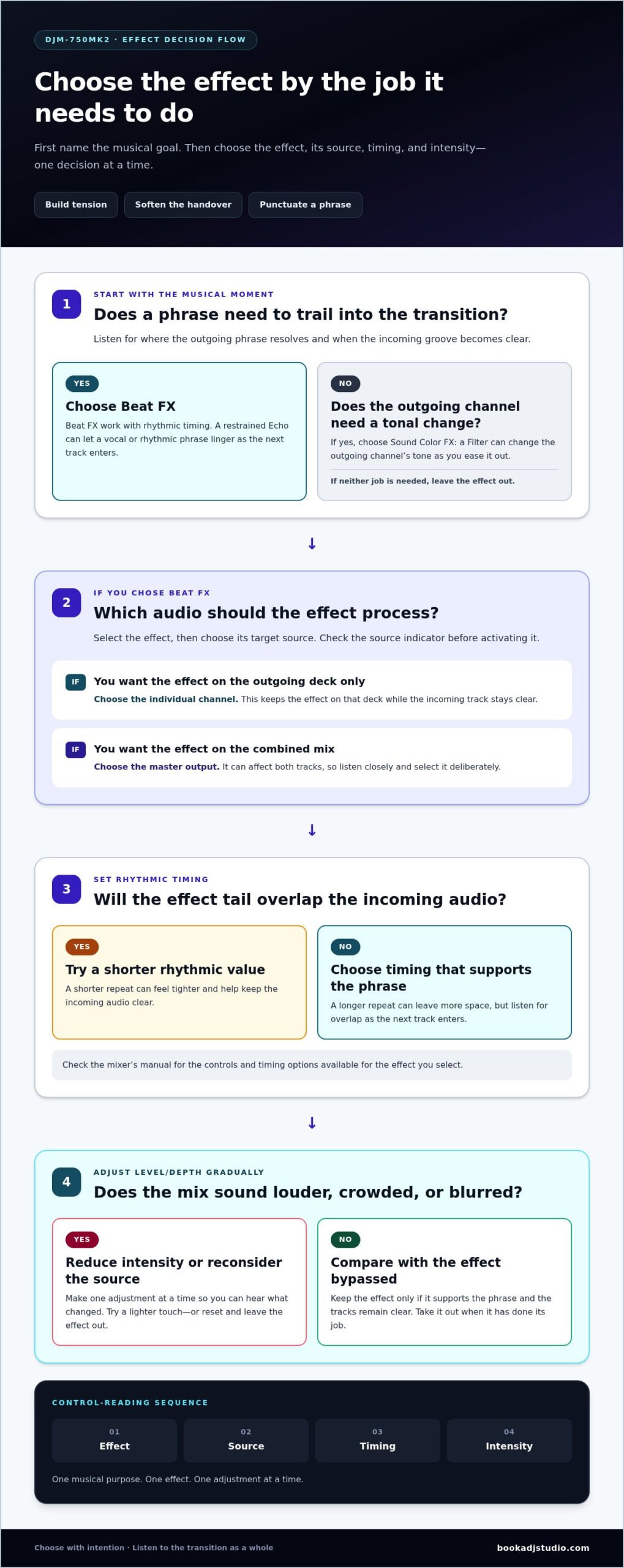
Once you know what you want an effect to do, read the controls in a fixed order. On the DJM-750MK2, select the Beat FX, choose its target source, set the rhythmic timing, then adjust the intensity with the Level/Depth control. Source assignment determines which audio the selected effect processes, so check the relevant indicator before switching it on.
Using effects on a djm 750mk2 feels more controlled when you treat these as separate decisions. The effect answers “what processing?” The source answers “which audio?” Timing answers “how does it relate to the beat?” Level/Depth answers “how strongly should it be heard?” The Pioneer DJM-750MK2 official product page gives the manufacturer’s overview. Refer to the mixer’s manual for exact control labels and available options.
Select the effect and the audio source
Start at the Beat FX controls. Choose the effect, then use the channel-selection control to target the audio you want to process. Beat FX can be directed to an individual channel or the master output. A channel target keeps the effect on that deck; the master target can affect the combined mix, so choose it deliberately. Before activating the effect, check that the source indicator matches your intention.
For a handover, targeting the outgoing channel can keep the effect on that track while the incoming track stays clear. If you select the master instead, listen closely because the effect may process both tracks. Don’t assume the source is right just because you selected the effect. Check it whenever you change your setup or move to a different part of a set.
Set timing and intensity by ear
Beat-synchronised timing sets how an effect relates to the track’s pulse. Choose a rhythmic value that supports the phrase instead of distracting from it. A shorter repeat can feel tighter; a longer one can leave more space but may overlap the incoming audio. Check the mixer’s manual for the controls and options available for the effect you select.
Next, bring up Level/Depth gradually. Start subtly and make small adjustments while listening to the transition in context. Compare the processed sound with the effect bypassed. Does the effect clarify the phrase, or blur the groove? If the mix gets louder or crowded, reduce the intensity or reconsider the source before changing several controls at once. One adjustment at a time makes it easier to hear cause and effect.
Rehearse these choices at performance volume. A focused DJ studio practice session in Timișoara gives you space to audition settings and refine a transition without rushing the decision.
Build a clean transition with a simple DJM-750MK2 effects workflow
A repeatable routine keeps the effect in service of the mix. Prepare the handover first, bring in one effect for a clear moment, listen, and take it out when it has done its job. For example, a short Echo on the outgoing track can mark the end of a phrase as the incoming track begins to take focus. Keep the rest of the transition steady so you can hear what the effect contributes.
Use this sequence as a starting point:
- Prepare the mix. Set up the handover and identify the phrase or transition point you want to accent.
- Select one effect. Choose an effect that fits the sound you want, such as Echo.
- Assign its source. Target the audio you want processed and check the source indicator.
- Audition, then exit. Introduce the effect briefly, listen in context, and reduce its intensity or switch it off when the moment passes.
This sequence makes using effects on a djm 750mk2 more deliberate. You avoid changing several parts of the mix at once and have a clear point at which to stop processing. Check the mixer’s manual for the exact control names and operation as you practise.
Practise one effect in a controlled pass
Choose one transition and one effect. Keep track levels, EQ moves, and timing consistent across passes so the effect is the only variable. Repeat the same musical passage, adjusting one effect setting at a time. Listen for three things: whether the phrase stays clear, whether the timing feels locked to the groove, and whether the effect adds something the dry transition lacks.
If the first pass feels too heavy, change one setting and run the passage again. Don’t compensate by changing the incoming track’s level or adding another effect. That makes it harder to identify what improved the sound. Comparing passes helps you develop a reliable sense of how much processing the moment needs.
Make the effect serve the handover
Think of the effect as an accent, not a background layer. Bring it in around the phrase you chose, then lower its intensity or disengage it before it masks the incoming track. A deliberate exit gives the next groove room to land cleanly. Take time to learn your setup and review a practical DJ equipment guide as part of your preparation.
After each pass, ask one direct question: did the effect make the handover clearer or more expressive? If not, leave it out or try a lighter touch. The cleanest transition is the one where the effect supports the music, then gets out of the way.
Fix muddy, harsh, or mistimed DJM-750MK2 effects
A transition that sounds crowded or abrasive doesn’t always need a different effect. Start by identifying what changed. The effect may be processing the wrong source, its intensity may be too high, its timing may clash with the phrase, or it may still be active after the moment has passed. Use a dry, unprocessed pass as your reference, then bring the effect back and compare. The contrast helps you hear whether the processing is causing the problem.
When using effects on a djm 750mk2, change one setting at a time. If you alter the source, timing, intensity, and track levels together, you won’t know which move helped. Keep the mix steady while you test, and refer to the mixer’s manual for the selected effect’s control labels and operation.
Why does an effect sound muddy or too strong?
First, check the source indicator. If the effect is assigned to the master rather than the intended channel, it may process more of the mix than you expected. Next, reduce the intensity and shorten the effect moment, then listen again. Avoid changing EQ, track levels, and effect settings all at once. Fewer simultaneous moves make it easier to preserve the phrase and find the cause.
A dry pass is a useful reset. Play the same section without the effect and notice whether the tracks already overlap heavily or the outgoing phrase is hard to hear. Then reintroduce the effect lightly. If the mix becomes muddy only when the effect is active, adjust the effect rather than compensating elsewhere. If the dry version is already unclear, revisit the transition itself.
What to do when timing or activation feels wrong
If the effect lands late, repeats awkwardly, or seems to linger, pause and recheck the selected timing and source indicator before trying the transition again. Practise switching the effect on and disengaging it while keeping track levels unchanged. Focus on when it enters and leaves. A clean exit matters because lingering processing can blur the next track’s opening and weaken its impact.
Turn troubleshooting into a simple loop: record a dry pass, add the effect for the same phrase, change one setting, and compare. Note what you hear in plain terms, such as “too dense at the handover” or “tail overlaps the next groove.” This DJ set practice guide can help you build focused review into your preparation.
Want room to refine transitions and hear your effects at performance volume? Book a DJ studio practice session in Timișoara and put your mix through its paces.
Turn DJM-750MK2 effects practice into a performance-ready habit
Build familiarity through focused repetition. Pick one transition, decide what you want the effect to add, and practise the passage until you can hear whether the gesture helps. The goal isn’t to use effects in every mix. It’s to make a clear choice under pressure, then leave enough space for the music to lead.
Create a repeatable effects practice drill
Keep each pass simple. Choose a transition and name its intended result, such as adding a short accent to the outgoing phrase or giving the handover more space. Practise the passage once with one effect, then repeat it without the effect. Keep your other mixing moves consistent so the comparison stays useful.
- Choose: Pick one transition and define the musical goal.
- Test: Use one effect, then run the same passage dry.
- Note: Write down what sounded clear, distracting, or mistimed.
- Repeat: Adjust one setting and compare the next pass.
Keep your notes specific. “The effect felt too strong before the vocal ended” gives you a clear adjustment to test. “It sounded bad” doesn’t. This simple loop helps you learn what each move changes and makes using effects on a djm 750mk2 more intentional rather than automatic.
Review your mix and prepare for the next set
Listening while you perform is different from reviewing afterward. If audio recording is part of your session, capture a practice pass and listen back. Does the effect support the phrase, arrive at the right moment, and clear before the next track needs attention? Mark the transition that needs work, then practise that section instead of replaying the whole set without a focus.
A dedicated studio session in Timișoara gives you space to practise transitions and review your mix. Book a DJ studio session for focused practice, and add audio recording or a livestream setup when it supports your creative goal.
Before your next set, review your notes and choose one effect move to practise again. Keep what serves the track, refine what distracts, and trust your ears to make the final call. If dedicated practice time would help, book DJ studio practice time.
Make your next mix a chance to grow
Choose one transition in your next practice run and decide what you want the effect to add before touching the controls. That intention gives you a clear target, while each repeat helps turn a deliberate move into a confident performance habit.
Keep experimenting. A subtle effect can leave more room for the track than a dramatic sweep, and silence can be the strongest choice of all. The craft of using effects on a djm 750mk2 is about making each gesture feel as if it belongs in your set. Let the music lead, then shape the moment with purpose.
Want dedicated space to put your ideas into practice? Book a DJ studio practice session in Timișoara and give your next transition room to evolve. Keep refining, keep listening, and step into your next set ready to make every move count.
Frequently Asked Questions
How do you use Beat FX on a DJM-750MK2?
Choose an effect for the phrase, route it to the intended audio, and set its timing. Test it briefly during a transition, then listen to whether it supports the handover. Consult the mixer’s manual for exact controls and operation.
What is the difference between Beat FX and Sound Color FX on the DJM-750MK2?
Beat FX are generally used for rhythmically timed changes; Sound Color FX alter a channel’s tone or texture. Pick the section that suits the musical result you want, and check the manual for exact options and behaviour.
How do you assign an effect to a channel on a DJM-750MK2?
Use the source-selection controls, then verify the indicated channel or output before activating the effect. If the sound changes somewhere unexpected, stop and review the source routing in the manual before trying again.
Why do my DJM-750MK2 effects sound muddy?
The effect may be too strong, routed to the wrong source, or lingering into the next phrase. Compare the transition without processing, then test the effect again. If the dry mix is muddy too, adjust the blend before adding effects.
Can you use more than one effect at a time on a DJM-750MK2?
Use multiple effects only when each adds a distinct quality and the mixer’s operation supports your intended combination. Start with one, then listen for overlap or clutter before adding another. Check the manual for supported options.
How do you practise DJM-750MK2 effects without ruining a mix?
Work on a short passage outside a full set. Record a pass if useful, then listen back for whether the effect distracts from the groove or phrase. Make one change before repeating the passage.
Can I practise DJM-750MK2 effects in a DJ studio in Timișoara?
Yes. A dedicated studio session in Timișoara gives you space to rehearse transitions. Audio recording or a livestream setup can be optional additions to your practice, depending on your creative goal.