What if the only thing standing between you and a flawless headline set was a piece of hardware you’ve never actually touched? We’ve all felt that spike of anxiety when the club booth looks different from your home setup. It’s the fear of looking like an amateur or missing a critical hot cue during a live transition. Mastering the CDJ-3000 vs CDJ-2000NXS2 workflow is the key to walking into any booth with total confidence. Stop guessing and start performing at your peak. ⚡
Discover the essential hardware differences and learn how to optimize your Rekordbox export settings for any professional booth. We are breaking down the interface evolution, performance features like Key Sync, and the best preparation strategies for 2026. Get ready to browse tracks faster and command the room like a pro. This guide provides the technical edge you need to level up your craft and ensure every transition is seamless. Your breakthrough starts here. 🎧
Key Takeaways
- Leverage the CDJ-3000’s massive MPU power for lightning-fast browsing and use Touch Preview to hear your next track without hitting load. ⚡
- Master the physical layout shift in the CDJ-3000 vs CDJ-2000NXS2 debate, focusing on the new 8-button Hot Cue array for more creative transitions. 🎹
- Execute harmonically perfect mixes every time by utilizing advanced Key Sync features and the visual precision of stacked waveforms. 🌊
- Future-proof your music library with professional Rekordbox export settings that guarantee a smooth performance on any industry-standard booth. 📂
- Stop watching tutorials and start practicing on professional gear in Timișoara to build the muscle memory needed for high-stakes club sets. 🚀
The Battle for the Booth: Why the CDJ-3000 vs CDJ-2000NXS2 Debate Still Matters
The club booth is your arena. To dominate it, you need to know your weapons inside and out. The CDJ-3000 vs CDJ-2000NXS2 debate isn’t just gear talk for enthusiasts; it’s about professional survival. You might walk into a venue in Timișoara and see the familiar, battle-worn glow of the NXS2, or you might find the sleek, screen-heavy interface of the 3000. A true pro doesn’t flinch. You need to be fluent in both languages to ensure your set flows without a single stutter. ⚡
Understanding this transition is about more than just finding the play button. It’s a fundamental shift in workflow speed. While the NXS2 taught us patience and precise muscle memory, the 3000 is designed for rapid-fire creativity. You aren’t just playing tracks anymore; you’re performing them. If you want to be a “plug and play” artist who can handle any professional environment, you have to master the nuances of both units. 🎧
The Legacy of the CDJ-2000NXS2
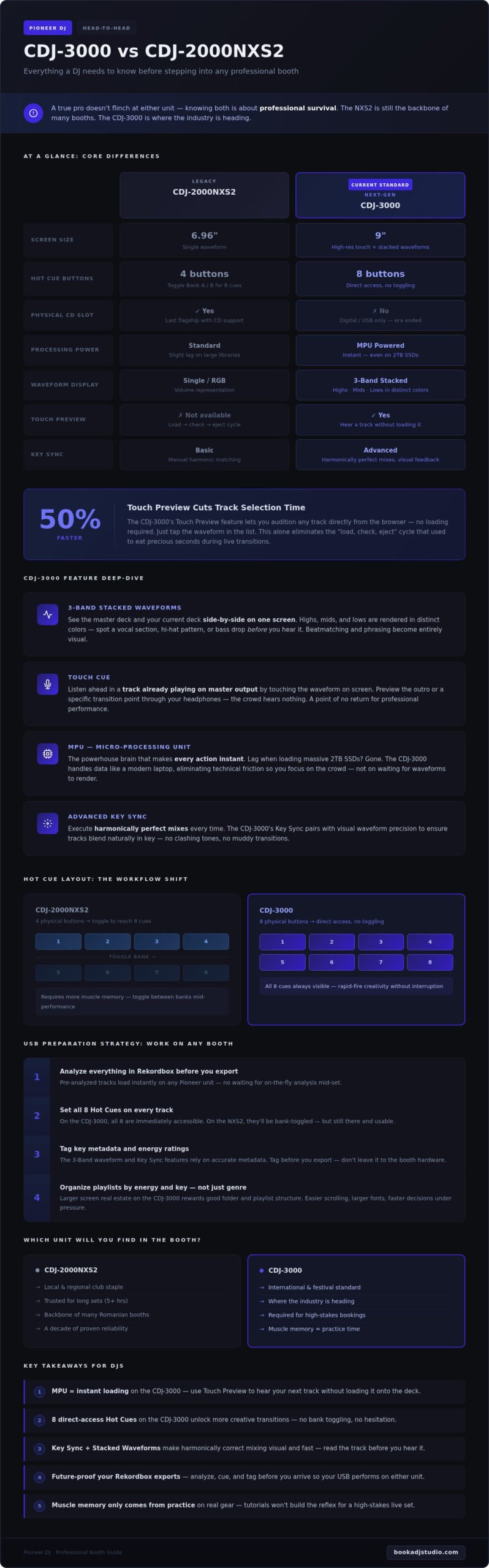
For nearly a decade, the CDJ-2000NXS2 sat on the throne. It’s a tank. Promoters across Romania still trust it because it simply doesn’t fail under the heat of a 5-hour set. This was the last flagship to feature a physical CD slot, marking the official end of the physical media era. Mastering this unit means getting comfortable with the 4-button Hot Cue layout. It requires more muscle memory than the newer models because you have to toggle between Bank A and Bank B to reach all eight cues. It’s tactile, it’s classic, and it’s still the backbone of many local booths. 💿
The Arrival of the CDJ-3000
Then came the CDJ-3000. Pioneer DJ dropped the “CD” from the name, rebranding it as a “Performance Multi-Player.” The biggest shift isn’t just the massive, high-resolution 9-inch touch screen that makes browsing a breeze. It’s the MPU. This Micro-processing Unit is the powerhouse brain that makes every action instant. Remember the slight lag when loading a massive 2TB SSD on older gear? That’s gone. The 3000 handles data like a modern laptop. This eliminates technical friction, giving you more time to focus on the crowd and less time waiting for a waveform to render. 🚀
Ready to feel the difference for yourself? Stop guessing and start practicing. Book a DJ Studio session in Timișoara to get your hands on the gear before your next big gig.
Interface Evolution: Speed, Touch, and Visual Feedback
The interface is where you connect with your music. In the CDJ-3000 vs CDJ-2000NXS2 comparison, this is the most visible shift. Pioneer DJ ditched the physical “Search” buttons. Why? Because the touch screen is now the command center. It’s faster. It’s more intuitive. It feels like the technology we use every day. This isn’t just a cosmetic change; it’s a complete rethink of how a DJ interacts with their library. 📱
The 3-Band Waveform is a visual revelation. On older units, you saw a blue or RGB waveform that mostly represented volume. Now, you see frequencies. Highs, mids, and lows are rendered in distinct colors. You can spot a vocal section, a hi-hat pattern, or a heavy bass drop before you even hear it. This visual feedback allows for a more surgical approach to mixing. You aren’t just guessing; you’re reading the DNA of the track in real-time. It’s about having total control over the sonic landscape.
Touch Preview and Touch Cue
Speed is everything in a high-pressure booth. Touch Preview lets you listen to any track directly from the browser without loading it to the deck. Just tap the waveform in the list. It’s a massive time-saver, allowing you to find the perfect next track up to 50% faster than on a standard NXS2 setup. This eliminates the “load, check, and eject” cycle that used to eat up precious seconds during a transition. ⚡
Touch Cue takes it even further. You can listen ahead in the track currently playing on the master output by touching the waveform on the screen. Check the outro or a specific transition point through your headphones without the crowd hearing a thing. Once you integrate these features into your workflow, going back to the NXS2 feels like stepping back in time. It is a point of no return for professional performance.
Visualizing the Mix
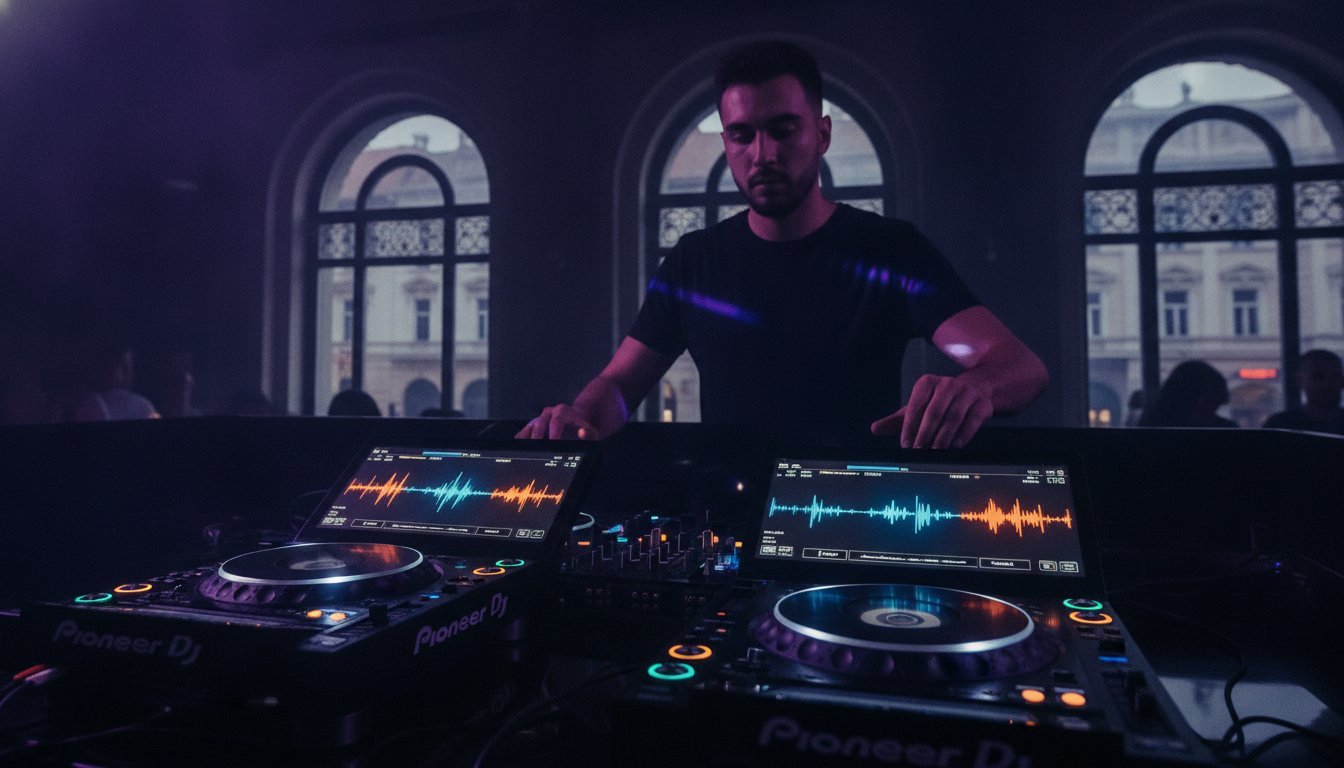
The 9-inch high-resolution screen is the star of the show. On the CDJ-2000NXS2, you were limited to a single waveform view per deck. The CDJ-3000 introduces Stacked Waveforms. You can see the master deck and your current deck waveforms side-by-side on one screen. This makes beatmatching and phrasing incredibly visual. The MPU is the hardware engine that enables instant track analysis. 🏎️
Navigating complex folders is no longer a chore. The larger screen real estate means more track info, larger fonts, and easier scrolling. Whether you’re digging through deep house crates or high-energy techno, the visual clarity keeps you in the zone. Don’t just take our word for it. You should test these features yourself in a professional environment to see how they transform your workflow.
Performance Features: Hot Cues, Key Sync, and the Jog Wheel
When you’re mid-set, muscle memory is your best friend. The CDJ-3000 vs CDJ-2000NXS2 comparison reveals a massive shift in how you physically interact with your music. It’s about moving from a setup that requires menu-diving to one where every essential tool is right under your fingertips. You want to focus on the energy of the room, not on searching for a hidden setting. Mastering these physical changes is what separates the bedroom hobbyist from the club professional. 🎹
Dedicated controls for Beat Jump and Loop functions on the 3000 are more than just convenience. They are performance enhancers. On the NXS2, some of these features required multi-button presses or screen navigation. Now, you can jump 16 beats ahead or catch a loop instantly with a single tap. This speed allows you to take risks, create live mashups, and keep the dancefloor locked in your groove. It is about having the freedom to play with your tracks in real-time. ⚡
Hot Cue Layout Comparison
The CDJ-3000 finally delivers the layout DJs have been asking for: 8 dedicated, linear Hot Cue buttons positioned right under the screen. This is a game-changer for live finger-drumming and rapid-fire transitions. On the NXS2, you are limited to 4 physical buttons. To reach cues 5 through 8, you have to hit the “Bank” button to switch modes. It’s a small step that can lead to big mistakes if you forget which bank is active during a high-energy transition.
Mastering the “Bank” button on the NXS2 is a vital skill for any touring DJ. Always set up your Rekordbox cues chronologically. This ensures that whether you are using the 3000s or toggling banks on the NXS2, your performance remains consistent. Practice both layouts so you never miss a cue during a headline set. 🚀
Harmonic Mixing and the Jog
Harmonic mixing is no longer a technical hurdle. With Key Sync on the 3000, the hardware automatically shifts the key of your incoming track to match the master deck. It’s harmonically perfect at the touch of a button. No more clashing melodies or awkward key jumps. If the automatic shift feels too digital, use the Key Shift buttons to manually find a sweet spot that maintains the energy of the mix.
Then there is the tactile feel of the jog wheel. The CDJ-3000 features a redesigned internal mechanism that removes the mechanical “clicking” sound found on the NXS2. It feels silky smooth and significantly more responsive. Use the Jog Adjust knob to find your perfect tension. Whether you want a loose wheel for long backspins or a heavy, weighted feel for precise scratching, the control is entirely in your hands. 🎧
Ready to feel the difference for yourself? You can reserve a session in our Timișoara studio to dial in your jog tension and master these performance features before your next gig.
Preparation Strategy: Making Your USB Work on Any Gear
You’ve mastered the features. Now, you need to ensure your drive actually works when the pressure is on. Navigating the CDJ-3000 vs CDJ-2000NXS2 transition starts in your home studio, long before you reach the club. A professional doesn’t leave compatibility to chance. Your USB is your digital DNA. It needs to be bulletproof. If you want to avoid the nightmare of a drive not being recognized mid-set, follow this strategic checklist. 📂
- Step 1: Always use the latest version of Rekordbox for export to ensure firmware compatibility with 2026 standards.
- Step 2: Choose AIFF or WAV for maximum sonic depth on big systems, or high-quality 320kbps MP3s for faster library browsing.
- Step 3: Configure “My Settings” to auto-load your personal preferences on any player instantly.
- Step 4: Color-code your Hot Cues. This provides vital visual recognition under heavy club strobe lights.
- Step 5: Test your USB on different hardware generations. Never let the gig be the first time you plug in.
Rekordbox Export Best Practices
Modern Pioneer gear requires a modern approach to data. When exporting for the CDJ-3000, you must enable “Device Library Plus” in your Rekordbox settings. This feature allows the 3000 to utilize its full processing power for instant track analysis while maintaining a legacy database for the NXS2. It is the bridge that keeps your library functional in any booth. ⚡
Don’t ignore the hardware side of your storage. While the NXS2 works fine with standard USB 3.0 flash drives, the CDJ-3000 thrives on the speed of portable SSDs. High-speed drives allow the MPU to render waveforms and search through massive folders without a millisecond of lag. Use the Sync Manager to maintain your folder structures perfectly. This ensures that your carefully curated playlists look exactly the same on every screen. 🚀
The “My Settings” Secret
Stop wasting time menu-diving when you should be reading the crowd. The “My Settings” feature on your USB is a professional’s best-kept secret. You can save your Jog brightness, Vinyl Mode, and even your preferred Tempo Range. When you plug into a player, it will ask if you want to load your settings. Hit “Load,” and the player transforms into your custom setup in seconds. Learn more in our Guide to Professional DJ Equipment.
This level of preparation eliminates technical anxiety. It allows you to step into the booth with total confidence, knowing the gear will react exactly how you expect. Whether you are playing a sunrise set in Timișoara or a peak-time slot at a festival, your workflow remains consistent. Stop guessing if your library is ready. Book your studio time today to stress-test your USB on our club-standard gear and record your first flawless 3000 set.
Get Hands-On: Level Up Your Skills in Timișoara
Reading about the CDJ-3000 vs CDJ-2000NXS2 is one thing. Feeling the tension of the jog wheel under your own hand is another. You can’t simulate the pressure of a live booth from your bedroom. Book a DJ Studio provides the only professional environment in Timișoara designed for you to bridge this gap. Stop watching YouTube reviews. It is time to touch the gear. 🎧
Our studio gives you access to the club standard without the club pressure. It is your space to fail, learn, and eventually dominate. Whether you are preparing for a festival slot or a local club night, practicing on the actual hardware mentioned in this guide is the fastest way to build total confidence. You deserve a platform that matches your ambition. ⚡
Practice Makes Professional
Elite DJs don’t leave their sets to chance. They book studio time to test new routines on the CDJ-3000s and refine their muscle memory for the 8-button hot cue layout. Recording your audio is a critical part of this process. It allows you to hear your transitions clearly and identify exactly where your phrasing needs work. Hearing your mix on a professional system reveals details you might miss at home. Book your practice session now to start your professional evolution. 🚀
Content is King in 2026
In 2026, your performance is a visual product. A high-quality 4K video set is the ultimate calling card for booking agencies and promoters across Romania. It proves you can handle the industry-standard booth with ease and style. Don’t just tell promoters you’re ready. Show them. Use our professional 4K video recording and livestreaming setup to reach your audience directly from a pro environment. Check out our gallery to see the gear in action and visualize your next performance. 🎥
Your breakthrough is waiting. Our Timișoara location is optimized for your growth, providing the tools you need to create, record, and perform at the highest level. Whether you need hourly studio access or a full session package, we have the environment ready for your performance. Stop waiting for the perfect moment. Create it. Reserve your spot today and master the booth.
Step Into the Booth with Absolute Authority
You now have the roadmap to dominate any stage. Understanding the nuances of the CDJ-3000 vs CDJ-2000NXS2 is the difference between a shaky performance and a legendary set. You’ve learned how the MPU processing power and Touch Preview features slash your browsing time. You know how to prep your USB to be bulletproof across any generation of hardware. Now, it is time to turn that knowledge into muscle memory. ⚡
Stop watching the screen and start touching the gear. Our studio in the heart of Timișoara is equipped with professional club-standard hardware ready for your breakthrough. Record your session with 4K video and high-quality audio to build the portfolio promoters can’t ignore. This is your moment to bridge the gap between practice and performance. 🚀
Master the club standard-Book your studio session today!
Your talent deserves the best platform. We’ll see you in the booth. 🎧
Frequently Asked Questions
Can I use a USB formatted for a CDJ-3000 on a CDJ-2000NXS2?
Yes, you can definitely use your USB on both units. Rekordbox prepares your tracks so they work across the entire Pioneer ecosystem. Just make sure your CDJ-2000NXS2 is running the latest firmware to avoid any library reading issues. When comparing the CDJ-3000 vs CDJ-2000NXS2, remember that while the 3000 handles files faster, your prepared playlists remain compatible. Stick to FAT32 or HFS+ formats for the best results.
Does the CDJ-3000 play CDs?
No, the CDJ-3000 has officially ditched the physical disc drive. It’s a digital media player designed for the future of DJing. You’ll rely on USB drives, SD cards, or HID mode with your laptop. If you still have a massive CD collection, keep those NXS2 units close. This shift allows for a bigger, better screen and more processing power for your creative flow. Focus on your digital library and dominate the booth.
What is the main advantage of the MPU in the CDJ-3000?
The Micro-Processing Unit is the brain that changes everything. It delivers lightning-fast track loading and a rock-solid system that won’t crash during your peak-time set. You get a smoother touch screen interface and advanced features like Touch Preview. This processing power ensures your CDJ-3000 vs CDJ-2000NXS2 experience feels like moving from an old smartphone to the latest flagship. It’s about stability and future-proof performance for every single gig.
How do I access 8 Hot Cues on the CDJ-2000NXS2?
You use the physical Bank buttons located right above the Hot Cue pads. The NXS2 has four physical pads, so you toggle between Bank 1 (A-D) and Bank 2 (E-H) to trigger all eight. It’s a bit more menu diving compared to the CDJ-3000’s eight dedicated horizontal buttons. Master this toggle to keep your performance dynamic. Practice this transition in our studio to make sure your muscle memory is sharp for the club.
Is the sound quality better on the CDJ-3000 compared to the NXS2?
Yes, the audio engine has seen a massive upgrade. The CDJ-3000 features 96 kHz/32-bit internal floating-point processing for a cleaner, more natural sound. You’ll notice better clarity in the high frequencies and a tighter low end. Even if you’re playing compressed files, the new DAC makes them sound punchier. It’s the professional standard your ears deserve. Step up your game and let your tracks breathe with this premium, high-resolution output.
Can I link a CDJ-3000 and a CDJ-2000NXS2 together in one setup?
You can absolutely link them using a standard LAN cable and a network switch. Pro DJ Link allows the units to share a single USB drive and sync tempos perfectly. Just be aware that some 3000-exclusive features, like Touch Preview, won’t work on the NXS2 player. It’s a great way to transition your setup while keeping your reliable gear. Plug them in, hit sync, and focus on the mix without any technical stress.
Where can I practice on CDJ-3000s in Timișoara?
You can test the full power of the CDJ-3000 right here at our studio in Timișoara. Stop watching videos and get your hands on the actual gear. We offer hourly studio access starting at competitive rates in lei. Book a session to record your next promo set in 4K or just to master the new layout. It’s the ultimate playground for local artists ready to level up their professional career today.
What is Touch Preview and does it work on older mixers?
Touch Preview lets you listen to a track by touching the waveform on the screen without loading it to the deck. It requires a Pro DJ Link connection and a compatible mixer like the DJM-900NXS2, DJM-V10, or DJM-A9. Older mixers won’t support the audio routing needed for this feature. It’s a massive time-saver during fast-paced sets. Check your mixer compatibility before you rely on this specific workflow for your next big performance.